Home Blog Page 23

How Blogging Can Change Your Life? Must Read For Newbies

0

Honestly you have no idea how can an idea generated in your mind can change your life. Yes, I am talking about blogging.

Now these days blogging is power full way to convey your idea in the public. And it is also a great platform to reach the people like you. I came from Indian society where a very few people know about blogging. In India blogging is work of great thoughtful person who have great knowledge about things. But it is a myth any person can do it. Blogging, if done the right way, can change your life. It is an activity that anyone can do as it’s cheap and easy to start. In fact, blogging can help you in both personal and professional aspects of your life. Most people choose blogging as their hobby, but they fail to realize how it is changing their life. A blog can affect everyone in a different manner. Nevertheless, it is certain that no matter who you are, you will experience some type of growth from starting a blog.

Why Blogging:-

Blogging is one of the most popular forms of writing today as it helps grow your creativity, which can further open various digital doors for you across the world. Initially, you may find it challenging to figure out how to start but there are a number of guides and tools that offer step by step walk throughs for beginners.Blogging is means to spread views. Here you can transmit your idea or view about particular subject or issues. You can also share your experience about things. Very best thing you can express your inner conflict about any issue.

It is hard to believe and think that there was a time about almost 20 years ago, blogs don’t even exist and now there are more than 150 million of them on the web.

On the other hand, it is the most powerful medium of communication for both businesses and individuals.

Once you have started blogging, it is very important to maintain and update it regularly as it can also help you in boosting your career prospects.

Below are the way by which blogging can change your life

#1. It will help you in becoming better writer

Here you can become a better writer.as much time you spend here u can improve your writing skill.

#2. It will help in boosting your confidence

confidence should be your reflect in your post. Blogging is easy anyone do it. Boost your confidence.

#3. It will help you in becoming more organized think.

you should well known about your work. You have fun with your work.

#4. It will help you in building network of relationships

Here you will find people like you. I did not start blog to make friends.I start it only to show my frustration about some issues in which I can’t do any thing. I choose blogging to show my anger. Here I found a lot of people who have same views, and we start conversation now I am writing about a lot of things. It make me updated. Once you start blogging believe me it change your life. In my case when I start it I was empty mind I had no thought as I told before I use it only to show my anger at any particular issue but very soon I found fun with it and start reading books and update my knowledge to generate a new and useful thought. Now a various people read my post and make there comment which feel me happy and special. It feels that I am person with whom they(reader) relate themselves.

#5. It will help you in leading healthier life habits.

Blogging wants time and devotion. Once you starts blogging your habits will change.

#6. It will help in making money

Now a days blogging become popular means of earning money. Many people strats it for earning money only

#7. It will also help you in changing the life of others also

Phrase “An idea can change the life” is best suited here. It may possible your perception about things can change others lives. I know a lot of people belonging to me are very thoughtful. They have great ideas about life. Whenever I need I go to them and believe me all the time I surprised by there views. You have also such wonderful gift of god. The gift of thinking.

#8. It keeps your mind active

every one likes a creative person and blogging give you a opportunity to show your creativeness. Use graph cartoon paintings made by you in your post.

So now u can understand that there are so many reason of start blogging. It will definitely change your life.
How to Design Content that can Work Well on different Devices & Viewports

2

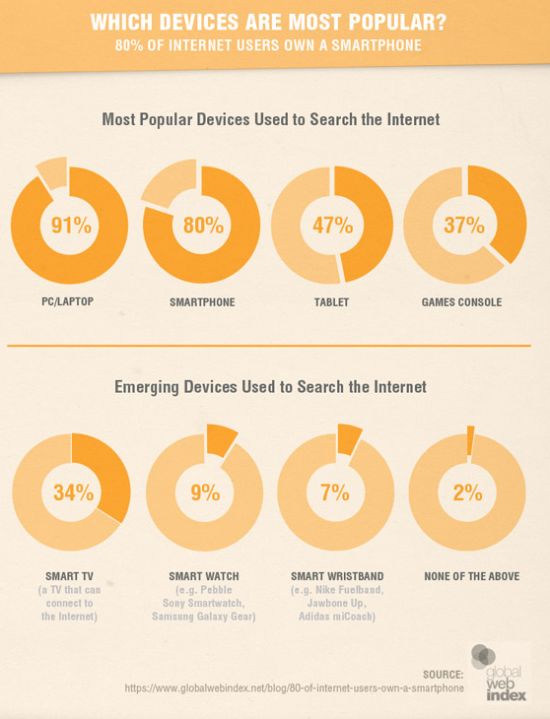
The mobile-friendly updates have brought the mobile sites and strategies in the spotlight.According to Global web index data, the 80% of internet users use smartphones for searching the internet.

most popular devices

Also, the comScore report clearly shows how the Mobile users have surpassed the desktop users Globally.

global users

So, it is now a question of understanding the consumer behavior while they are using different Mobile devices. The continuous inventions of better smartphones and better data coverage,services and cheaper devices are the major factors that will outpace desktop users. Apart from that the 3G and 4G penetration in developed and developing countries will further boost the use of mobile technology and users. All this has increased the importance of mobile optimization.

As you know content is king in SEO world and plays a vital role in organic rankings. You’ve put a lot of time and efforts in putting up a great content but you don’t know how user access it. That is why it is important to make sure that your content works well on all the platforms desktop,mobile,tablet etc.

There is always a difference when we see the same content in the Mobile and Desktop.The elements that are visible in the Desktop version might not be visible in the Mobile version.

As you can see in the screenshot below on the larger screen the text is small but readable but on a smaller screen, the text is completely unreadable. Researchers have shown that people don’t actually read the entire web page,they scan the text & tend to read only 20 – 28% of the content.So it is important to focus on the subject at hand and tell the story upfront. In order to make your content work on all devices and viewports,make sure to highlight important points at the start.

Make sure the content published provides all the information visitors wants and nothing more.The content should be in plan English,Shorter words and simple sentence structure so that it should be understood by the wider audience.

As most of the users coming online will have the cheap devices with lower quality displays,small viewports that require more scrolling & less responsive the paired down approach for writing content needs to be adopted.

  • Keep it Simple
  • Reduce Disorder
  • Get to Point

Use real text and images, not dummy content.

As said content is king for Google,so it should not be used in the last stage in the design. It should be developed together with visual design. Most of the designers make use of loreum Ipsum dummy text while creating wireframes and comps. Use of Dummy text looks pleasing but it creates an unrealistic design and the content becomes the secondary part.

The user comes for content,not the design. According to Designer Luke Wroblewski using dummy content creates unrealistic assumptions and serious flaws in design. When real content is added design fails.

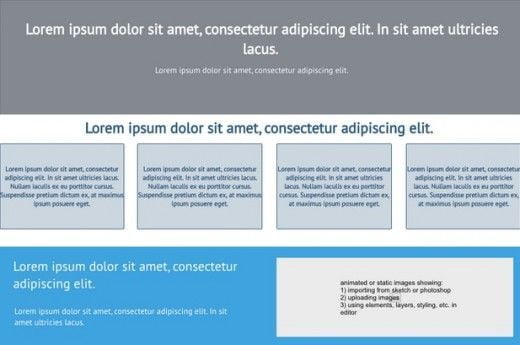
A typical wireframe with dummy content will look like below mentioned snapshot. Everything looks fine and in order.

lorem ipsum

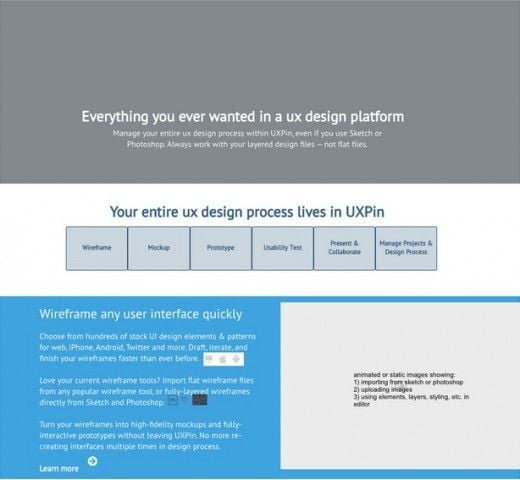
But see the below snapshot once the real content is added to the wireframe.

ux design plateform

In most of the cases, we need to do redesigning and restructuring once the original content is added to the wireframe. Use of original content in place of Dummy content will help in reducing the design and structure flaws.

Eliminate Unnnecsaary Images and Content

Try to get rid of unnecessary words,sentences,Phrases.The content written should achieve the user goal. The basic idea to remove anything that is unnecessary and keep that can attract the users.

The Headline of the content should not take much space it should be short and strong. The short headlines are easy to scan whereas long headlines get lost below the fold.

Content that can Work Well on different Devices

The above the fold content needs to be pwoerful and should attarct the readers to read the complete Article.

Use short paragraphs

Make sure to keep your paragraphs short & meaningful which can hold the interest of readers. A long paragraph can make the readers impatient.

According to HTTP Archive, HTML files constitute nearly 70k and 9 requests for an average web page. Try to avoid larger .html files and keep the code simple for reducing the page weight. Also, try to avoid multiple application calls and redirection over the mobile network. Learn how to write efficient HTML, read Sam Dutton High performance   Article.

Eliminate Unecessary Images

Images are extremely important for the web page and constitutes 60% of page weight. Images really help in increasing the interest of readers but it also increases page weight, the number of file requests. Excess image file request can create a problem over mobile networks.

Try to get rid of images.

Try to consider a design that avoid images. Ask yourself what visitors on the site are trying to achieve? Do images serve that purpose?

Try to use real text and make the text beautiful with the help of Web fonts available for free. Don’t use text as graphics as it will not respond well to different viewport device sizes.

Instead of images make use of CSS for gradients,rounded corners,shadows & background textures,features supported by modern browsers.

Make use of background images using media queries  to avoid background images on small viewports.

Images with splash screen should be avoided.

Make use of CSS for UI animations.

Make use of Icon fonts as these are easily indexable and entire set of images can be downloaded in one font.

Inline SVG & Data URI images are well supported on mobile and desktop browsers.

Make use of video instead of GIF images.

The most important content should be put at the top of the web page as user tend to read web pages in F shape pattern.

The social sharing icons can mess the layout and can also slow down the page speed. Make use of responsive social sharing buttons

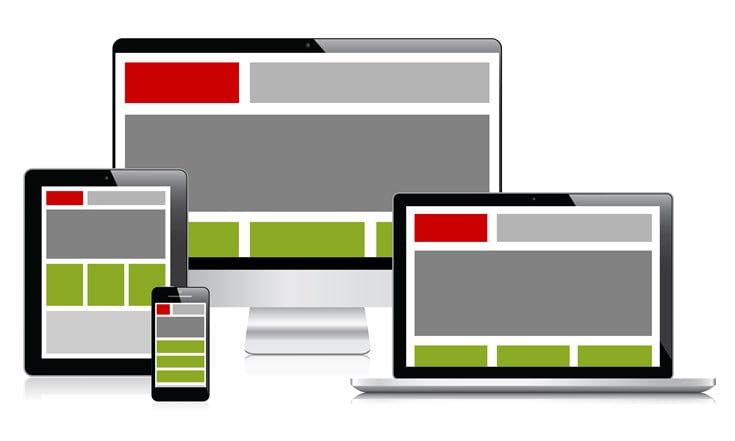
Craete responsive layout for content that can work on mobile,desktop or any other device.

Testing

Test your content on smaller viewports using Chrome Devtool or some other emulation tool.

It is also important to test content under low bandwidth and high latency.There are a number of online tools that can help you in this testing.

Try to test your app or site on your friend or colleague devices.


Author

I’m Simran an SEO consultant and marketing manager for SEO Professionals India. I’ve more than 5 years of experience as an SEO expert and have worked for many big brands.

Recover The Lost Data With The MAC Data Recovery Software

Losing data is a common problem these days and none of the devices is prevented from this problem. Whether you have a windows device or the iOS Mac, you will surely face the consequences of the data loss.

Causes of data loss in MAC:

Let us discuss the possibilities due to which data is lost on MAC:

File Corruption: If the file header is corrupted in your MAC then it will lead to the corruption of files. Due to this, you are unable to access the files and thus your data is lost.

Unmounted volumes: When your volumes do not mount properly then the risk of data loss increases.

Formatted media: It often happens that due to the formatting of the media or reformatting of the operating system can lose all of your data stored on MAC.

Overwritten data: It often happens that you overwrite the data on affected file and due to this; you cannot access or delete the affected files.

Wiped hard drive: If the disk wiping occurs that will also erase all your essential data and thus you will lose all of your data.

Accidental deletion: Everyone makes this common mistake. You often delete the data mistakenly and the trash is empty as well.

Crash: When you upgrade your Mac, the operating system, or the software crash many of your confidential data is lost.

Reset and power off: Due to sudden power off or the reset, the data that is not saved is lost.

Virus: Most of the data loss scenarios that occur on MAC are the because of the viral transmission or the virus infection.

Improper copy and cut: It often occurs that you mistakenly cut or copy a data and forget to paste it appropriately and the main file is deleted this causes the data loss.

EaseUS Data Recovery Wizard for MAC

Thus to help you in this hour of need we have developed this best data recovery software to recover all your lost data from your Mac notebooks and desktops. The procedure with which it works is reliable and safe.

Types of data recovery

Following are the types of data you can recover from this MAC data recovery software:

  • Images
  • Music
  • Videos
  • Documents
  • Many more

Best data recovery software features

You will find the following amazing features in EaseUS:

Dual mode:

To ensure that all the deleted files are recovered it will run two types of scan:

  • Simple scan
  • Deep scan

Preview:

Before recovering the data, it will provide you with a preview so that you can select the quality of the files.

Easy to use:

The results that are scanned will be stored in three types of catalogs that will make it easier for you to search it:

  • Path
  • Type
  • Time

So now, stop worrying and launch the EaseUS Mac data recovery software to prevent you from losing any type of data. With our special offers, this data recovery software will provide you the best experience.

How To Automaticaly Post Instagram Photos into Facebook Page

Hello guys, Currently if we post a photo on our Instagram and want to share it to facebook then we just have to select facebook share button. And this goes automatically post on our facebook timeline.

But If you are managing a Facebook Page and want to share a photo on that page, not on your facebook wall. But How you can do that, Here’s the solution so that your Instagram posted photo goes into your facebook page.

Recommended: How to Save and Download Instagram Photos Easily (3 Methods Given)

Steps To Post Instagram Photos into Facebook Page

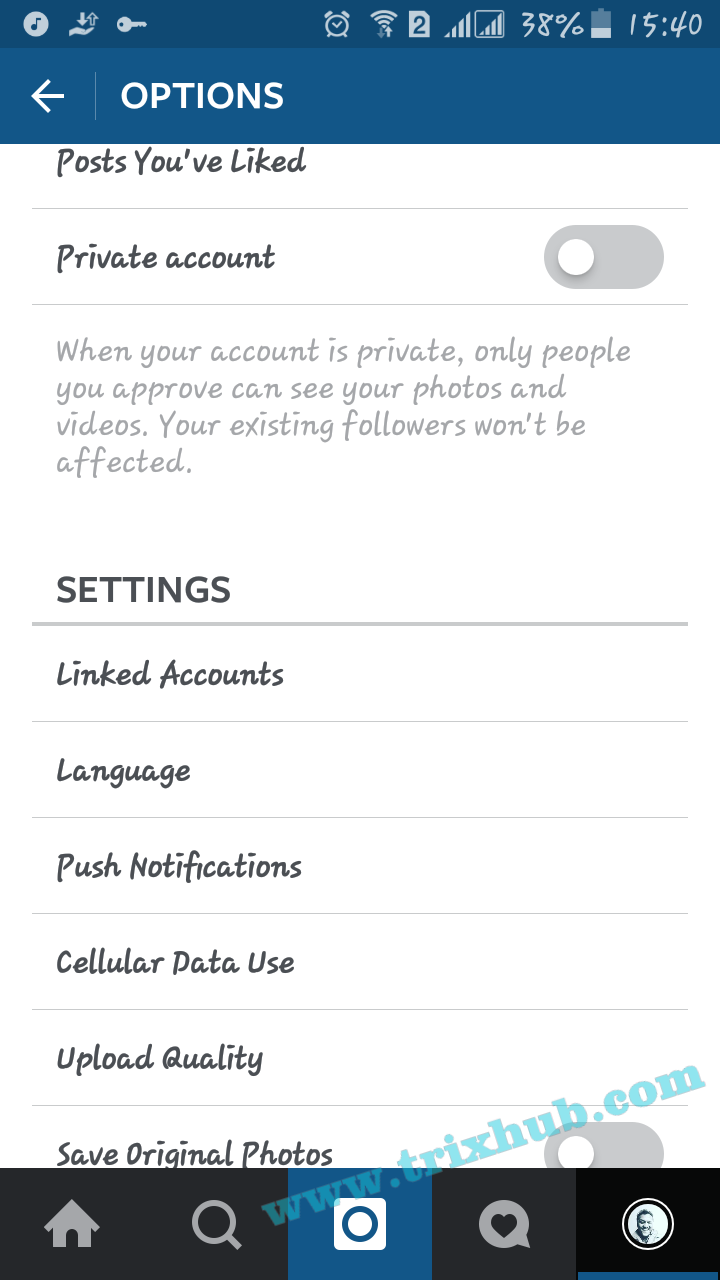
  • To share a photo on a Facebook Page instead of your personal Facebook Timeline, Then launch Instagram and view the Options page.
  • In the iOS app, you can find the Options page by viewing your profile, then tapping on the gear icon. On Android, view your profile and tap on the Menu icon in the top-right corner.

Instagram settings

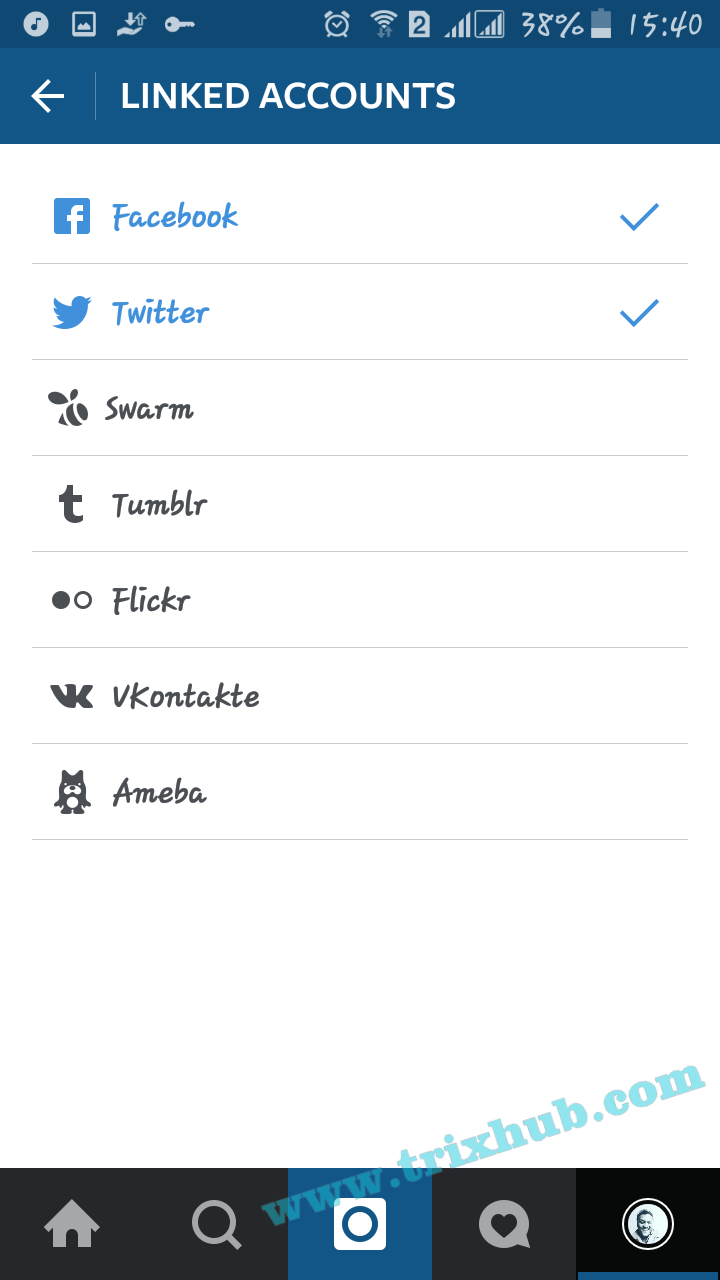
  • Now under settings, Tap on Linked Account.
  • Tap “Facebook,” then “Share Photos To” on the next screen.

Instagram share

Instagram photo sharing

Instagram photo on faceboon page

  • If you manage any Facebook Pages, you should see a list of them on this screen. Tapping your preferred Page will then default any future Instagram sharing on Facebook to that respective Page.
  • That’s it.

Recommended: How to Change Facebook Profile & Page Username

In the future if you want to switch back to posting Instagram photos on your personal account, you’ll need to follow these steps again and select your Timeline instead of a Page. It would be nice if Instagram would prompt you where to send the photo once you enable Facebook sharing for a particular photo, similar to what happens when you enable “E-mail” for a photo in the iOS app.

How to Speed Up Your WordPress Website With These Easy Tips

0

Note from Abhay: This article has been contributed by Pankaj Solanki, a WordPress lover. He manages his own web development company in Jodhpur. He has been experimenting with WordPress poems for 2 years. Here he is sharing his tips for speeding up a website. Take it away Pankaj…


There has been a debate in web developers if a website must be beautiful/slow OR simple/fast. There are pros and cons in both sides.

I will tell you what I believe. As long as simple/fast does the work, don’t go for beautiful/slow. Because beautiful designs require things like HTML 5 OR CSS 3. There are still people who use Internet Explorer 4, how will your website look on those devices?

Other thing you know is that speeding up your website is important. It improves user experience and makes them happy. At the same time, it is an official google ranking factor.

But have you ever really tried speeding up your website? I have! It was a frustrating 2 month experiment that I did. In the end I learned so many things. And, I am going to share some of those with you. I will talk about things other than caching and image optimization. These have been talked by everyone out there.

Host

I know when you are starting out, you can’t afford costly host. That is fine. When I started this experiment, I myself did not change hosts to verify which one is faster. So I won’t talk about hosts now.

Yet, I will say that if you can afford, go for premium hosts, they are much faster. I have heard internet giants recommending WPEngine. But for stater You can visit Top 5 Best Cheapest and Reliable Web Hosting to Use in 2016

Themes

When you are starting out, it is easy to get trapped in free theme’s dilemma. Why not, there are thousands of free themes available.

Free themes are not coded properly and premium themes are costly. What options do we have?

Use Freemium themes. They are free themes released by a premium WordPress theme company. They are perfect for what we want here.

Two of my favorite companies are aThemes and MyThemeShop. They have awesome free & premium WordPress themes.

Plugins

Always use minimum number of plugins. Keep reducing the number of plugins you use on your site. Plugins add up their codes to our WordPress site which makes the website heavier.

Use P3 (Plugin Performance Profiler) plugin to analyze all installed plugins. If a plugin is heavy either uninstall it OR switch to their competitors. You can also use plugins to speed up wordpress like WP Super cache.

Use CDN

CDN is a great technology to speed up your website. What it does is, load your website from US if you are located in US and from Canada if you are located in Canada.

There are many CDN services available. Cloudflare has been working effortlessly for me. They also have a free lifetime plan. Perfect for new websites.

They also have a WordPress plugin for WordPress users. If you are using W3 Total Cache, then no need to install this additional plugin.

Optimize your Homepage

It is important, because it is the most important page of your website. People will visit this page often.

If you are showing full posts on homepage, minimize them to excerpts. Don’t show more than 3-5 posts on your home page.

Remove unnecessary widgets and keep your social sharing buttons limited only to posts.

Optimize your database

WordPress uses SQL database to store the information. Your posts, post revision, drafts, auto-drafts, comments, comment meta-data, spam comments etc are stored in database.

Eventually, it becomes heavier and heavier. So to make it light again, we need to optimize the database.

WP Optimize is the best solution I have found. It can be set to optimize your site on autopilot.

Your need to be cautious when using database plugins, they can make or break your site. But, WP Optimize has never broken my site.

Use Keep-Alive

It is a good trick I learned from another marketer. Keep-alive keeps the connection alive and loads even partially created HTML.

To enable keep-alive you need to add the code to your .htaccess file:

<ifModule mod_headers.c>
Header set Connection keep-alive
</ifModule>

WARNING: Make sure to back up your .htaccess file before you make any changes to it.

Remove Query Strings from Static Resources

It was a frustrating thing GTMetrix kept telling me to optimize. I never knew what to do.

This was a huge problem for me until I found this plugin Remove Query Strings From Static Resources.

Just install it, no settings no options, and it fixes the problem.

Conclusion

I have listed everything what I did to speed up my website. If you yourself are struggling with your website speed, I hope this article will help you.

Install these plugins and make your website rocket fast. Keep speeding up!

Make Money From Your Blog/ Website With Bidvertiser: Best Adsense Alternative

Google Adsense is the best CPC program for bloggers. Multiples of successful bloggers primary income source is google adsense. But Adsense approval is not easy. Read 5 Reasons for Disapproval of Google Adsense. We hear always many bloggers quit blogging because of not getting AdSense approval. But Don’t panic, There are many ways to make money online with blogs.

So here I’m going to share a Best AdSense alternative that pay you on every clicks. Yes I am talking about Bidvertiser. Bidvertiser publishers program also didn’t reject your website (mostly) as Adsense always do.

Bidvertiser is an online advertising platform and a best adsense alternatives for publishers that presents a Unique way of advertising. Bidvertiser is an advertising system mixed with a bid system, the bidding system gives the publishers the possibility to earn more money from their ad slots.

Must Check Out: Top 15 Google Adsense Alternatives To Make Money From Blog

It’s very easy to sign up for Bidvertiser. Go and sign Up for your free publisher account. Once you’re approved, you can start putting ads on your page and earn money.

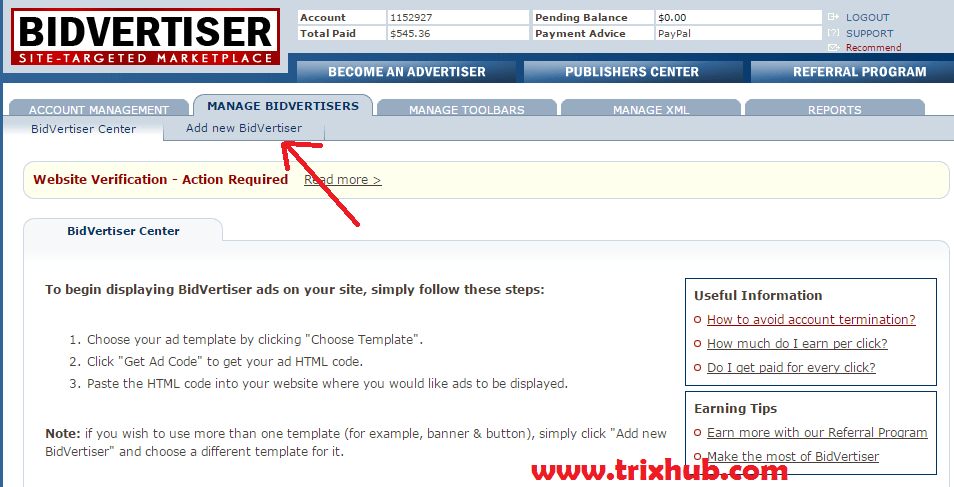
To get started, click on, “Add a new bidvertiser” tab and add your website URL. Now one website can’t be registered in two accounts and each ad for each websites can’t be placed on different website. 

You have to choose a category of your website and this will show up adds relevant to that category. Once you’re done, you can click on the “template” to choose the ad format, color and style. Click on “Get code” to get your ad code.

Reasons why Bidvertiser is a better alternative to Adsense:

Here are some good reasons why Bidvertiser is a good alternative to adsense. Take a look-

1. They show higher paying ads: This is why the name is “Bidvertiser.” Your ad unit will show up the maximum paid ads each.
This means you will have the chance to earn more money per click.

2. Add as much units you wish: If you’ve ever used adsense, then you will know that you can’t put 3 add units per page. But in bidvertiser, you can put as many ad units you want meaning more revenue. It’s a better choice for longer pages.

3. Payment Method: Bidvertiser pay you via paypal, check, and wire transfer.

4. Minimum payout: Adsense pays a minimum of $100 per month but bidvertiser will pay you even if you made only $10. The minimum payout for paypal users is only $10.

6. Current bids: These are some info that adsense will never shared with anyone. You can see the current bid of your ad unit. See the list of ads and bid amount and you will learn how much you can earn with a particular ad.

8. Refferal bonus: Bidvertiser offers different advertiser and publisher commissions. All you have to do is to add some of the affiliate links and banners in your website. Once a person joins and spends or earns an amount of money, you will be paid a commission.

Payment Proof

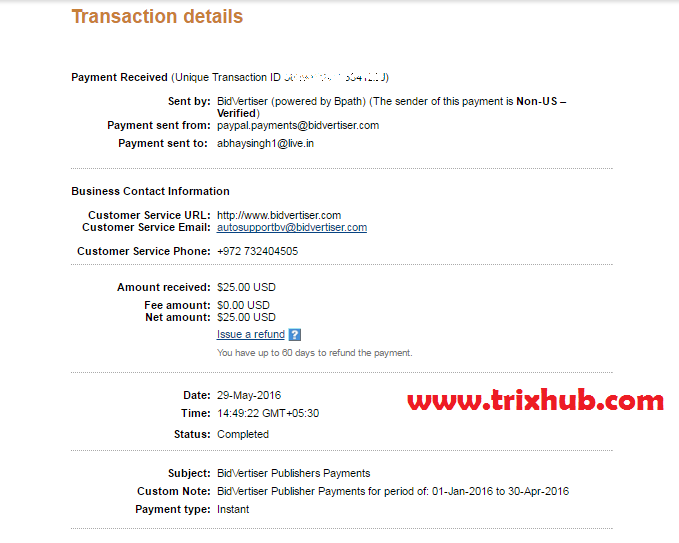
Here is the payment proof from bidvertiser.

bidvertiser payment proof

Steps To Start With Bidvertiser:

First Go and Register into Bidvertiser.

Once you’re approved, you can start putting ads on your page.

Click on “Add a new bidvertiser” tab and add your website URL.

add new bidvertiser

You have to choose a category of your website and this will show up adds relevant to that category. Once you’re done, you can click on the “template” to choose the ad format, color and style. Click on “Get code” to get your ad code.

Now just copy the code and place on your website where you want to show ads like header, sidebar or footer.