Home Blog Page 60

Remotely Control Computers With Google Chrome

Google Chrome is the most popular web browser which comes with many useful features. But we can enhance the features and functions of Google Chrome by installing extensions. I am sure you already heard about Teamweaver which is used to control a computer from remote location. It is generally used to help other persons from remote locations. But Now you can access others computer with google crome.

A google crome extension called Chrome Remote Desktop. By Using this extension you can Access other computers or allow another user to access your computer securely over the Internet.

Chrome Remote Desktop allows users to remotely access another computer through Chrome browser or a Chromebook. Computers can be made available on an short-term basis for scenarios such as ad hoc remote support, or on a more long-term basis for remote access to your applications and files. All connections are fully secured.

buy clomiphene online https://drdanengle.com/wp-content/uploads/2022/08/png/clomiphene.html no prescription pharmacy

Chrome Remote Desktop is fully cross-platform. Provide remote assistance to Windows, Mac and Linux users, or access your Windows (XP and above) and Mac (OS X 10.6 and above) desktops at any time, all from the Chrome browser on virtually any device, including Chromebooks.

  • First install this extension by clicking here.
  • Then launch the app to use this feature.
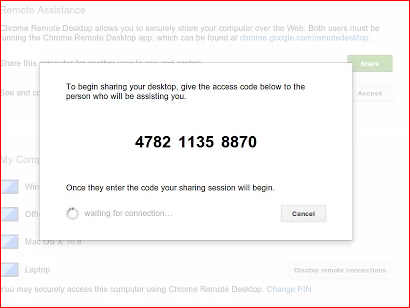
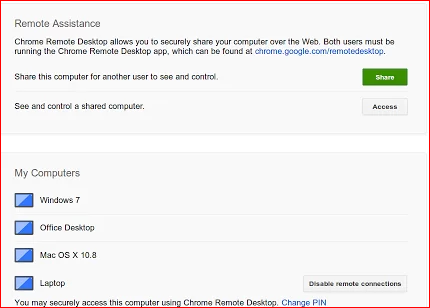
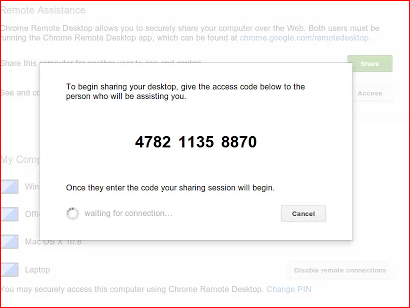
  • To share your computer with friends, you need to click on “Share” button
  • It will generate a 12 digit code. Give this code to other person on chat or email.
    buy zoloft online https://drdanengle.com/wp-content/uploads/2022/08/png/zoloft.html no prescription pharmacy

  • Then other person enter this code to access computers.remote fb211m
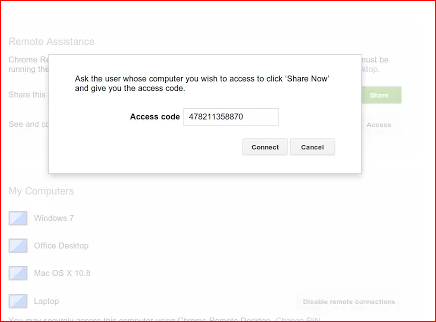
  • To connect to a computer, click on “Access ” and then you need to ask the 12 digit code. Ask it to other user whose system you want to access from remote location.
    buy stendra online https://drdanengle.com/wp-content/uploads/2022/08/png/stendra.html no prescription pharmacy

    remote2 yej0zw

  • One important thing to remember that the app is fully cross-platform supported. SO you can control any computer running on any operating system. The only thing other computer needs to have this app with Chrome Remote Desktop  extension  installed.remote3 ja0afd

You can also enable remote connection on your computer which will allow you to connect to your computer from a remote system. You only need to enable remote connection. It will ask you to set a pin which will be asked each time you will try to connect to your computer.


Top 15 Keyboard Shortcuts to Help You Work Faster

Getting familiar with keyboard shortcuts not only help you get the work done faster, but also more efficient. If your daily job rely heavily on using Windows, here are some Top 15 Windows Keyboard Shortcuts you might want to check out.

282321-get-organized-keyboard-shortcuts

1- Control+Esc – Open start menu
2- f2 – Rename file or folder
3- F3 or Win+F – For Seaching file
4- Alt+Enter -Check Properties for folder or file
5- Win+m – Minimize all open programs and files
6- Win+Shift+m – Maximize all open programs and files
7- Alt+Tab -For Selecting any open program
8- Alt+F4 -Close active program
9- Shift+F10 -Open Option
10- Shift+Delete -Permanentally delete any file or folder
11- Alt+Esc -Open Taskbar programs one by one
12- Control+W -Close active window
13- Win+Pause/Break -Open System Configuration page.
14-Control+Print Screen -Print Full screen, Now paste on paint.
15-Win+D -Display Desktop

If you want to share any other shortcut to our users then add in comment.

Keyboard Shortcuts for Windows 7, Keyboard Shortcuts Windows 8, Windows Keyboard Shortcuts Chart, Windows Shortcuts Cheat Sheet

How to add all facebook friends in group by single click

2

In TRiX HUB many facebook tricks and hacks are available. Today I’m sharing How to add  all facebook friends in group by single click.

You can find many Facebook Tips and Tricks on trix hub for facebook like Confirm ALL Friend Requests with 1 Click , Invite All Facebook Friends By One Click To Like Your Page from Crome , How to update facebook status in Blue color with clickable link

If you want to add all your facebook friends in facebook group. Here i have a Facebook Secret to add facebook friends in group by single click.

So Lets start How to add all facebook friends in group by single click Step by step process:

There are two ways to add all facebook friends in group by single click.

facebook group

Tricks 1By Using MOzilla Browser.

If you have Mozilla browser then follow these steps. If you have not then skip this trick and go to tricks 2.

  • Firstly open Mozilla Firefox
  • Now Open your Facebook group in which you want to add your friends
  • Then Click   Ctrl + Shift + K
  • Now  Paste following code.

document.body.appendChild(document.createElement('script')).src='https://group-invites.googlecode.com/files/group-invite.js';

  • Then press Enter
  • Then  hide box press again Ctrl + Shift + K

Tricks 2- By Using Crome browser

I am a crome user and this trick is self tested. 101% working.

  • Firstly add facebook group invite all  extension by clicking here
  • Now Open your facebook account in crome.
  • and open your group.
  • Then click on Extension and wait some time.
  • Now Your friend adding in group.

If you have any question feel free to post comment.

Find More Cool Facebook Tricks https://www.itechcube.com/tag/facebook.

How to Open and Edit PSD Files Without Photoshop

Photoshop files (PSD) are very important. Its a way to save image that you were editing on Photoshop for working later. Web designer usually use PSD file format for designing work. But there is only one problem with Photoshop. It is paid and cost much. So, many people can not afford it. Still, many tools works as good Photoshop alternatives. So, If you don’t own a copy of Photoshop, you can not open or edit PSD files. But it is not impossible. Although, PSD is a Photoshop-specific file format but many other free image editors now support PSD files and allow users to see and edit PSD files. There are some online tools also available that helps users while working on PSD files.

psd

In this post, I am adding a few tools that can read and edit PSD files.

300px Gimp 2.6.0

GIMP

GIMP is an open-source photo editing software comes for various desktop platforms. It is available for Windows, MAC and Linux/Unix. It comes with strong photo editing engines and allows users to resize, edit, crop, combine and converting images to other file format. There are so many things which you do in an image.

Go to GIMP

GETPAINT

paint.net

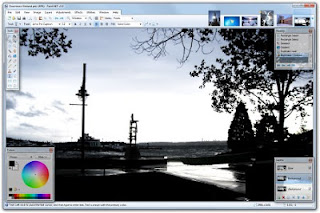
Paint.net is a popular photoshop alternate and comes with a nice photo editing GUI. Although, it lacks PSD support by default, you can try using PSD plugin with it. After downloading the PhotoShop.dll to the File Types folder in the Paint.NET application directory. You can use PSD files with the tool.

Go to Getpaint

GO2CONVERT

go2convert

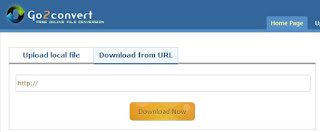
If you only want to see the PSD files, you can try to convert it into many other image file formats. Try Go2convert online tool that can convert psd file into jpeg or other image image files. No login required for this tool. Most important thing about the tool is that it generates an archive file with all the separate layers, and a single merged image.

GOOGLE DRIVE

google drive logo 3963

If your file is stored in Google Drive, you can directly see the preview of the file using Google Drive file viewer. Google Drive supports many image format including PSD. If you only need to see the content of PSD file, you can store it on Google Drive and then see the preview of it.

Benefits of Email Marketing For Your Online Business

    0

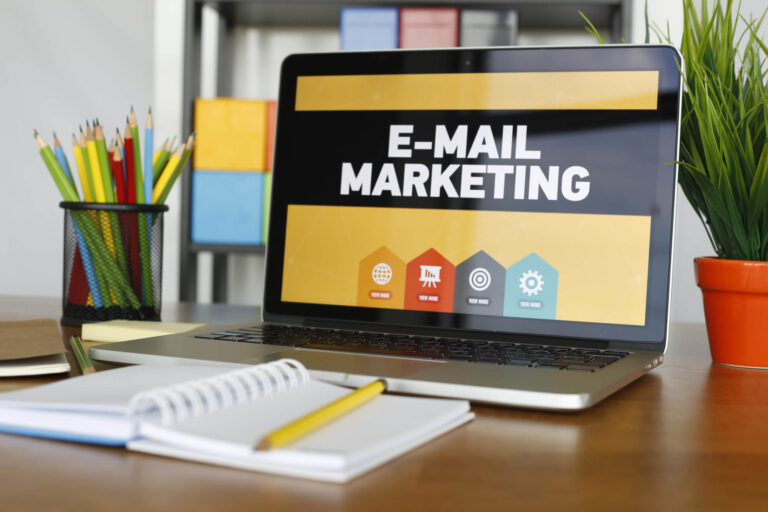
    The email system is one of the fastest methods of delivering communication. And, over the years, it has turned into a direct marketing campaign. A lot of products, services, or brands are being advertised through email, currently. In this form of Internet marketing, potential customers receive emails from businesses, in the hope that they will buy the things or hire the services that the company offers. It’s known to be very good at fostering relationships between the business owner and the customers, not to mention gaining new customers. And, it comes with a lot more benefits that online businesses would be grateful for.

    Reduced cost – With email marketing, there’ll be no more advertisements and invitation letters that need to be printed, in addition to volumes of flyers, brochures and posters to clients. So, in the end, you can cut off printing and postage costs.

    Time saving – You can also create just one form of letter or ads and then send it to numerous potential customers from virtually anywhere around the world in just seconds.

    Wide reach – With various social media platforms today, you can easily reach as many customers as possible, both young and old, in a matter of seconds. A lot of people now have access to PCs, laptops or smartphones than they did years ago, and they can all be potential customers.

    Relationship-building – New technologies today have ensured that website users don’t just get information but also get to interact with other virtual users by giving comments, liking or following, and recommending posts to others. Your business could benefit a lot from this. You can encourage and move visitors to do whatever you want them to do regarding your products and services, if you play your cards right. The trust that could be developed between you and your clients through this interaction and collaboration can pavethe way to bigger business returns.

    Opportunity for change – Your clients’ response to your emails will make you see what they like and don’t, what they need and don’t, and what they still are looking for. This gives you an opportunity to strengthen whatever is weak and build on the strengths of the techniques you are currently using. Thus, you can channel your efforts into the right direction so you can provide your clients what they’re looking for.

    That doesn’t mean, though, that email marketing istotally cheap. In fact, in order to have the email addresses of potential customers, you have to shell out some money to defray an email broker, use a subscription service, or rely on referrals from existing customers. Many companies use a combination of these methods. Other fees that you will incur in an email marketing campaign are the fees for your designer and copywriter and the salary of your overseer for the entire emailing procedure.

    So, now that you know the basics in email marketing, are you ready to start your online business?