Home Blog Page 52

10 Excellent Tips on Writing Paid Reviews

Are you going to write paid review. Wait First read basic tips to write paid reviews. Here im listing 10 excellent Tips to write paid review. Many paid review websites like Sponsored Reviews, Pay Per Post provide you good amount and relevant reviews to write on your blog which are useful for your blog readers. Just remember too much of paid review might repel your readers. Paid reviews are no doubt a good way to generate income but you must write reviews that your readers like.

Also Read: How to Make Money With Sponsored Reviewspaid review

10 Tips to Write paid Rreviews:

  1. Find out as much as you can, about the advertiser. Check out the company’s blog or website and try to gauge if the business is legitimate.
  2. As much as possible, try the product or service before you write the review. If you’re a well-established blogger, some companies may actually send you their products to try out. This ensures that you really have something to say about the product or service based on personal experience.
  3. The article must sound as natural and as close to your usual tone as possible. The last thing you want to do is produce a review that reads like an ad.
  4. Take pictures or a video to add more substance to your review.
  5. Follow the advertiser’s instructions or you might not get paid. Review the post before you publish it.
  6. The number of paid reviews on your blog must not exceed the number of regular articles/content. Be picky about doing sponsored reviews, and do it in moderation.
  7. Write reviews that are relevant to your niche and will be helpful to your readers. If your blog or website is about health related tricks, a review related to health products and supplements like “how to loss weight ” probably won’t be of much use to your audience.
  8. You are writing a review, not an ad. Talk about your experience with the product instead of focusing solely on its merits. Make it personal.
  9. Engage your readers. End the review by asking them about their own experiences with the product. Rate the product and ask your readers to rate it as well.
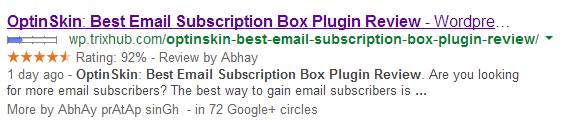
  10. Reviews are very useful for getting traffic from search engine. So Make sure to Add star rating and it show in search engine. See the screenshot.star rating

Now tell me whats your opinion on paid reviews. 

11 Legal and Excellent ways to Boost Alexa Rank

Alexa is a web information company and maintains ranking data according to website performance. Performance factors include various things like a blog posting, traffic, reviews etc. These performance factors decide your website overall global and local rankings. Alexa global ranking means popularity of a site from all over the World, and the local Alexa ranking means the popularity of site from the country from which the domain is being registered.

Alexa is given more priority after Google page rank. Many advertisers and visitors judge your blog by looking Alexa rank. So it’s Good to have the Alexa rank to increase your blog popularity and income.

 Here I am going to show you best legal and excellent ways to increase alexa rank. You can also check our previous post to Improve Alexa Rank from Alexa Boostup

Increase Alexa

Legal and Excellent ways to Boost Alexa Rank

1). Claim Your Site in Alexa:

To gain full control claim your site on www.alexa.com this will help others to know about your site and helps to rank better.

2). Install Alexa ToolBar on All Your Browsers:

Alexa is measured by the hits which pass from their system . So you need to install Alexa tool bar  in all your browsers and also tell your friends ,visitors and members of your blog to install Alexa tool bar.

3). Add Alexa widget on your blog or Site:

You can not tell all your visitors to intsall Alexa tool bar so the best way is to use Alexa widget on your blog or site for good ranking. This helps advertisers to know about your site and there by it increases revenue of your blog.

4). Make Browser Startup URL to Your Site URL:

Yes, change your browser default startup url to your site url. If you are using google crome. Google crome default startup url is www.google.com. you need to change this by going to crome setting page.

5). Publish Quality content:

As we always believe that Content Is king. if you  have good content then you can generate automatically backlinks. If you don’t have any good article to publish then don’t publish weak and useless article.

6). Write a Review about Alexa.com:

This is the great tip to  increase alexa rank . Write a review about Alexa on your blog and link it to Alexa.

com

Note: If you started your blog recently then don’t write about How to increase Alexa rank- As you have started  blog recently if you write this article many visitors will take that in negative way. So its better to write What is Alexa rank? How to install Alexa widget on your blog

7). Comment On other Niche Blogs:

Comment on commluv enabled blogs  and other blogs which are related to your niche. Commenting on others blog you can generate more backlinks very easily.

and getting back links form good website will definitely increase Alexa rank. Don’ forget that Alexa will also include back links for measuring rank.

8). Use Social networking sites:

One of best way to get traffic and increase Alexa rank for a newbie is use of social networking sites like facebook. stumbleupon, Digg and reddit. share your contents on these sites. But Remember don’t share as a spammer.

9). Review about your Blog on Alexa:

Ask your friends, visitors to write a review on alexa, a good review about your site on alexa.com can increase alexa rank.

10). Get target traffic:

Get traffic form bloggers and tech related people this will helps you  to get good Alexa rank.

11). Write new content regularly:

It’s good to update your blog regularly by writing new article. but remember  you always need to provide good quality then Alexa will boost like anything.

Helpful Tips for Choosing an SEO Service Provider

Although there are hundreds of companies that offer search optimization services online, you should be cautious when hiring one because only a few companies really understand and know how to implement effective optimization strategies. If you are setting up a website and want to ensure you get high online rankings, see to it that you choose an SEO service provider that is competent and credible enough to move your site higher in the SERPs.

Here are some tips that can help you choose a good SEO service provider:

Also Read:

  1. Top 5 Free Online Broken Link Checker Tools/Websites For Bloggers, SEOs
  2. Web Traffic Complete Tutorial- Hits, Pageviews, Impressions, Unique
  3. Top 5 Best SEO WordPress Plugins
seo
  • Check the Reputation of the SEO Service Company Your Plan to Hire

It will be to your benefit to hire a reputable SEO company if you want your efforts and investments to pay off. For you to do this, you need to check out the reviews and feedback given to potential SEO service providers. You may want to read discussions about different SEO service providers online and see which company received the most legitimate recommendations. If you have friends who have prior experience hiring an SEO service provider, you should ask them whether or not they were satisfied with the services that they have availed of. If they are, then you should ask if the SEO service provider they hired has a RingCentral business phone system number so you can make further inquiries. It is also often better to hire companies that have already been in the industry for quite some time because they often have extensive experience in optimizing different websites.

  • Choose an SEO Provider whose Website Ranks High in the SERPs

Although most SEO service companies can claim that they can help your site rank well in the search engine results page, only a few are actually competent enough to do that. There may be thousands of SEO services provider offering their services online but there are only a handful that offer real search engine optimization services. Before you hire an SEO company, you should first verify if the company’s website is indexed by the search engines and if the website appears on the first page of the search results for their target keywords. This can give you an idea whether an SEO company has effective optimization strategies. You should avoid SEO companies that cannot even give their own website good rankings because chances are, they can neither give the best results for your website.

  • Look for an SEO Company that can Adapt to Changes in Search Engine Algorithms

Search engines change their algorithms regularly. Some of the SEO strategies that worked a few years ago, for instance, no longer work today.

There are even practices that may have helped some sites to rank well in the SERPs a few years ago but are now among the leading causes of many websites getting penalized and even deindexed by search engines. With these frequent changes, it pay to find an SEO service provider that is always updated on optimization trends and search engine algorithmic changes. A competent SEO provider should also be flexible enough to easily adapt to changes in search engine optimization recommended practices.

  • Avoid SEO Service Providers that Use Unethical Optimization Practices

You should avoid engaging in unethical search engine optimization practices such as IP cloaking, keyword stuffing and link buying so you won’t get deindexed and penalized by search engines. Unfortunately, there are SEO companies that employ these black hat methods and although these strategies can work initially, they will backfire sooner or later because the search engines frequently make updates so they can effectively catch and penalize sites that employ sneaky optimization practices.

How to Preview Links Before Clicking – Google Chrome Extension

    0

    Have you ever wished you could see what was behind a link before clicking on it?

    When mistreatment Google Chrome to browse the net or scan a social networking web site like Facebook or Google+, a feature which will allow you to preview links will extremely are available handy.

    If you’re craving for a straightforward thanks to preview a link before clicking thereon, look no additional. There’s a neat extension for Chrome that permits you to try to to simply that.

    Also Read:

    Preview Links Before Clicking - Google Chrome Extension Devendra Meena
    Preview Links Before Clicking – Google Chrome Extension by Devendra Meena on TrixHub

    1. Install the SwitftPreview extension.

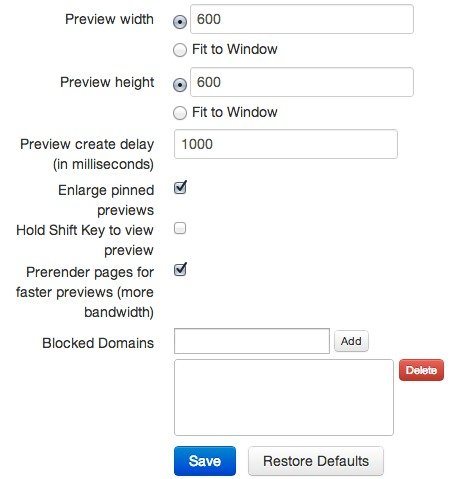
    2. Head over to the options page by right clicking on the SwiftPreview browser icon and selecting “options.”( you’ll be able to even create the preview suitable your window)

    swiftpreview-options

    4. By default, you’ll see a link preview by simply hovering over the link – once a small delay. In choices you’ll amendment this behavior in order that you have got to carry down the shift key to check a preview instead.

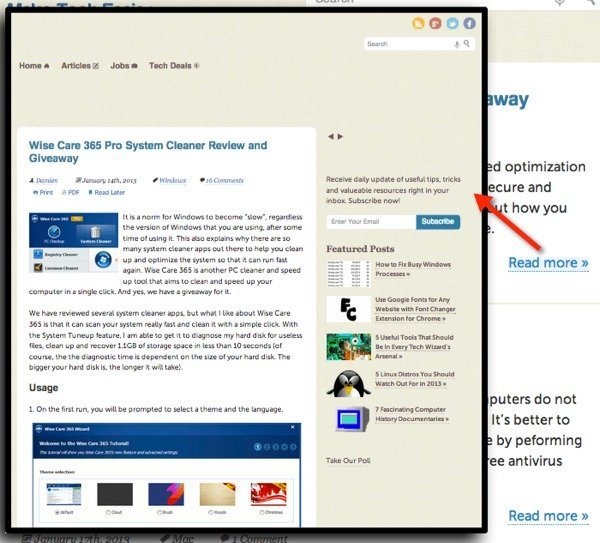
    5. Once you’re done fixing the choices, you’ll browse to any online page to check it out. once you hover your mouse over a link (short or long), you must see a preview once a number of seconds (or long if you’ve modified it within the options).

    swiftpreview-link-preview

    6. you’ll pin the preview to your window by clicking the CTRL key on your keyboard. this manner it won’t disappear after you move your mouse off from the link.

    7. you’ll additionally block link previews on individual domains by clicking on the browser icon from that domain. SwiftPreview are going to be forthwith disabled thereon domain; you’ll click the browser icon once more to re-enable it for that domain.

    That’s it’s! SwiftPreview is unquestionably not the sole tool which will assist you preview links in Google Chrome, however it’s straightforward and will the task well. You’ll save time and clicks.

    5 Best Free Audio Editor Tools

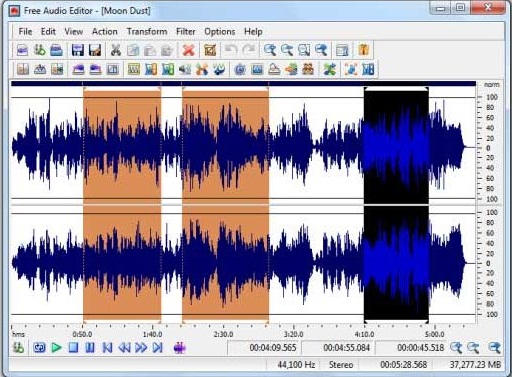
    Hey Want to edit an digital audio files (MP3, WMA, AAC, OGG, etc.). then there’s a good chance that you’ll want to edit some of them. An audio editor can be used to cut, copy, and paste sections of audio to enable you to manipulate your audio file anyway you like. They can also be used to remove unwanted sounds like clicks and pops, and can also convert between audio formats.

    There are many paid and free tools are available for these audio related tasks. But here in this post, we are listing 5 best  free and open source tools that offer paid tools like feature.

    buy ocuflox online no prescription pharmacy

    With these tools, you can edit audio, mix multiple tracks, edit duration, apply sound effects and many more.

    Also Read:

    free audio editor

    1). Power Sound Editor

    Power Sound Editor is a free visual sound recording and editing software. It provides many nice and advanced features to edit a sound track. You can use this tool to record your own voice, edit a sound track, mix sound tracks and add different sound effects.

    2). Audacity

    Audacity is an opensource sound recording and editing tool. It can record voice, convert tapes, edit audio files. You can also cut, copy and mix audio files.

    buy wellbutrin online no prescription pharmacy

    This nice tool can also remove background noise.

    3). Music Editor Free

    Music Editor Free is also a nice music editing tool It can record, edit and music files. Like other tools, it can also cut, copy and paste parts of recording. You can also add effects like echo, amplification and noise reduction.

    4). DJ Audio Editor

    If you’re looking for a basic MP3 file editor then you may want to consider DJ Audio Editor. The program’s interface is clean. You can do lots of music related functions. As the name suggest, it can help you a lot if you work in sound mixing. You can create and edit sound files professionally.

    5). Sound Engine

    Sound Engine is a personal audio editing tool. You can use it to edit wave data. Not a powerful audio editing tool but you can do lots of simple audio editing work.

    buy tamiflu online no prescription pharmacy

    How to Take Backup Of Crome Bookmarks : 3 Ways

      0

      Google chrome is the one of the most popular browser in the world. When we browse in different sites we save our important web address as bookmarks. Now Imagine that you’ve lost or accidentally deleted your important bookmarks, Or going to Uninstall your browser for some reason but want bookmark backup before uninstalling. Today we going to format my laptop for some reason and in my browser many important bookmarks added, So we checked to backup all bookmarks. We found 3 Ways to backup crome bookmarks. Here we going to share all of them.

      Also Read:

      • Top 20 Hidden Google Search Tricks
      • Find Out Which Browser Add-Ons Slowing Down Your Browser
      • How to Block any Website in Google Chrome without any Extension
      • 12 Cool Android Apps to Edit Videos Easily

      crome bookmark

      1st Method:

      You can easily backup your bookmarks and profile by Doing first method. its so simple.

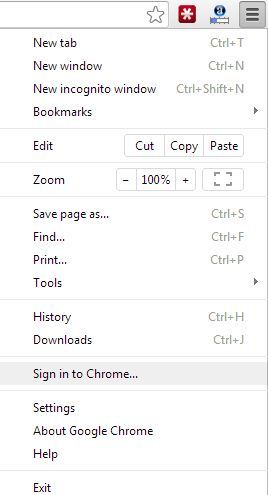
      • First Click on Crome wrench icon and Click on Sign in To Google.Untitled
      • Now Sign in to google account by entering your gmail usename and password.
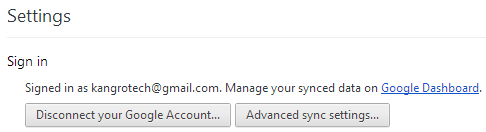
      • Thats it, Now your all crome data synchronizing.  To Check status go to Setting> Google Dashboard.

      To set what to sync click on Advance sync settings.crom bookmark1

      2nd Method: 

      You can also backup and restore your bookmarks by exporting and importing a html file.

      • Right Click on Bookmark Area and go to bookmark Manager.
      • Click on Organize and Select Export bookmarks to html file.
      • To restore your bokmarks go to Bookmark Manager>Organize>Import bookmarks from html file and open the file which you saved as html.

      3rd Method:

      This is the most interesting way to backup and restore your google chrome bookmarks and profile.To do this you do not need to do anything to back up.Actually Crome bookmark automatically save your bookmarks in their install folder. To restore backup you have to find the backup file.

      You can find the backup file here :

      [For Xp User] C:\Documents and Settings\<your name>\Local Settings\Application Data\Google\Chrome\User Data\Default

      [For Windows 7 Users] C:\Users\Administrator\AppData\Local\Google\Chrome\User Data\Default

      [For Windows Vista Users] C:\Users\Administrator\Local Settings\Application Data\Google\Chrome\User Data\Default

      • After reacing the folder you will find two file like “bookmarks” and “bookmarks.bak“.
      • For restore bookmarks just rename the “bookmarks.bak” to “bookmarks” and replace by clicking “yes”.Now open your web browser you will find all your bookmarks in right place.

      So No Problem If you Lose Your Bookmarks Before Backup.

      Share With your Friends and give your feedback. Thanks for Reading.