Home Blog Page 28

Top 15 Content Marketing Tools to Use This Year (Updated List)

IF you are a content writer, then you need to use content marketing tools to engage more traffic. The idea of content marketing is to attract and retain customers by creating and curating relevant and valuable content. Here in this Post I have selected some best Content marketing tools to use this year.

List Of Best Content Marketing Tools

#1. Evernote

Evernote makes it easy to remember things big and small from your everyday life using your computer, phone, tablet and the web. did you know you can use it to record audio and turn it into text? Yes, that’s right – and it’s free to use.

#2. LongTail Pro

LongTailPro Is One Of The Most Popular Desktop SEO Tool For Keyword Research. This Tool Runs On Both Windows And Mac. Finding Right Keywords That Generate Good Organic Traffic Are The Most Difficult Task. With LongTailPro, You Can Easily Search Good Keywords, Niche Research, Competitive Keywords.

#3. SEMRush

SEMRush is best keyword research tool. Not only are you able to check your own keywords, you can gain insights into the terms your competitors are currently optimizing around. With the help of their platform, you can perform competitive analysis and determine the highest potential keywords in one easy swoop.

#4. Blog Post Ideas

There are many blog title generators out there, ContentForest’s Title Tool is an excellent Website Marketing Tool for finding Creative Marketing Ideas. All you need to do is add a keyword, and it will suggest relevant and engaging topics to match.

#5. FocusBooster

Productivity and focus are immensely important aspects of creating effective content, which is why everyone needs at least one or more content marketing tools to help them buckle down when necessary.

FocusBooster is a free app that relies on the Pomodoro technique, which is based on 25-minute sessions of working. While you can adjust your focus periods, the point of these content marketing tools is to help you develop periods of intense focus with intermittent breaks.

#6. SEOPressor

Search Engine Optimization (SEO) Is The Process Of Improving The Visibility Of A Website Or A Web Page In Search Engines. On Page Optimization Is Very Important For website owners. SEOPressor wordpress Plugin Is Best On Page Optimization WordPress Plugin. SEOPressor Is All In One And Truly The Most Powerful WordPress SEO Plugin Even Built. SEOPressor Has Many Features That Will Help You Optimize All Of Your Posts And Rank Your Site Well In SERP Without Fearing A Penalty From Google.

#7. TriveLeads

Thrive Leads Is One Of The Most Popular List Building WordPress Plugin. This List building wordpress plugin help you to gain users on your site by colleting email ids. So you can promote your content through sending email to your users.

#8. MailChimp

MailChimp is one of the easiest and best email marketing platforms to use to market your content to your email list. Don’t have an email list? The exclusive content your business will create and distribute using this platform will help fuel new subscribers to your email list.

#9. Word2CleanHTML

Many experienced content marketers prefer drafting their articles in Microsoft Word or Google Docs, and for good reason. The spelling and grammar check capacities on many major content management systems (CMS) exist, However, it’s rare to get a clean copy and paste off a word document.

So Using tools like Word2CleanHTMLis good.

#10. Optimizely

It’s easy to make the plunge into A/B testing your content with Optimizely, which is one of the most straightforward platforms for testing on-page elements. You can optimize your headlines, calls-to-action, and much more – and it even integrates with WordPress!

If you’ve been scared to begin conducting marketing experiments, it offers a fantastic introduction to this invaluable practice.

#11. Prezi

It’s easy – and free – to create engaging, interactive presentations in this program, even if your graphic design skills are minimal at best. While some templates and functionalities are paid, you’ll be amazed what you can accomplish (fast) without spending a dime.

You can promote your final product on Slideshare, or even publish it as an eBook!

#12. Storify

This is among the most well-respected and best-known tools for creating socially integrated blog posts. Adding the right Tweets to your articles is as easy as doing a search within the platform, and clicking-and-dragging your selected Tweets to embed the content right in your blog.

Most of the tool’s functionality is free, but the paid version allows you to create content on breaking stories that’s updated in real-time.

#13. Pocket

With Pocket, you can Save videos, articles and other helpful resources away to check out later. The Pocket app helps keep your favorite resources organized from apps like Twitter, Flipboard, Pulse, Zite and 300+ apps. And you can check on any device laptop, tablet or mobile deivce.

#14. Remember That Milk

Manage all your tasks with this app that seamlessly integrates with Gmail, Outlook, Twitter, Evernote, Google Calendar and more. Think of this app as the to-do list reinvented.

#15. Harvest

Harvest is the time tracking tool that can help to keep your content marketing efforts on schedule with accurate and effective software to help make smarter decisions for your business. Understanding where your time is spent and on what tasks will help strengthen your content creation efforts.


Hope you like these content marketing tools to use this year. These Top Content Marketing Tools help you to Marketing Products and services.

How to Secure Your WordPress Site From Brute Force Attack

0

Hello Friends, This is Abhay and today I’m going to show you how you can protect your WordPress site from brute force attack.

Brute Force attack is a common type of attack, that attacker try to gain access by using guessting password combinations.

By Wikipedia, A brute-force attack, or exhaustive key search, is a cryptanalytic attack that can be used against any encrypted data. Such an attack might be used when it is not possible to take advantage of other weaknesses in an encryption system that would make the task easier. It consists of systematically checking all possible keys or passwords until the correct one is found.

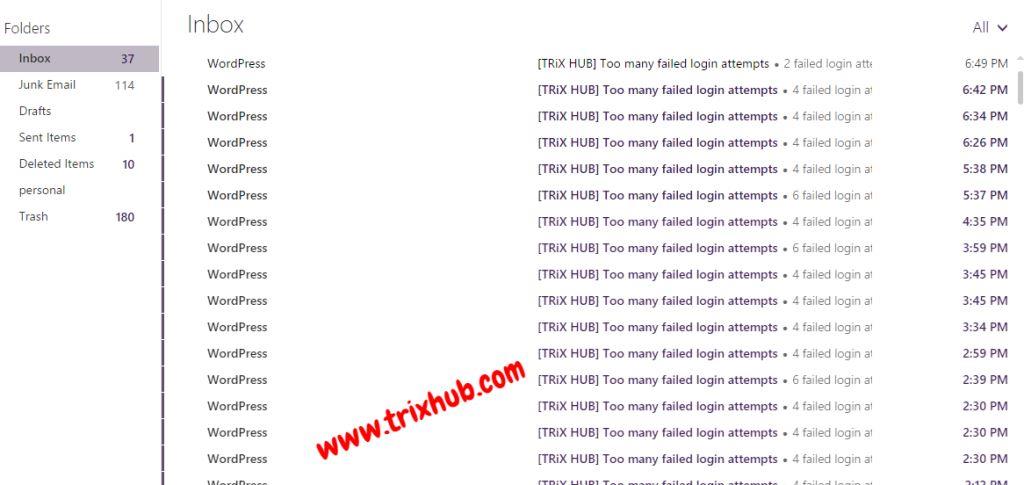
From last few days, My blog trixhub.com getting lots of brute force attacks. So this is the reason I’m here to write this post. Our Blog is fully secure so i think no one can break easily by doing this type of stupid things.

Here is the screenshot of brute force attacks on my site.

login lockdown
login lockdown

How to Secure WordPress from Brute Force attacks:

There are many things to secure WordPress sites, Here i have listed the best ways to protect wordpress site from brute force attacks.

Method 1: Jetpack Users activate Protect Module

If you are using Jetpack wordpress plugin, Then you can easily proect your wordpress site by activating their protect module.

Protect is a cloud-powered brute force attack prevention tool. Jetpack Protect module leverage the millions of WordPress sites to identify and block malicious IPs. Protect tracks failed login attempts across all Jetpack-connected sites using the Protect module. If any single IP has too many failed attempts in a short period of time, they are blocked from logging in to any site with this plugin installed. Protect is derived from BruteProtect, and will disable BruteProtect on your site if it is currently enabled.

I recommend Jetpack to every wordpress users, Because this plugin have lots of features and originally developed by Automatic Inc. (A WordPress Development Team). You can check Essential WordPress Plugins for Bloggers.

Download Link

Method 2: Use Limit Login Attempts Plugin

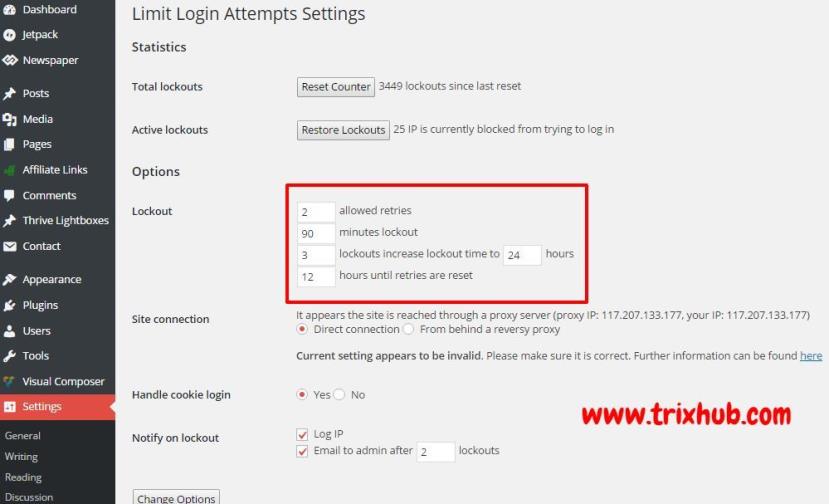
This is the another method to prevent wordpress brute force attacks. Limit Login Attempts Plugin, Limit the number of login attempts possible both through normal login as well as using auth cookies. This WP Plugin blocks an Internet address from making further attempts after a specified limit on retries is reached, making a brute-force attack difficult or impossible.

I personally use this plugin on most of my sites. This plugin send me a mail everytime when failed login attempts made on site.

Download Link

Limit Login Attempts

Method 3: Change WordPress Admin Username

Yes this is the most important thing, After installing wordpress, Change your admin username.

By default, WordPress generate username ‘admin’. and everyone knows your wordpress administator username. So you have to change imidiately this username.

But the question come how you can do this. You can use Better WP Security WordPress Plugin or create a admin level account and delete the first one.

I will create a step by step tutorial about changing wordpress username as soon as possible.

My Recommendation:

Personally, I’m using all the 3 above methods in my sites. and the best thing i am using a custom username in all of my WordPress site. So this is the best thing to protect from brute force attacker.

2026 Bigrock Coupon Code- Discount Promo Code

    0

    About Bigrock:

    Bigrock is a web IT solutions provider stemming from the Directi group of businesses. Directi dates back to 1998 when it was founded to deliver innovative web products to clients across the globe. As a market leader in providing web presence solutions, Bigrock focuses on individuals, small businesses and corporate customers. The company provides a range of comprehensive solutions designed to meet client needs effectively and affordable. Some of the major products that Bigrock deals in include:

    1. Domain registration
    2. Web hosting services
    3. Ecommerce solutions
    4. Business-class email services
    5. Web building products
    6. Digital certificates

    Bigrock’s major aim is to provide innovative high-end services designed to make creating of a web presence as easy as possible. On this note, the company offers round the class customer assistance in order to take care of any problems you might be experiencing promptly. You can reach them via phone, email or the live chat. Their services are highly reliable especially in terms of quality and tech support. More than that, they are simple enough for you to be able to work with them comfortably without the need for advanced IT knowledge. To crown it all, Bigrock ensures that the services are affordable enough for you to make a great return on investment.

    Bigrock Coupon Code for 2026

    Big Rock India offer special BigRock Coupon Codes for our readers in this month. Coupon Code will expire on the end of the month.
    By using Big Rock Coupon Codes you will get 24% off on Web Hosting + 10% off on Domain Names  . Details are available bellow.

    Offer Details:

    Promo Code: FEBAFF26

    Offer: 25% off on Web Hosting + 10% off on Domain Names
    End Date: 29 Feb 2026

    How to Avail Discount:

    • First you have to click here for bigrock website.
    • Search domain name from here or choose hosting package from here
    • In order summery page you have to apply coupon code FEBAFF26
    • After applying coupon code you will get discount.

    6 Top Content Copy Protection WordPress Plugins to Protect Content From Copy Cats

    0

    We write content with many efforts and some copy cats, Copy content from our site and publish in their blog. This thing affect your site ranking. The duplicate content can decrease your blog ranking in search engines, if someone copied your content, Google detect duplicate content and penalize both sites. So protecting content is really important if you think your content being stolen. You can disable text selection and right click. SO copy cats will not be able to copy your content.

    Here we added few Plugins that will help you to do this job.

    #1. WP Content Copy Protection & No Right Click

    This wp plugin protect the posts content from being copied by any other web site author.

    The plugin will keep your posts and home page protected by multiple techniques (JavaScript + CSS).

    Features of This Plugin:

    • Protect your content from selection and copy. this plugin makes protecting your posts extremely simple without yelling at your readers
    • No one can save images from your site.
    • No right click or context menu.
    • Show alert message, Image Ad or HTML Ad on save images or right click.
    • Disable the following keys  CTRL+A, CTRL+C, CTRL+X,CTRL+S or CTRL+V.
    • Advanced and easy to use control panel.
    • No one can right click images on your site if you want

    Download Plugin From Here

    #2. Content Copy Protection & Prevent Image Save

    This plugin is for content protection and can protects your content from steeling, it prevents content select and copy and also prevents images saving from context menu,

    Features of This Plugin:

    • Protect your content from selection and copy.
    • No one can save images from your site.
    • No right click or context menu.
    • Show alert message, Image Ad or HTML Ad on save images or right click.
    • Disable the following keys  CTRL+A, CTRL+C, CTRL+X,CTRL+S or CTRL+V.

    Download Plugin From Here

    #3. WP Content Copy Protection

    WP Content Copy Protection is a simple, yet effective plugin that uses an array of aggressive techniques in protecting your online content from being stolen.

    Features of This Plugin:

    • Disables right click context menu on all content (except href links)
    • Disables text selection (globally) on PC and mobile devices
    • Disables text and image drag/drop/save on PC and mobile devices
    • Basic image protection (image link URL’s are automatically removed)
    • Copy methods disabled from onscreen keyboard and shortcut context key
    • Secures your uploads directory and sub-directories from public access
    • Disables right click and save function on default video and audio embeds
    • Javascript validation (displays error message when disabled in user browser)
    • Disables keyboard copy controls (CTRL A, C, X)
    • Disables ‘Source view’, ‘Save Page’, and ‘Print’ key functions
    • Disables f shortcut key for accessing developer tools to view source code
    • No negative side-effects on your SEO (search engines can read your content)

    Download Plugin From Here

    #4. WP-CopyProtect

    Wp-CopyProtect is also a simple WordPress plugin to stop copy cats. This plugin disable text selection, right click. check out the features.

    Features of This Plugin

    • Disable selection of text
    • Disable right click on your blog – Disable right click with popup message or without popup message.
    • No side-effect on SEO – Search engines can read your content without any problem.
    • User specific setting – Apply above settings to all users or specific category of users like Admin.

    Download Plugin From Here

    #5. Smart Content Protector

    Smart Content Protector is the go to Plugin to Protect the Text and Images in your WordPress site. In order to avoid Plagiarism, it is essential to make sure the Text and Images from your WordPress site is not copied. This Plugin serves as the Content Protector for your WordPress site. It works automatically once the Plugin is activated

    • Multiple Text and Image Protection methods
    • Advanced Image Protection using Responsive Lightbox
    • Image Watermark
    • Protect your Text and Images by Disabling the Mouse Right Click and Possible Shortcut Keys for Cut (CTRL+x), Copy (CTRL+c), Paste (CTRL+v), Select All(CTRL+a), View Source (CTRL+u) etc.
    • Protect Content based on User Level (Members / Guests)
    • Alert Message Option for Print Screen (PrtScn, ALT + PrtScn and CTRL + PrtScn). You can use it trick your users by displaying say “Print Screen is Disabled” message.
    • Enable this Plugin on Home Page or All Pages or Custom Pages/Posts in Settings Page
    • Custom Pages/Posts has Include/Exclude specific Page/Post for Protection
    • Disable Image Dragging, Disable the Link which contain image extension
    • Option to Display Alert Message on Mouse Right Click
    • Log IP Addresses that Copied Content
    • Disable Right Click for Internal/External Links
    • Inherently disables Right Click for HTML5 Video/Audio

    Download Plugin From Here

    #6. WP Control Copy

    Control Copy gives you the power to limit the visitors abilities to copy content (text, image, video or audio (html5)) from your site. Moreover, it gives you the ability to take control over the text copy action of visitors to your site (ctrl-c/cmd-c/right-click-copy)

    Features of this plugin

    • Limit text copy to Logged In users only (Member privilege).
    • Allow Logged in members to get a clean copy.
    • Add custom text at the end of the copied text.
    • Custom Text can include : URLs, Blog Name, Author name, Year, Date, Post/Page title and more.
    • Redirect to a page of your choice or Add a notification (or Both), in case your visitor disables Javascript.
    • Image Protection : Disable image dragging and Right Click over images.
    • Disable Right Click. Make it even harder to copy content.
    • Disable Save Page – Which disables saving images, code and text.
    • Disable Print Page – With Print Page you can easily convert a page to PDF, WPCC will disable that.
    • Disable Print Message – Replace a page with a notification message once being printed.
    • Disable Browser Developer Tools

    Download Plugin From Here

    7 Best Domain Name Registrar to Register Your Website Name in 2016

    Domain name becomes a need of everyone in this digital age. Everyone want to register their name on Internet. Her we have written why you need to register domain name.

    In this age, There are many domain registrar available on the Internet. and they provide domain name at very cheapest rate. When you serach domain name in google then you can see many ads that giving domain name in just $ 0.99 / year. But many spam registar also available. SO you have to think on this when you going to register your domain name.

    >>>> How to Choose Best Web Hosting Provider?

    So here i have created this post, So you can easily find Best Internet Domain Registrar that register your domain name at cheapest rate and also provide domain security and many things.

    What is Domain Name Registrar?

    Domain name registrar is an organization or commercial entity that manages the reservation of Internet domain names. A domain name registrar must be accredited by a generic top-level domain (gTLD) registry and/or a country code top-level domain (ccTLD) registry. The management is done in accordance with the guidelines of the designated domain name registries.

    Top Best Domain Registrar

    #1. iPage

    (Domain+Hosting only for $1.99/ Month)

    ipage hosting

    iPage is one of the most popular, cheapest and best domain registrar + Hosting Provider. iPage offers many services such as free SiteLock security, Free toll-free number, Site Analytics, Free YP (Yellow Page) listening, Daily Spam and Malware scanning, Constant network scanning and free up to 200$ for internet marketing.

    You can easily register your desired domain name on iPage if available. Web hosting packages of iPage are also cheap and affordable. The best thing of iPage is you can get a free domain with one year web hosting purchase. So, it’s great opportunity to start your site with iPage at the affordable price. You can Read our iPage Review Here and Pre purchase FAQ questions.

    [su_button url=”https://www.itechcube.com/proceed/ipage/” target=”blank” style=”stroked” background=”#f7511a” color=”#ffffff” size=”9″ center=”yes” radius=”10″ icon_color=”#c7f2fc” rel=”nofollow”]Register Domain Name With iPage[/su_button]

    #2. Godaddy

    (Domain Start at $1.49/ Year)

    GoDaddy domain
    GoDaddy

    Godaddy is another best domain registrar. Godaddy established in 1997 as a Jomax Technologies, which later became Godaddy. It’s world largest domain Registrar Company with ICANN-accredited registrar and also sells e-business related softwares and services.

    Godaddy also offer Powerful web hosting services, Their hosting plans start from $4.99/month. Godday is best for buying the domain name. We have already registred 11 domain names with Godaddy. And TRiXHUB.com also registred with Godaddy. You Can Find the complete step by step guide to buy domain from Godaddy.

    [su_button url=”https://www.itechcube.com/proceed/godaddy” target=”blank” style=”stroked” background=”#f7511a” color=”#ffffff” size=”9″ center=”yes” radius=”10″ icon_color=”#c7f2fc” rel=”nofollow”]Register Domain Name With Godaddy[/su_button]

    6 Key Points to Consider While Picking Domain Name for Your Blog

    #3. NameCheap

    (Domain Registration start at $0.99/Year)

    Namecheap domain registrar
    Namecheap domain registrar

    Namecheap is an ICANN-accredited domain registrar and web hosting company, based in Los Angeles, California. Namecheap was founded by Richard Kirkendall in 2000.

    In November 2010, it was voted the best domain name registrar in a Lifehacker poll. Again, in September 2012 it was voted as “Most Popular Domain Name Registrar” in Lifehacker polls.

    NameCheap Hosting offers Shared Hosting, Reseller hosting, VPS hosting, Dedicated servers and Email hosting in cheap prices. Their domain management system is very flexible. So you can register your new domain with NameCheap.

    [su_button url=”https://www.itechcube.com/proceed/namecheap/” target=”blank” style=”stroked” background=”#f7511a” color=”#ffffff” size=”9″ center=”yes” radius=”10″ icon_color=”#c7f2fc” rel=”nofollow”]Register Domain Name With NameCheap[/su_button]

    Top 5 Best Cheapest And Reliable Web Hosting To Use In 2016

    #4. BigRock

    (Indian Domain Registrar at 57INR/ Year)

    bigrock domain registration
    bigrock domain registration

    BigRock is one of the leading providers of a wide spectrum of domain services in India. Bigrock offers domain name registration, website hosting, email hosting, VPS hosting and more. They also offer various value-added services, such as WHOIS, DNS management, and premium domain sales etc.

    Bigrock is a Indian Domain registration company and their prices are awesome. They provide domain name as low as 57 INR / year. And their hosting plans start at 59 INR.

    [su_button url=”https://www.itechcube.com/proceed/bigrock/” target=”blank” style=”stroked” background=”#f7511a” color=”#ffffff” size=”9″ center=”yes” radius=”10″ icon_color=”#c7f2fc” rel=”nofollow”]Register Domain Name With Bigrock[/su_button]

    Tips to Remember When Going to Buy a Domain Name

    #5. Hostgator

    (Domain+Hosting at $4.5/ Month)

    Hostgator

    Hostgator is an excellent domain registrar and best hosting provider company at lowest prices. Hostgator is the best web hosting provider for every plateform. This is the reason many experts recommend this Host provider. It was found in 2002. Their hosting plans are very affordable for new and old websites. You can purchase hosting as low as 4-54$ per month with free domain name.

    You can also get 25% discount by using Coupon COde: TRIXHUB25OFF

    [su_button url=”https://secure.hostgator.com/~affiliat/cgi-bin/affiliates/clickthru.cgi?id=kinngabhay” target=”blank” style=”stroked” background=”#f7511a” color=”#ffffff” size=”9″ center=”yes” radius=”10″ icon_color=”#c7f2fc” rel=”nofollow”]Register Domain Name With Hostgator[/su_button]

    #6. Name.com

    name.com domain
    name.com domain

    Name.com is also a well known domain registration company and having a good online reputation in the field of domain registration and web hosting. Their hosting plans start from 4.99$ per month and domain registration price is 10.99$/year. Name.com founded in 2003 by Bill Mushkin. They offer the number of services such as domain registration, SEO tutor, Website Builder, One-click WordPress Install, SSL certificates, Email services, Google Apps for work and much more.

    [su_button url=”https://www.name.com/” target=”blank” style=”stroked” background=”#f7511a” color=”#ffffff” size=”9″ center=”yes” radius=”10″ icon_color=”#c7f2fc” rel=”nofollow”]Register Domain Name With Name.com[/su_button]

    #7. Register.com

    Register Domain Names
    Register Domain Names

    Register.com founded in 1994 and currently managing million of websites and blogs on their hosting platform. Register.com is also a best domain registrar that powering millions of websites. Their services are amazing and 24 live support is just outstanding. You can buy or register your domain name address easily on register.com at lowest prices.

    [su_button url=”https://www.register.com/” target=”blank” style=”stroked” background=”#f7511a” color=”#ffffff” size=”9″ center=”yes” radius=”10″ icon_color=”#c7f2fc” rel=”nofollow”]Register Domain Name With Register.com[/su_button]


    8 Star Rating WordPress Plugins To Enable Post Rating Option

    1

    Reviews and rating option becoming trending these days. Giving option for users to rate post and show star rating in post increase user ingagement. Also these plugins help you to show star rating in google search result.

    Recomended: Best Product Review WordPress Plugins For 2016

    Free Star Rating WordPress Plugins

    #1. kk Star Ratings

    kk Star Ratings allows blog visitors to involve and interact more effectively with your website by rating posts.

    This plugin displays a 5 star ratings in your posts/pages. It has quite cool hover fade effects and animations. KK Star Rating also inludes a widget so you can show top rated posts in your sidebar as well. The best thing KK Star rating wordpress plugin Supports Google Rich Snippets. So Now the ratings will be indexed in google search results.

    Full Details & Download Link

    #2. Polldaddy Polls & Ratings

    The Polldaddy Polls and Ratings plugin allows you to create and manage polls and ratings from within your WordPress dashboard. This plugin developed by a popular developer who is part of Automattic (a well-known WordPress development company). You need to opt for a WordPress.com account that will provide an API key.

    The Polldaddy rating editor allows you to fully customize you rating. You can also avail of the the ‘Top Rated’ widget that will allow you to place the widget in your sidebar.

    Full Details & Download Link

    #3. WP-PostRatings

    WP-PostRatings is another free wordpress rating plugin here. Once it’s installed it will offer you to paste a special code of its own wherever you wish to enable the rating system. You can add this system to posts, comments or pages (any number of them).

    It’s very light weight and uses AJAX codes to perform better. The code can be placed even in the widget area. You can even show posts or pages according to ratings which simply helps users to find the best articles of your blog.

    Full Details & Download Link

    #4. Yasr – Yet Another Stars Rating

    Yet Another Stars Rating is a simple plugin which allows you and / or your visitor to rate a post or element. With YASR you can make your own review or let your visitors vote, and you can even create multiple sets (a set of stars for each aspect to rate). Review scores or visitor ratings will be indexed by search engines through snippets .

    Full Details & Download Link

    #5. Rating Widget

    The Rating-Widget Ratings plugin allows you to create and manage ratings from within your WordPress dashboard. You can embed ratings into your posts, pages or comments. PLUS, you can embed ratings into your BuddyPress activity updates and comments.

    But the bad part of this plugin, Its not updated from long time. SO i don’t recommend. You can try and use this plugin by your own choice. 

    Full Details & Download Link

    25 Best WordPress Review Themes To Use in 2016

    Premium Star Rating WordPress Plugins

    If you go for premium plugin then absolutioly you get lost of customization options and amazing features. Here we have also added few best selected premium star rating plugins for wordpress.

    #6. Rating Form

    Create rating systems with choice of self made forms like Stars and Thumbs Up Down or create your own by uploading images that will turn into an rating form where users/guests can rate.

    Price: $19

    Full Details & Download Link

    #7. WordPress Rate Everything

    This plugin allows anyone to add star rating to any WordPress post, post type and pages or just simply paste the short code from the backend or PHP short code to make the rating work anywhere you want. The plugin will show web site visitors the current rating and once they are logged in they can rate using AJAX.

    Price: $18

    Full Details & Download Link

    #8. Comment Rating Plugin

    The WordPress Comment Rating Plugin allow your visitors to vote other persons comment. This plugin very useful on buddypress enabled websites.

    Price: $21

    Full Details & Download Link