Home Blog Page 49

20 Free PHP Open Source Social Networking Scripts

Social Networking had forever been a chief idea of human relationships and it existed since time long time. However the world woke up and had a notice on it only with the inception of popular sites like Twitter, Facebook, Orkut and MySpace. Since then people wanted to add their own features on such network and there emerged exciting tools like Ning, CollectiveX and Snappville. But then we know web industry is demanding so we all wanted to have more control over domain, branding, design and database. With that in mind this amazing thing introduced  Open Source Social Networking Script.social networking

Also Read: Top 5 Best Places to Learn jQuery Online

Here i’m going to share top 20 Free PHP Open Source Social Networking Scripts that can help you build your own network in no time!

Top 20 Open Source Social Networking Scrips:

Affelio – Affelio Open-source social networking software can be availed at SourceForge which is among largest open source software provider. It helps people to build cool stuff and share it with a global audience. Distributed architecture, Internet-wide scalability, highly customizable is few among the key features.

AROUNDMe – AROUNDMe is little different, here you do not create your own social network site but helps building your own collective service that permits your user to make their network and group. AROUNDMe is fully customizable with XHTML, CSS, PHP, and JAVA.

Anahita Social Engine – Anahita is scalable social networking software that is built as Joomla extensions with Nooku framework. Some of the outstanding features would include fully customizable, follows Google Open Social Standards and works with Amazon Cloud storage.

AstroSPACES – AstroSPACES open-source social networking application is written in PHP and utilizes the Smarty Template Engine. Being a great open source, it is very customizable. In fact it is the first open source social networking script introduced across the web.

BuddyPress – BuddyPress is a great packaged collection of plugins and themes for buiding up a social network service around an installation of the well-known open source blog engine WordPress MU.

Community Engine – CommunityEngine is a free, open-source social network plugin for Ruby on Rails applications. Drop it into your new or existing application, and you’ll instantly have all the features of a basic community site. Clippings, Photo uploading and tagging, Private messaging, Private messaging and forums are basic features.

Dolphin – Dolphin Smart Community Builder is universal open source software that allows you to build any kind of online community. With a huge variety of features & options, you can quickly launch your own very unique and successful website.

Elgg – Elgg empowers individuals, groups and institutions to create their own fully-featured social environment. Elgg was awarded with the best open source social networking site last year and since then the usability of this software was even augmented. This piece of software will offer you almost everything that you need to build and manage a social network.

iSocial – iSocial  social networking CMS software allows you to create your own Friendster and Orkut like sites. Use bookmarks, dating and create groups with just one mouse click.

Insoshi – Insoshi is one of the new open source social networking software that is build on Ruby on Rails released this April. Basic features are well integrated and free open source plan is available.

kickapps – KickApps provides brands, enterprises and web publishers with solutions that enable them to create and manage next generation web experiences that are social, interactive, dynamic, distributed, and data-informed. With KickApps you can build your own community with social networking and photo & video sharing, widgets, custom video players and much more.

Lovd by Less – Lovd by Less is among few open source social networking platform written in Ruby on Rails. You will find most of application ready with Lovd by Less that is needed. Flickr and YouTube are integrated with the software. If you are not a PHP lover then Lovd by Less is your option.

Mahara – Mahara is an open source social networking plus ePortfolio web application. You can create and maintain a digital portfolio of their learning, and great social networking features to interact with each other. Blogs, resume builder, file manager and view creator are key features of Mahara to help you create arrangements of content in a particular way for others to see.

Mixxt –  Mixxt open source helps you build own social network fast. Features included are quite powerful. You can choose from many Community functions such as Forum, images, events & wikis.

Mugshot – Mugshot is a Java based software developed last year. It is sponsored by Red Hat and allows users to pull together all online activity at one place. Mughots integration with music sites like iTunes, Rhapsody, Yahoo! Music, and others are key features.

ODS – OpenLink Data Spaces (ODS) is a Distributed Collaborative Web Application Platform, Social Network, and Content Management System, written using VSP, VSPX, and the OpenLink AJAX Toolkit, atop OpenLink Virtuoso. It incorporates a broad range of industry standards for data access and data management.

OpenQabal – OpenQabal open-source social-networking and collaboration platform is driven by the principles of federation, composition, and openness; with a unique highlighting on enabling “distributed conversations”. Basically written in Java and interoperate readily with other applications which are built on open standards such as RSS, XHTML, Web Services, WS-Trust, WSDM, WSRF, and more.

OpenPNE – OpenPNE is a Social Networking Service Engine written in PHP. It carries many features such as friend control, friend invitation, diary, blog feeds, message box, and more.

Phpizabi – PHPizabi open source social networking site comes with is great features for creating & managing basic-to-advanced communities. However, it works superb with small network and may have problem building up big network.

Xoops – Xoops is another well-known extensible CMS allowing you to build social network based on your needs. Starting a personal blog and then expanding it to social network is possible via various modules. Xoops uses Yogurt module to create site with many exciting features. Both Xoops and Yogurt are written on PHP and also goes with LAMP.


Media.net Review : Good CPM Ad Network

0

Media.net is an online contextual ads program in partnership with Yahoo Bing Network.  It enables web publishers to earn advertising revenue through putting their ads on websites or blogs similar to adsense. The network is growing fastly promising webmasters and bloggers a better advertising solution.

media.net

Yahoo and Bing together to provide an advertising network, referred to as Media.net. Media.net network. As Media.net not provide details such as CPC and CTR like Google AdSense,  all you see on the dashboard is RPM and prints that makes many people assume they pay for print only.

Read: Top 15 Google Adsense Alternatives To Make Money From Blog

If you are searching for the AdSense Alternative, than simply try the Media.net which will work great. Also you can use Media.net along with your Google AdSense in your Blog. Media.net Payout is almost same as Google which is $100. For more information see the Media.net Terms of Service Page & Program Guidelines Page.

Here are pros and Cons of media.net

Pros:

  1. A promising alternative to adsense.
  2. Better RPM rates i.e combination of CPC and CPM
  3. Easy to understand dashboard and reports
  4. Different ad slots are available + mobile friendly ads
  5. Keyword rich optimized ads
  6. NET 30 payout via paypal
  7. Account Manager for support
  8. Approval rate is better compared to adsense

Cons:

  1. RPM rates are not consistent. The most common issue discussed on web. You may sometime receive $0 RPM.
  2. $100 minimum payout
  3. Currently their ads are contextual based
  4. High RPM rates for US and European Traffic as per my observation.

Read: What to do for Google Adsense account approval

Top 10 Best SEO Plugins For Firefox

SEO plugins of Firefox gives you the ability to analyze SEO scores of a webpage at the same time of visiting the website. That’s why they are very popular.  There are hundreds of SEO plugin for Firefox.Some are excellent and some are pretty ordinary.All these plugins mentioned in this post works perfectly  with Firefox 18  and they will definitely help your SEO analysis process.

seo adons

1)SeoQuake

SeoQuake is one of the most popular Firefox SEO plugin.The best feature about this plugin is it focuses on both on page and off page SEO factor.Just like the RDS Bar, SeoQuake  also has aSEO bar which shows Google PR,Alexa rank,number of pages indexed by Google,number of pages indexed by Bing,back-links according to Google, back-links according to Bing, SEMRush traffic rank, Facebook like,Google+,Twitter tweets  etc.This bar also supports one click on page SEO analysis and keyword density analysis.You can also choose which information you want to see in the bar.

Also Read: Top 5 Free Online Broken Link Checker Tools/Websites For Bloggers, SEOs

The most unique feature of this  plugin is that  it is integrable on your search result page.So when you search for something on Google or Bing or in any search engine in the results page you will  see this bar after every result(as shown in the figure below).So you can easily do competition analysis  for your targeted keywords using this plugin.

2)WebRank Toolbar-

WebRank toolbar is also very popular Firefox SEO plugin.When you visit any website this toolbar will show you  number of pages of that site indexed by Google , number of pages indexed by Bing,back-links according to Google back-links according to Bing,back-links according to Alexa,Google,PR,Alexa rank,Compete rank,Quantcast rank, Facebook like,Google+,Twitter tweets,Stumbleupon share,Delicious share,domain whois etc.One very unique feature of this Firefox SEO plugin is that it shows Norton safeweb and Mcafee site advisor suggestion of  the website you are currently visiting.This toolbar is also fully customizable.

3)RDS Bar-

RDS Bar is one of the most popular & most downloaded Firefox SEO plugin.While visiting a website from  this bar you can easily know  about number of pages of that website indexed by Google,indexing date,PR,Dmoz,SEOmoz page authority.You can also know number of pages indexed by Bing,back-links according to Google back-links according to Bing,back-links according to Alexa,back-links according to MajesticSeo,back-links according to Ahref, Alexa rank,Compete rank,Quantcast rank,SEMRush traffic rank,Technorati authority rank,Google trend and many more.

You need to log in(sign up is free of cost)  to get some information such as domain age,website host, provider.But most of the important information is available without log in.One very cool feature of this bar is you can select every single information that you want to see in the bar.So suppose you don’t want to see Quantcast rank you just have to unchecked it from settings.

You may Also Like: 11 Legal and Excellent ways to Boost Alexa Rank

4)Seo & Sem-

Another cool SEO bar which shows number of pages indexed by Yahoo,number of domain reference in Yahoo, Google PR,Dmoz,Yandex TYC,presence of site in Yahoo directory,presence of site in Yandex directory, Alexa rank,IP address,W3C site validation,site age,robots txt.This toolbar is also totally customizable.

5)SERPTrends SEO Extension-

Most of the website’s position  moves up or down in all search engines.Now this plugin gives you the ability to track this change in SERP.When you search some term for the first time it records  SERP of the websites.Now when you again search for the same term in the results page it shows the changes(You have to search at least after 24 hours to notice any change).It uses different color and number to point the change (as shown in the figure).

6)KGen-

KGen shows strongest keywords of the webpage you are currently visiting.You can get keyword cloud,keyword statics by easily clicking on the scan it button.You can also export the result.

7)SEO  Doctor-

This fantastic Firefox SEO plugin calculates link statistics of the website you are currently visiting.SEO Doctor shows on page SEO problems and its  recommendation on it.Besides this plugin provides one click access to some popular SEO tools.

8)SEO Professional-

SEO Professional toolbar shows Google PR,S rank,Seznam index,back-links according to MajesticSEO,page indexed by Google.History of these information is saved on a database.So that you can easily change performance change over a period of time.

9)WebStatData Organizer Report-

This plugin displays total keywords the website has in the top 20 organic results,estimated visitors from that number of keywords and total advertise cost for buying  those keywords.The only problem with this website is if the website is relatively new then does not show any data for that.

10)MozBar-

This popular Firefox SEO plugin shows  mozRank,page authority and domain authority of every website you visit.It fetches these information from the Linkscape Matrics.

Bonus Firefox SEO plugin-

There are also some other SEO plugins but they does not provide as much feature as above tools.Some tools only shows Google PR and Alexa rank.But if you want to explore other Firefox SEO plugins you may try these two plugins.

Domain Hammer SEO Analysis-

Domain Hammer SEO Analysis tool shows Yahoo back-links, Google PR,Dmoz, Alexa rank,mozRank,domain age.You can choose which  information you want to see on the toolbar.

Foxy SEO Tool-

This Firefox SEO plugins lets you one click access to many popular  tools like  Alexa, Compete, Quantcast, Google Site, Yahoo! Site Explorer etc.

How To Pick The Best Joomla Video Player For Your Site

1

Joomla is a classy CMS (Content Management System) which will facilitate the users to develop and design proficient and expertise websites for their organization. This can be done by the well equipped set of prevailing tools and applications. The main advantage of Joomla is that the users can add not only content but also videos to the website.

Joomla is a much preferred software tool for building website across the universe. This is due to the fact that Joomla has a lot of additional benefits and pros in comparisons to the other software available. To manage the media content of the website and configure the media to specific file format Joomla can be efficiently utilized.

Check Out: 30+ Best Responsive Joomla Templates

Joomla provides the option of adding videos to your website in an easy and trouble free manner. Even though there are so many options for video player, it is very vital that the customers must choose the best Joomla video player for your site.video joomla player

Mobile Access Compatible

Nowadays mobile app and mobile usage is very common and wide spread. Majority of people check about the business and other needs through their mobile devices only. Therefore the video player you choose must be compatible with all types of mobile like iOS, Android, Windows, etc. From these devices only users research about products, get in touch with companies and make their purchases. Not only smart phones but the video player should be compatible with the internet connection enabled tablets also.

Desktop Compatibility

Having a custom video player in your site is a beneficial option for developing your consumer base. On the other hand, the video player is effective only when it can be easily watchable. If not then it will do nothing more than consuming the space. Consequently, the video player you choose must be compatible to any average users’ desktop PC. It should neither be too complex nor too amateurish.

Exceptional Video and Audio Quality

Apart from being compatible with both mobile and desktop another main factor that needs to be considered when picking the best Joomla video player for your site is the quality of video and audio. If the video and audio that is played is either poor or not in sync with each other then the whole point of adding the video player in the first place becomes squander.

Live Streaming:

Live streaming is another buzzword these days. While picking a Joomla video player the concept of live streaming must be considered. The supports should be provided for all sorts of sophisticated streaming like RTMP, Lighttpsd, Amazon S3, and Live Telecast for producing outstanding videos.

Social Media:

This is as essential as air is for human life. Yes, indeed people who visit your site and watch the videos must be provided with the social media share option. Hence pick a Joomla video player that provides this option. As a result this option enables users to share their preferred videos with everyone on the social media networking sites like Facebook or twitter with aid of social sharing capability.

By picking the best Joomla video player for your site you can obtain the very the largest part out of your website.

Top 5 Free and Premium Video Sharing Themes for Joomla

    1

    The necessity for video sharing themes is escalating as their demands are increasing globally. It is an era which belongs to images and videos, and adding attractive visual elements to your site is the great way to promote your product and services effectively. In order to add visual elements to your Joomla site, a simple and easy way would be to incorporate a video sharing theme with amazing features. I know you’d be hooked to learn more about popular themes and what features they carry to create a perfect video sharing website offering great entertainment to customers cutting through the site.

    You May Also Like: 30+ Best Responsive Joomla Templates   Wordpress Themes Collection

    Video Plus Theme:

    Apptha Video Plus Theme

    If creating a video sharing website cost-effectively is your motto, then this is the best theme for you. Of course, it is completely cost-free and comprises some amazing features like:

    • Stylish and tableless design
    • Easy to set up and install
    • Sidebar widgets
    • Social networking icons
    • Monetization using ads possible
    • Amazing top banner display, etc.

    Download

    Splendid Gallery:

    If you find adding articles or videos to your Joomla article pages is time consuming and hard, then splendid gallery for Joomla is the best choice. This video sharing theme has the ability to integrate YouTube photo gallery effectively to the site. It is completely cost-free as well. Given below are some of its exciting features.

    • Display products and services
    • Set up video gallery
    • Set up videos of products with descriptions
    • Set up video category
    • Video progress bar, etc.

    Download

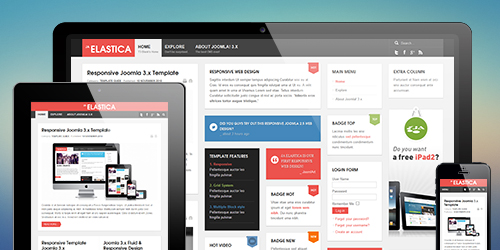
    JA Elastica Theme:

    JA Elastica

    If you plan a Joomla video sharing theme that can help in the process of taking your businesses to mobiles, then FW Video Gallery is the best choice. The perfectly designed responsiveness of the plugin enables most users to track their favorite websites on the handheld devices smartly. This product is available at free of cost as well. The following features may well help you realize the performance of this product.

    • 5 Different responsive layouts
    • Different content grids
    • Additional support mega menu
    • Multiple module class suffixes
    • Bonus extensions, etc.

    Download

    Music Free:

    Music Free

    If you wish to create a video sharing music website offering a unique look and feel for your customers then picking up Music Free for Joomla is the best way out. This is a free Joomla template with some impressive features. Find some of its top-notch features below.

    • Custom typography
    • Responsive design
    • HTML 5
    • Cross-browser product
    • Social API, etc.

    Download

    Rayzz 3.0:

    Rayzz 3.0

    If you wish to raise a Joomla website with music, blogs, content, photos, etc. adding Rayzz 3.0 to your website is the correct option. Cost of this product is estimated to be $97. Some of its powerful features include:

    • Complete social sharing options
    • SEO-friendly URLs
    • Enhanced performance for better outputs
    • Amazing default design
    • Ads for monetization, etc.

    Download

    I certainly know the above list of video sharing themes would have reduced your search time online. If you find them useful and constructive for your business, download them today and start improving your business endeavors efficiently.

    Advantages and Disadvantages of Flash Web Design

    Flash web design in recent years have bestowed powers on the web designers to create a more expressive and interactive websites that can attract people in more numbers.However, many people find using of flash unnecessary as it slows the process of loading pages. Like other technologies, Flash has its own pros and cons. Many Companies provide cool web templates compatible with flash web design. like 1&1 personal web templates.

    82_21431b

    Advantages of using Flash while designing your web are:

    1. Use of Flash makes your website more interactive- Web designers use flash to make your website more interactive. With the use of flash, web designers get the opportunity to use their creativity while designing the websites. The web designers use different flash interactive features which range from feedback forms to exciting games and movies. Visitors always feel like visiting the websites that use the flash technology.
    2. There is no problem of cross browser compatibility- Flash web design technology removes the problems related to the compatibility with other websites. You will not have to wonder on how your HTML codes are interpreted on other internet browsers. Your flashed elements will be seen exactly the same in every browser except on the browsers that have the specification of latest Flash Player version.
    3. Flash animation help communicating in an expressive manner- Flash web design uses plethora of animation features which have of all vectors tools and these animations help you in giving the messages in a more expressive way.

    Disadvantages to use the  Flash web design:

    1. Takes long time to load- Flash takes longer time to load. Internet users have to wait for longer period. This might lead to losing of potential visitors.
    2. Problem related to Search Engine Optimization- It is also expected that some search engines may be unable to read the Flash texts. As the search engines will not be able to read, there is possibility of falling of your website’s ranking and also your website will not enjoy enough traffic, comparatively.