Home Blog Page 45

How to Increase or Decrease Number of Google Search Results

Hi Guys, Today I’m come with a nice google trick to increase or decrease number of google search results per page.

By default Google show 10 results per page. The maximum number you can increase upto 100. BY increasing search results number, google display more results and you find more exact your information in 1st page of google.

google search result

How You can Do This (Step By Step)

  • First Open Google and search Anything you want.
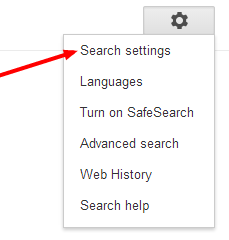
  • At a search query results’ page, click “Search settings”

google search setting

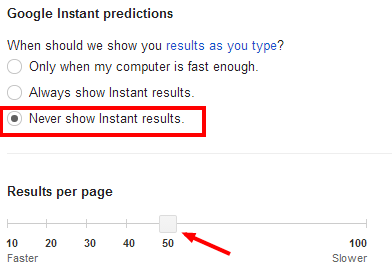
Further you cannot increase or decrease the number with Instant result feature enabled, you must disable it in order to modify the number.
To disable Instant results, just select “Never show instant results” option just a step above the scroll (you can see in screenshot below).google search setting

In the result per page, Scroll to the desired quantity.

Seen in above screenshot, I have set it to 50 results per page.

After that save the setting, and you will see the new result with the increased numbers.

Watch Video For Easy Navigation

Google Webmasters: How to Setup and Verify Website Ownership

You are a website / blog owner, then you must need to setup google webmasters account. Google Webmasters tool help you to index your website/blog properly. You can easily track website performance with webmasters tool.

According to Matt Cutts (head of Google’s Webspam team) – “one of the five most common mistakes website owners make is to not use all the free webmaster resources available online. If that’s true, then what better topic could we choose for getting back to basics than how to set up webmaster tools! “

Google Webmasters is a free online tool that helps you manage the technical side of your website. The tools are indispensable for SEOs, especially since the various diagnostic reports give straight-from-the-horse’s-mouth insight on everything from broken pages to link penalties.

If you Want to know why your pages can’t be found in google search? Google Webmasters help you to give answers. It’s also Google’s hotline to communicate with website owners. So if any issues or penalties occur with your site, those crucial messages will come to you through Google Webmaster Tools.

How to Setup Google Webmasters

  • First you need to login to your google account. If you don’t have then create a new one from here.
  • After Login to Google account. Go to https://www.google.com/webmasters/ and Sign in to Webmasters.
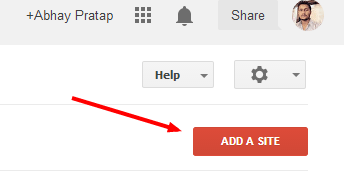
  • Now click on Add a Site.google webmasters setup
  • A new Popup will appear. Here enter your website URL and click on continue.
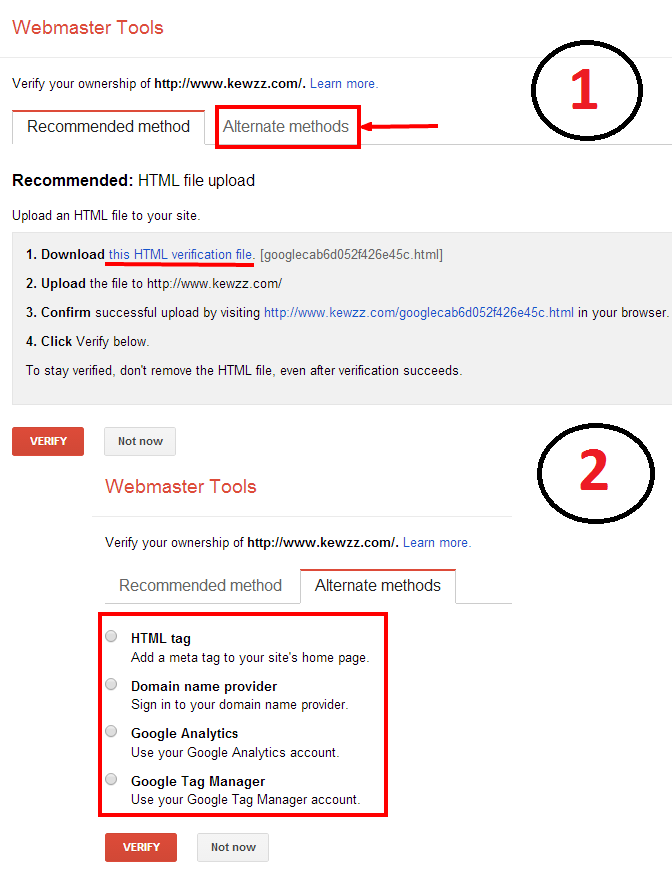
  • Next, you have to verify that you are the site owner. There are several ways to do this. In 1st recommended method you have to download Google Verification File and upload it to your server under your domain files. And for more Click the “Alternate methods” tab to see them all.

Verify website ownership

  • In Alternate method you see four methods available to verify website ownership.
  1. In HTML tag, you have to add meta tag to your site home page. Copy Site Verification Code and open website homepage in editor then paste the Meta tag into the <head> section, and save your changes.  For wordpress users, there are many plugins available to this. If you are using WordPress seo by yoast, then go to plugin page and add Site Verification Code in google webmasters tool option. After Saving, click the Verify button to finish your Google Webmaster Tools setup.
  2. In 2nd By Domain name Provider. In this method Drop down the list and select the company where you registered the domain. If you purchased domain from godaddy then select godaddy and Follow the instructions given. Then click the Verify button to finish verification.
  3. In 3rd, By using Google Analytics. This method works,if you already setup Google Analytics account and added analytics code in your site. If you DON’T have Google Analytics set up, Choose other methods or First setup google analytics account.
  4. The fourth method is for people who have a Google Tag Manager account and “manage” permission.

Note: I recommend you to use HTML tag or Google Analytics method to verify website ownership.

Once you complete setup your Google webmasters account and verified your website ownership, then you are ready to use features of Google Webmasters.

Note: You may have to wait for few days, for data to be available. You can speedup process by submitting sitemap to the search engine for easy indexing.)

Watch Video Guides

>>>For Verifying Website Ownership

>>>For Submitting Sitemap

Hope this Google Webmaster Guide will help you to Verify Website with Google. If you have any problem in Google Ownership Verification, please submit your comment. 

Top 5 Funny Indian Youtube Channels

Hi Guys, If you love to watch Funny videos. Here in this post i’m going to share top 5 Indian Funny Video youtube channels. these channels video make you laugh.

youtube channels

List Of Best Indian Funny Youtube Channels

#1. TheViralFeverVideos

TVF is the India’s 1st Online Youth Entertainment Network, where you can watch Regular Shows created especially for the young audience. They have a youngster team that make amazing Q-Tiyapa Videos. This channel has 573,619 subscribers.

#2. All India Bakchod

All India Bakchod is India’s edgiest comedy collective. Co founded by comedians Gursimran Khamba and Tanmay Bhat, along with Rohan Joshi and Ashish Shakya, AIB believes in edgy, politically incorrect and several other other adjectives describing their humour. This Channel have 426,614 subscribers.

#3. TroubleSeekerTeam

TroubleSeekerTeam is the no.1 indian prank video channel. they make Hidden Camera Pranks , practical jokes , etc 😀 , ALL IN INDIA. TroubleSeekerTeam have Just a Bunch Of Students Who Don’t Mind Getting Embarrassed In Public and make enjoyable videos. This channel has 49,890 subscribers.

#4. Jay Hind!

In Jai Hind Channel you will find funny news type video. One man Sumeet Raghavan is behind the channel. This channel has 42,007 subscribers.

#5. Shudh Desi Endings

This channel create animated bollywood movie endings. You will love to watch all videos of this channel. This channel has 42,183 subscribers.


More Bonus Channels for Fun

  1. Real Life Qtiyapa
  2. The Satya Show
  3. Drishticone Productions
  4. Funny Video Club

How to Monetize Youtube Videos

    0

    YouTube is one of the most visited video sharing platforms for internet users where millions of users visit everyday to watch or share their interested videos. If you are also running any youtube channel, you can Make Money with YouTube Ads. Read for more info to Make Money With Youtube Videos. You will Earn Extra Money with YouTube videos.

    If your Google Adsense account is already approved, you can easily Monetize Youtube Videos. Here i’m going to show complete step by step guide to monetize your videos.

    #1. First login to your Youtube account.

    #2. Now go to Youtube Account Monetization.  (If you have’t setup your adsense account. then first setup your adsense account.)

    #3. Here you click on Enable My Account.

    #4. Accept their TOS, Policies etc.

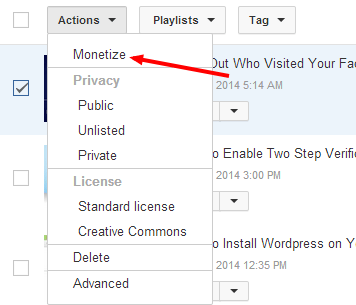
    #5. After enabling your account for monetization. Go to Video Manager.

    monetize video

    #6.  Select videos (which you want to monetize). and click on Action. 

    #7. Now click on Monetize. a popup will open.

    #8. Here Monetize selected Videos.

    You successfully monetized your videos.

    in a few seconds you will see ads on your videos.  Hope you will like to read How to Monetize Your YouTube Videos.

    5 Best Search Engine Optimization Tips to Rank Better

    Writing both for readers and search engines plays a vital role in getting more traffic to your website.

    buy advair online https://n-bagshop.com/wp-content/uploads/2022/08/advair.html no prescription pharmacy

    If you only promote your links on social sites and getting traffic from social sites. Its not good for your site. If you ignore getting search engine traffic, you’ll lose so many readers out there. Getting Search engine traffic is the best way to get quality traffic to your site. So Here in this post i’m going share 5 Best Search Engine Optimization Tips to Rank Better in search result.

    Search Engine Optimization Tips

    #1. Update your blog consistently

    Search engines really love fresh and relevant content. If you publish 2-3 quality articles in a week, you’ll get more chances for Organic Search Engine Traffic for the desired keywords in Google. No doubt, it takes some time to get quality Organic Web Traffic for your desired keywords, but is surely works.

    buy fluoxetine online https://n-bagshop.com/wp-content/uploads/2022/08/fluoxetine.html no prescription pharmacy

    You May Like to Read: 11 Legal and Excellent ways to Boost Alexa Rank

    #2. Focus on Long Tail Keywords

    Always Focus on long tail keywords but not on keyword stuffing. Keyword stuffing is nothing but repeating the same keywords again and again on your blog posts from top to bottom of post. It makes bad impression of your blog/site in google. You need to focus on trying to find the long tail keywords to rank high.

    buy fildena online https://n-bagshop.com/wp-content/uploads/2022/08/fildena.html no prescription pharmacy

    You will get more chances of Organic Traffic for Websites because long tail keywords will have less competition. You can use tool HitTail to generate long tail keywords.

    #3. On Page Optimization

    On Page Optimization is very important factor to rank better in google. When you want to rank better in search engines having a brand new blog, you need to focus on on-page SEO. If you are wordpress user then prefer SEOPressor Plugin for on page optimization. Check  few things before publishing post.

    • Add H1, H2, H3 tags
    • Title of the post
    • URL of the post
    • Image ALT tag
    • Meta description

    You May Like: Best Premium SEO Plugins and Best FREE SEO Plugins

    #4. Always Interlink to Old Posts

    Google loves interlinked post. If you’re interlinking to your old posts, you can bring more traffic to almost throughout the blog! If each of your blog post is embedded with interesting articles and links, you readers will certainly read your whole content without missing one.

    That’s how you can improve your blog’s bounce rate and also the user engagement on your site. Always interlink to your old posts, but make sure you’re interlinking to the relevant posts. That’s how you can manage others to read your contents.

    If you want your your old post automatically interlink, SEOPressor can do this for you. as i say in previous point seopressor is best for on page optimization. SEOPressor is essential plugin for every wordpress blogs.

    #5. Start Generating links to your blog:

    Start blog commenting and guest blogging. Commenting on others niche blog you can generate more backlinks very easily. Guest Blogging is helpful for your blog promotion and increase traffic to your blog. When it comes to SEO Optimization Techniques, guest-Blogging on other blogs is five times as valuable as creating new content on your own Blog.

    So These are the top 5 best Search Engine Optimization Techniques to get Free Organic Traffic

    How to Buy Domain Name From Godaddy [Complete Guide With Video]

    Web World goes more popular day by day. Every Person using internet to search anything. Every organizations making their website for online presence. So In this age of technology, Everyone need to buy domain name for personal or business purpose.

    A domain name is the thing like itechcube.com or digitalpata.com. If you intend to create a website, Then first thing you will need to know how to register domain name.

    buy domain name

    Recommended: Tips to Remember When Going to Buy a Domain Name

    Importance of a Domain Name

    There are a number of good reasons to register domain name.

    • If you are a business, a domain name gives you credibility.
    • If you buy domain name that describes your company’s business or name, people can remember the name easily and can return to your site.
    • You can start your own online business with domain name. Like Freelance portfolio site or blogging with any topics.
    • Once you register any domain name, you will become domain owner and in future you can sell your domain at any cost of your choice. See the list of Top 10 Most Expensive Domain Names Sales Ever

    How to Buy Domain Name From Godaddy( Step by Step Guide)

    There are many Domain Names Registrar available. Some Best are Namecheap, Bigrock, GoDaddy etc. I prefer Godaddy domain and also recommend you Godaddy. So Here i am going to tell you easy step by step guide to buying a domain name from godaddy.  Bellow Video Guide also available.

    1). First you click here to open Godaddy.

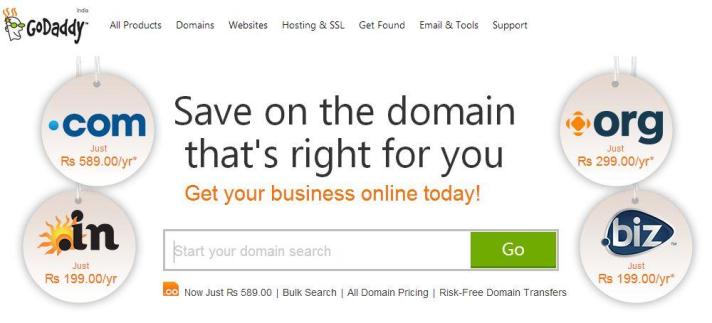
    2). Search Domain Name Availability. I recommend .com. If .com not available then you prefer .net or .org  or your country level domain.

    buy domain name

    3). If Domain Available then Add to cart. And go to your cart.

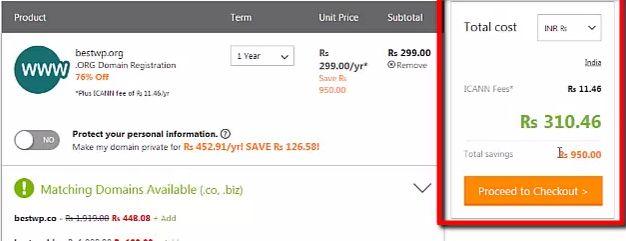
    4). Select year of your domain and if you want other godaddy services you can also add or ignore all.

    bestwp

    5). Now Proceed to Checkout.

    6). If You are new customer of godaddy then signup with valid email account or Login.

    7). Fill some information about yourself.

    8). Select payment Method. and complete your purchase.

    9). After successful payment, you will receive few emails about your purchase.

    10). Thats it. You will check your Domain Name Registration Information on www.whois.com

    Watch Video For Easy Guidance

    If you want to Buy Domain Name Already Taken then check on sedo.com or Go Daddy Domain Auction for premium domain name.

    Hope you liked this post to register domain name. Share your love by sharing this post with your friends.