Home Blog Page 46

12 Tips For Fast Google AdSense Approval

    3

    Google AdSense is a very popular CPC program by google which pays it’s publishers for advertising google ads on their websites. If you are running a blog or website with nice content and traffic then you can earn more money from Google Adsense Account. But it is really very difficult to get Google Adsense Account Approval. Most of the times, Google rejects AdSense applications saying that the your website doesn’t comply with Google policies. So, Here in this post I’m going to tell you some Google Adsense Approval Trick to Apply for Ad Sense.

    Recommended: Top 15 Best Google Adsense Alternatives 2014
    Google adsense approval

    Google Adsense Tips for Fast Approval

    1. Add A Privacy Policy Page In Your Blog

    Privacy Policy is a very important thing for your blog/website. It tells your visitors how your website uses their online data,what they should do and what they should not. It makes your website working transparent and helps visitors to know clearly about your website policies. It may not be a major issue for Adsense Approval but you should give it a try.

    2. Add An About Us Page:

    Adding an About Us page also makes it clear for visitors that who are you and what are you doing on your website. It gives details about your website, tells it’s background and hence builds trust between you and your visitors.

    3. Add A Contact Us Page:

    AdSense may look for your contact details for Google Adsense Account approval because it proves that there is a real person behind the website. Contact page helps the visitors to contact you and do inquiries and send feedback.

    4. Clearly Visible Name and E-Mail:

    Make sure that your full name and email address (or contact details) are clearly visible on contact page or any other suitable place. This makes your presence valid.

    5. Your Age Must Be At Least 18 Years:

    While entering your date of birth in the adsense application, make sure that your age becomes 18 years or more, otherwise your request will be rejected.

    6. Minimum Number of Posts:

    There is no limit of posts for applying for AdSense, but for better results, you must apply for AdSense after 70+ posts. The length of each post must be of 500+ words.

    7. Design And Navigation:

    The design of your site must be professional or easy to navigate. Don’t use lots of javascript effects or lots of images. Make the design simple and clear and use navigation bar to make the navigation easy. Always try to include a search bar in your site so that the visitors can search what they are looking for.

    8. Content Is King:

    The most important thing is the content of your blog. Never copy any other blog’s content and always try to write unique content. If your content is unique and valuable for the visitors, the traffic of your site will increase day by day and this is what google looks for. Never use abusive or pornographic content and don’t publish cracked software’s and copyrighted material. So make your content easy to understand and useful.

    9. Provide Value To Your Readers:

    Never say that you are blogging for money or just for time pass. Try to build a relationship with your readers and provide value to them. Be interactive with them and be humble and honest for your readers. Say that you are trying your best to help your readers and will keep it on.

    10. Use A Top Level Domain:

    Instead of using free domain like abc.blogspot.com, use a top level domain like .com, .net and .org. You can search top level domain by clicking here. These domains are given preference by search engines and will improve search results which will drive more traffic to your site.

    11. Never Use Other Ad Networks With AdSense:

    Before applying for Google AdSense, remove ads from other Ad Networks. Google doesn’t allows any publisher to use any other network’s banner ads with AdSense. Although you can’t use banner ads, but you can use In-Text ads, such as Infolinks with Google AdSense.

    12. Don’t Use Paid Traffic or Paid To Click Sites:

    Google hates paid clicks because these clicks are not valuable for google Advertisers and they don’t get any response. So google cancels those accounts which use paid clicks.


    6 Best Backlink Building Tricks For Bloggers

    Link Building is one of the most important factors that increases the search engine visibility and page rank. There are many Link Building Service and so many Link Building Tools are available which can be used in link building. But purchasing backlinks and using softwares for backlink building is not a legitimate way and the blogs which build backlinks using illegitimate ways are hit by Google Penguin penalty and their SEO score is destroyed. So, I created this post to get quality and Free Backlinks for your blog.

    backlink

    Recommended: How to Get Backlinks from PR 9 Websites Easily (Ultimate guide)

    #1. Submit Blog Into Blog Directories

    Submitting your blog into different blog directories, such as DMOZ, can be a good way to get trusted backlinks and to drive traffic to your blog. While submitting your blog into blog directories, you must choose the category which is more suitable for your blog. This will make your blog more visible and will help your blog to be found by the directory users.

    #2. Commenting On High PR Blogs

    You must comment on other blogs to get backlinks from them. This is the easiest way to build backlinks. You can find high PR blogs by searching on google. Commenting on High PR blog you will get High PR Back Links. If you still feel any difficulties in finding some blogs to comment, then you can use Scrapebox tool.

    Also Read: How to Get Quality Backlinks from PR 9 Websites

    #3. Use Your Blog Links In Your Social Media Profiles

    Social media become more popular. If you have made your profiles in Facebook, Google+, Twitter etc then you must add your blog links in your profile, linking your blog links with your profiles will link your blog links with social media sites also. Not only this, there are some search engines and websites which collect data by searching in the social media profiles of the people so if you have linked your blog links with your social media profile then you will automatically get backlinks from these types of search engines and websites.

    #4. Write Guest Posts On Other Blogs

    You can Build Backlinks Free by writing quality guest posts on other blogs. This may help you in backlink building and can drive some more traffic from the blog where you wrote guest post.

    Also Read: 11 Legal and Excellent ways to Boost Alexa Rank

    #5. Get Backlinks From Government Websites

    Find some .gov or .edu websites and comment there and include your blog link in the comments. These websites are highly valued and trusted so you will get quality backlinks which may increase your page rank. You may use Drop My Link site to find some government sites to comment on.

    #6. Join Forums And Comment In Them With Your Links

    Forums are also a great way for Website Link Building and traffic. Search for the topics in the forums which are related with niche of your blog and answer the questions of the members. In each answer, add a link from your blog which may be useful for the user. This will bring massive traffic to your blog and you will get backlinks from that forum.

    We Hope these common and easy ways to build backlinks for your blog.

    Top 10 Must Have Google Chrome Extension For Bloggers

    0

    Chrome Browser is very popular browser and my favorite . I am using Google chrome from 2009. But sometime like to use Mozila firefox. Mostly many bloggers use google chrome browser and in this post i am going to share some top must have Google Chrome Extensions for Best Bloggers.

    Recommended: Top 15 Must Have Android Apps for Bloggers

    chrome extension

    List of 10 Google Chrome Extension For Bloggers

    #1. Alexa Traffic Rank

    This tool is Provided by alexa. its provide you alexa rank and stats easily, there is no need to go alexa website. by using this tool, it will also help to improve your alexa rank. This extension also show alexa rank in every google search result.

    #2. SEOquake

    SEOquake is a SEO extension for Google Chrome, it shows PageRank, Alexa rank, Google Index, Yahoo links, Google links,Bing index, Webarchive age, Delicious index, Whois link,SEMRush rank, Nofollow links, Keyword density, Site diagnosis Etc.

    #3. Zemanta

    By Using Zemanta, you can enhance your blogging experience, it recommends Images, links, articles and tags, its also provides your contents and links, you can add related contents on your article by using zemanta.

    #4. AddThis

    AddThis is a good sharing extension of Google Chrome. This extension allows you to share, bookmark and print the pages instantly. Sharing is fast and easy to do whenever they like without slowing down the Chrome.

    #5. LastPass

    Lastpass is best password manager chrome extension. LastPass is my favorite Chrome extension. LastPass saves your passwords and gives you secure access from every computer and mobile device.

    #6. Awesome Screenshot

    Take awesome screenshot by this tool, you will love this tool to take screenshot of any webpage. you can Capture, Annotate, Edit, Save and Share webpages.

    #7. Edit This Cookie

    This is a cookie manager extension for google chrome. With this extension you can edit, delete, add new, protect, block cookies.

    #8. bitly

    Everyone knows about bitly link shortener. With This extension you can make short link of any webpage with single click. you can also customize your shortlinks from within the extension.

    #9. Pocket

    Read your stuffs later by using this tool, set up your account on pocket and save your online stuff which you want to read later and access your stuff from anywhere from phone,tablet or laptop. you can access those stuffs even you are offline.

    #10. ScribeFire

    This is a simple and popular Google Chrome interface which let the bloggers to post and to manage the blog posts. you can edit, update, and schedule the blog posts along with an option of uploading the images.

    Hope you like our Google Chrome Extensions list for bloggers.

    Do not forget to Share with your friends$$$

    Top 5 Best Free Audio Editors For Windows

    0

    As a multimedia creator, we normally use audio editor for recording audio, edit the duration and timeline, mix multiple sound tracks, apply simple effects for audio enhancement and create conversion between different audio file formats. Here in This post I am going to share Top 5 Free Audio Editor and Recorder Tools for windows. Some of them allowing users to only cut, merge or change formats.

    And some others are richer in their feature set and offer the ability to cut, wince, record, add effects and encode onto higher bandwidths. Many of the audio editors available today are actually free even though they offer high end features. Bigger editors usually depend on separate plug-ins to operate specific features which in turn ensures longevity and diversified usage.

    Best Free Audio Editors

    #1. Audacity

    audacity

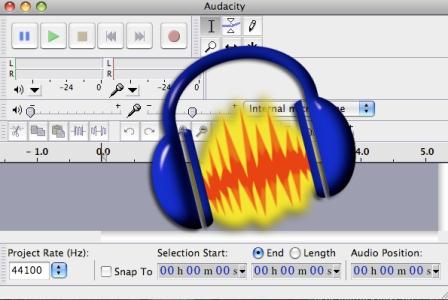
    Audacity As a cross-platform open source Free Audio Editor and Recorder, Audacity is designed to play sounds, import or export various formats. With Audacity you can Simply edit, copy, cut and paste them using unlimited undo functionality. You can even apply effects, mix tracks to recordings. It features a customizable spectrogram, amplitude envelope editor and to enable audio analysis it uses a frequency analyzer.

    Download Audacity

    #2. Wavosaur

    Wavosaur

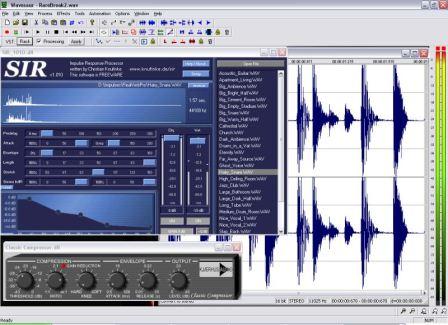
    This audio editor is excellent in recording directly from sound card inputs, processing and editing files, Wavosaur perform various audio functions quickly. It can import many different formats including raw binary files. Some basic options include trimming, cropping, mixing, pasting, copying and cutting.

    Other features include 2D and 3D frequency spectrum, sonogram, synthesis generators, statistics, markers and loop points support. This particular audio editor comes with batch processor, VST effects and a MIDI control surface. Wavosaur is VST and ASIO compatible.

    Download Wavosaur

    #3. Mp3DirectCut

    mp3DirectCut

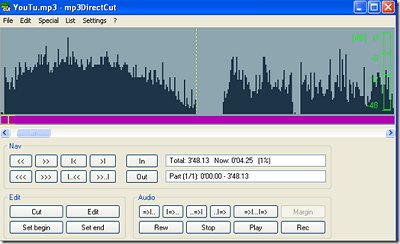
    mp3DirectCut is a fast and extensive audio editor and recorder for compressed mp3. You can directly cut, copy, paste or change the volume with no need to decompress your files for audio editing. Using Cue sheets, pause detection or Auto cue you can easily divide long files.

    Download Mp3DirectCut

    #4. Music Editor Free

    Music Editor Free

    Music Editor Free (MEF) is Free Music Editing Software and helps you to record and edit music and sounds. It lets you make and edit music, voice and other audio recordings.

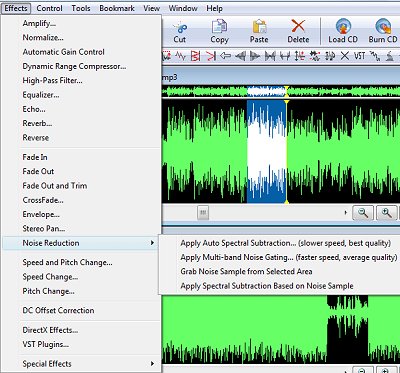
    When editing audio files you can cut, copy and paste parts of recordings and, if required, add effects like echo, amplification and noise reduction.

    Download Music Editor Free

    #5. WavePad Sound Editor

    wavepad

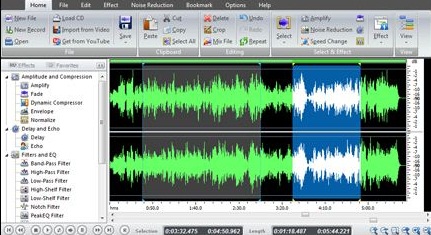
    WavePad Audio Editor lets you make and edit music, voice and other audio recordings. When editing audio files you can cut, copy and paste parts of recordings and, if required, add effects like echo, amplification and noise reduction. WavePad works as a wav editor or mp3 editor but it also supports a number of other file formats including vox, gsm, real audio, au, aif, flac, ogg and more.

    Download WavePad

    Hope these Digital Audio Editor Softwares will help you.

    How to Increase Pendrive Data Transfer Rate

    Many of you have Experienced That the Speed of Your Pendrive has Slow Down After Few months Of Usage. So Today I will Show You some Amazing Trick to Speedup Pendrive Data Transfer Rate.

    Factors on which pendrive transfer rate depends

    1. Age of your Pendrive : When You buy a New Pendrive it works Faster but as it gets older, The Data Transfer Rate Starts Decreasing.

    2. Types of Files : Data Transfer Rate Depends on Types of Files ,If You are Transferring. Songs, Docs, Videos May get Transferred very Quickly.

    3.Location of Files : Pendrive Data Transfer Rate also depends on Locations of Files. If you want to transfer a bunch of files to Same Drive But another Folder then it will get Transferred very Fast. But if You want to Transfer Files from one Drive to another then it will Take some Time Comparatively. Likewise in Pendrive.

    4. USB Port Version : USB Port Version 2.0 is Most popular and the computers which are manufactured after year 2000 Have 2.0  Usb port Version. This version of USB port give you the Speed of 35 mbps.Usb 3.0 Gives You Much Higher & Faster Speed Then Usb 2.0

    Speedup Pendrive (Step by Step Guide)

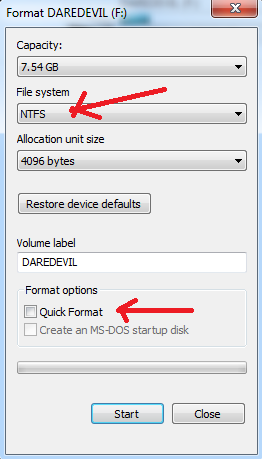
    #1: First Connect your Pendrive into computer, Right click on your pendrive and select Format (You will Loose All your data in your pendrive so better Take a backup) Then,Select NTFS File system, Uncheck Quick Format And Click On Start.
    Pendrive Data Transfer
    Note: We Are Changing The File system to NTFS Because FAT 32 Can not Handle Large amount of data.
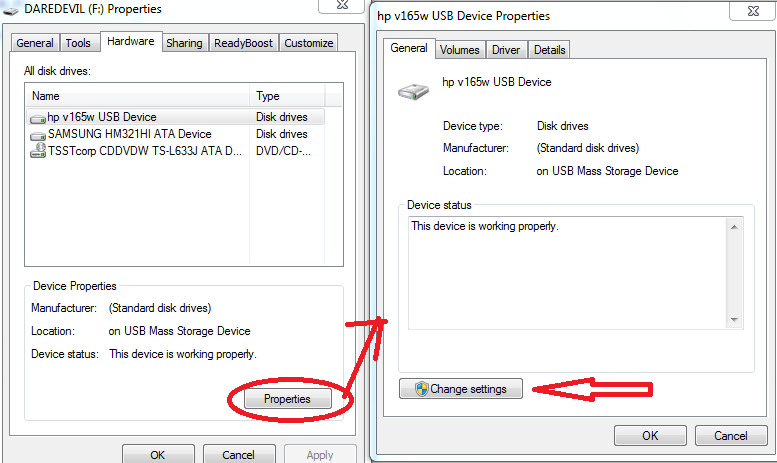
    #2: After Formating Your Pendrive, Now Time to Change the Device Policy. Now Again Goto Your Pendrive Properties , click on  Hardware Tab. Select Your Usb Device from the list and click on Properties .
    Pendrive Data Transfer
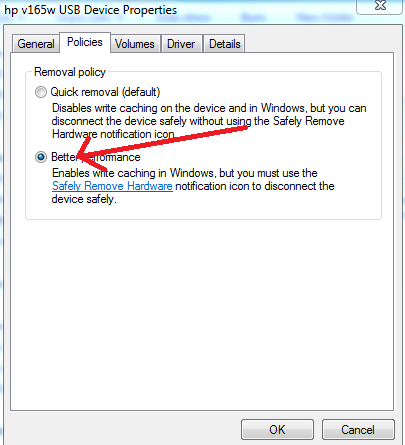
    #3: After Clicking on Properties You will see a new Dialog Box,Click on Change Settings, Another Dialog Box will appear , Click on Policy Tab and Select Better Performance, Click ok .
    increase pendrive speed
    #4: Thats it. I will Recommend to Restart Your Computer.
    Note :  Understand That After Changing the Device Policy , Your Pendrive Data Transfer Speed Will Increase But Make Sure You Click on ” Safely Remove Hardware and Eject Media”  Before Removing Your Pendrive.

    How to Connect Facebook To Twitter [Video]

    Hi Guys, Today I’m going to show you a trick to link your facebook account into twitter account.Linking your Facebook account with your Twitter account Allow Facebook to Update Twitter.

      Only those posts marked for Public appeal on facebook, will be auto-shared with Twitter. Obviously, this is for those posts that need a wider audience that Facebook couldn’t give to many.

    Connect Facebook To Twitter

    Connect Facebook To Twitter (Step By Step)

    If you want to know how to do it in just a few easy steps, follow these instructions. If You don’t want to read watch bellow Video.

    Watch Video

    This easy linking Automatically Post Facebook to Twitter. you can also Connect Twitter to Facebook Page.

    Now Share this post with your friends.