Home Blog Page 15

List of the most popular websites where you can place your classified ads

0

Posting classified ads may seem dated, but don’t discount their effectiveness (if posted at the correct place). Free ad posting sites do not all have the same weight of authority.


When placing an ad, you want to be sure that it will be seen by people who are likely to be interested in what you have to offer. In addition to olx and quickr (nonstop TV advertising), you can post ads online and attract customers to your business.

popular websites where you can place your advertisements

Here is a list of the most popular websites where you can place your advertisements.

Many people will see your ad if you put it on one of these sites, which will lead to a positive response for your business.

1. eBay

This American multinational firm uses the internet to sell products and services from consumer to consumer and from business to business. eBay is one of the world’s largest technology corporations, with operations in over 30 countries. This website serves as an advertising medium for local and global businesses.

9236 719 people like eBay’s Facebook page in the United States. Their Facebook pages in the UK have 1 678 126 likes, and their pages in India have 3 684 823 likes. On Twitter, they have a following of approximately 591 000 people in the United States, 112 000 in the United Kingdom, and 166 000 in India.

2. Craigslist

Today, Craigslist is one of the most prominent international free ad sites. It features sections for employment and housing as well as services and gigs. The user interface of this classified ad site may be considered old-fashioned, yet it is still one of the best.

3. LetGo (OLX)

OLX is a global company that hosts free classified advertisements from various categories, such as automobiles, jobs, homes, pets, and personals. Sellers on OLX have the option of customising their adverts with images and videos, as well as posting their ads on social media. OLX’s global Facebook pages have over 1 million fans, and the company has approximately 60 000 Twitter followers.

4. Backpage

Backpage can be found in many countries. It began in the United States and has since expanded to other countries in North America, Europe, Asia, Australia, and Africa. They have a wide range of ad posts to choose from, with local places, community, buy/sell/trade, automobile, musician, rents, real estate, employment, dating, adult, and services among the many sub-categories.

5. Gumtree

In addition to France, the UK, Australia, and New Zealand, this free ad site is available in several other countries as well. Gumtree is well-known for promoting automobiles, apartments, houses, and services, pets, furniture, and other goods. Gumtree’s Facebook page in the UK and South Africa has over 1.5 million likes, while the company has over 70.000 Twitter followers across many accounts.

6. Classified Ads

Classified ads are available on classifiedads.com for those who are interested. You can post free classified ads on our website. You can use it for advertising anything from cars and real estate to pets and personals. From vehicles to jobs to services to pets and everything in between, there’s a tonne of information to be found in the screenshot above.

7. Oodle

Many listings from sites like eBay, Myspace, ForRent, and others are aggregated on Oodle. In addition, local newspaper and website advertisements are included. They truly power Facebook Marketplace if you have never heard of them before.


Cars, real estate, rentals, jobs, personals, items, tickets, pets, and a wide range of other classifieds can all be found on Oodle.

8. Adpost

ClassifiedAdsFree.com is yet another free classified ad website. These cities are spread around the globe, from the United States to Australia to Malaysia to India to Canada and even Singapore.

9. Hoobly

Hoobly’s site features a wide variety of advertisements. There’s everything from news about upcoming events to articles about art, books, collectables, gadgets, jobs and occupations, hobbies and crafts, gardening, jewellery, musical instruments, and pets and animals. Everything from A to Z is in one place.

10. Salespider

Salespider has teamed up with well-known retailers, including Walmart, Macy’s, and Amazon.com. You will discover a free classified ad section on the site when you first access it, where you may place your ad. The largest free social network where business owners can discover free sales leads and prospect lists, as well as free business directories and forums, is called LinkedIn.

11. Adsglobe

Adsglobe is a free classified ad network with locations in the United States, India, South Africa, and beyond. Categories covered include employment, real estate, rents, autos, services, listed items for sale, travel, events, pets, and more.

12. Yakaz

For example, Craiglist and Kijiji’s classified listings are gathered by Yakaz (A Canadian based free ad site). Items such as real estate, vehicles, jobs, and so on can be sorted by features such as price range, location, and date listed, and the results are presented in an easy-to-search fashion. Yakaz is based in the United States, but it will also conduct searches in nations including the United Kingdom, France, Germany, Mexico, Spain, Argentina, and Chile.

13. Advitty

Advitty is one of the best free classified websites and mobile applications available. Everyone is welcome to post their advertisements on Advitty at no charge. With Advitty, you can submit and browse ads faster than ever before. The list goes on and on. You will be able to purchase and sell nearly everything with us. If you’re a buyer, all you have to do is glance through our categories or use our search bar to find precisely what you’re searching for. With Advitty, you can find the ideal seller in a matter of seconds. Because Advitty only features verified sellers, you won’t have to stress about falling victim to fraud. You can do it quickly, securely, and with minimal effort. Advitty is the place to go when you need to acquire anything, including vehicles, real estate, used musical instruments, and even pets.

Advitty’s ad posting experience is the fastest you’ve had as a seller. You’re free to include anything you want on your list. As a seller, you can publish your ad to Advitty and begin selling your product right away. You’ll have the rest of your mind knowing that your money is safe with us because we only list verified and registered members with complete profiles. The Indian government’s cybercrime regulations keep your money safe.

For the first time in India, we’ve launched the fastest posting ever! You now have 5 seconds to post an ad! When it comes to everything, Advitty has it all.


Buyers and sellers are brought together in a horizontal marketplace that’s both simple to use and secure at the same time.


Top 5 Best Instant Loan Apps in India- Get Personal Loan Quickly

Instant loan apps are like mini banks in your pocket that provide instant access to credit in case of financial emergencies. You can get instant loan approval through instant loan apps by completely following the online application process.

I have analyzed and compiled a list of the 5 best personal loan apps in India, that you can use for personal and emergency expenses like medical, wedding, home renovation, travel, purchase of mobile or bike.

Recommended: Download Free Classified App to post Free Unlimited ads

Top 5 Best Instant Loan App in India 2021

1- India Lends Instant Loan App:

In association with over 50 banks and NBFCs, India Lends offers instant personal loans up to Rs. 50 lakhs for tenure ranging from 1 year to 5 years.

India Lends charges interest rates ranging from 10.75% to 25%, depending on your credit and risk profile. Top 5 Loan App in India | Quick Personal Loan app in India

This loan is for both salaried and self-employed people with a minimum salary of Rs. 15,000 per month. But, IndiaLends seeks at least 6 months of work experience for salaried individuals and 3 years for self-employed individuals.

On the app, you have useful tools like “Spend analyzer”, “EMI calculator” and credit card suggestions. Top 5 Loan App in India | Quick Personal Loan app in India

App Store Details for India Lend Instant Loan App

ParticularsGoogle Play Store Apple Play Store
App Rating4.14.5
No. of App Reviews69,5819.3K
App Size19 M184.4 MB
CompatibilityAndroid 4.4 and aboveiOS 10.3 or above, compatible with iPhone, iPad and iPod touch

Advantages of India Lends Instant Loan App

  • Loan amount up to Rs 50 lakh.
  • Personal Loan for both Salaried and Self Employed
  • 15,000 Rupee is the minimum salary required to apply for the loan

Disadvantages of Instant Loan App

  • 3 Years Work Experience for Self Employed
  • Processing fee up to 6%

2- KreditBee Instant Loan App :

You can get an instant loan from CreditBee in the range of Rs. 1000 to Rs. 2 lakh for a period of 62 days to 15 months.

CreditBee accepts loans in the form of “Flexi Personal Loan”, “Personal Loan for Salaried” and “Online Purchase Loan”.

You will be required to pay interest rates in the range of 0% to 29.95% depending on the type of loan and risk profile. CreditBee gives you access to a higher amount and longer tenure for subsequent loans if you repay your existing loan on time.

App Store Details for KreditBee Instant Loan App

ParticularsGoogle Play Store Apple Play Store
App Rating4.5NA
No. of App Reviews617,596NA
App Size14 MNA
CompatibilityAndroid 4.4 and aboveNA

3- Kreditzy Personal Loan App:

Creditzy Technologies is a Bengaluru-based company with a personal loan app that offers loan amounts in the range of Rs. 1000 to Rs. 1 lakh for a tenure of 91 days to 365 days.

The personal loan can be accessed across India and the amount is disbursed directly into your bank account.

Creditzy charges an interest rate of up to 29.95% per annum and personal loan processing takes around 10 minutes. However, you must be an Indian resident of 21 years and above and the monthly income should be more than Rs. 17,000 to apply for Creditzy personal loan.

App Store Details for Kreditzy Instant Loan App

ParticularsGoogle Play Store Apple Play Store
App Rating4.5NA
No. of App Reviews97,359NA
App Size13 MNA
CompatibilityAndroid 4.4 and aboveNA

4- NIRA Personal Loan App:

You can get a personal loan from NIRA to pay medical expenses, rental deposits, weddings, pay bills and other expenses in a matter of minutes.

You can apply for a loan of as little as Rs. 2,500 and up to Rs. 100,000 and pay off within 12 months. You need to upload your Aadhaar and PAN details along with your selfie while applying for a personal loan.

To be eligible for the loan you need to earn a minimum of Rs 12,000 monthly. NIRA charges an Annual Percentage Rate (APR) of 24% to 36% per annum and the processing fee is Rs. 350 to 2% of the loan amount.

App Store Details for NIRA Instant Loan App

ParticularsGoogle Play Store Apple Play Store
App Rating4.3NA
No. of App Reviews55,204NA
App Size16 MNA
CompatibilityAndroid 4.4 and aboveNA

5- RapidRupee Instant Loan App:

You can get RapidRupee instant loan in 30 minutes. The only basic documents required are Aadhar and PAN card.

RapidRupee offers loans to meet the small but urgent needs of both salaried and self-employed individuals with a minimum income of Rs. 10,000 per month.

The loan amount ranges from Rs. 1,000 to Rs. 60,000 and carries an interest rate of 12% per annum. The repayment period ranges from 3 months to 12 months.

App Store Details for RapidRupee Instant Loan App

ParticularsGoogle Play Store Apple Play Store
App Rating4.3NA
No. of App Reviews257,100NA
App Size13 MNA
CompatibilityAndroid 4.3 and aboveNA

Fixed: No input file specified Error in Codeigniter

Hello guys, Today I’m working on a Codeigniter project for my client, And started getting the problem “No input file specified“. And tried many methods and searched on google also. and checked StackOverflow but it does not get me any solutions as using Shared hosting on client projects.

Sometimes when you move your local/staging Codeigniter project to live/client-server, make some changes in code in the production stage, then you find “White screen of death” in Codeigniter. A message popup showing “No input file specified”.

Then you search on internet sites like StackOverflow and find some code sites to make some changes in php.ini. But if your production server is hosted on a shared server, then this will not work.

So if you are using shared hosting, then we find very easy method to fix No input file specified Error.

no input file specified

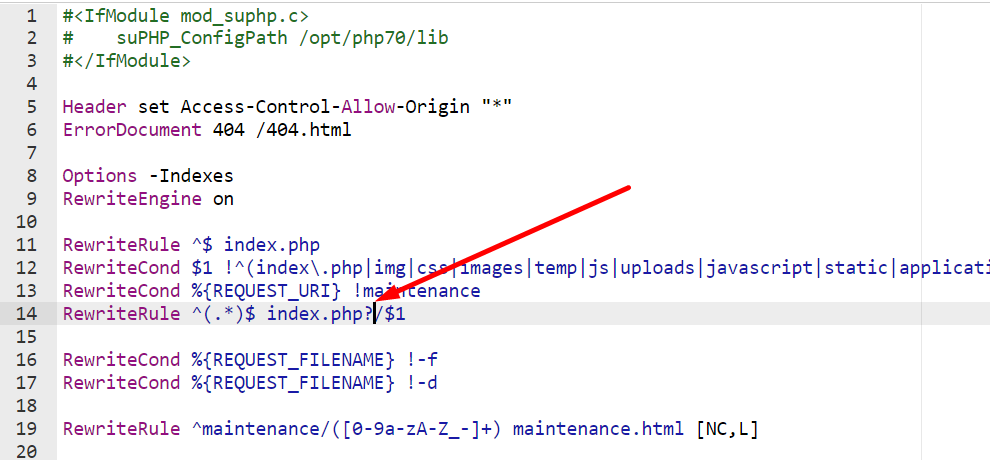
I have also faced this issue and could not found a very informative solution to solve this problem. After some r&d, I found a very nice solution which may work on Godaddy, IIS Cpanel or apache, Nginx. Just change some code in your root htaccess file. Just append a question mark (marked as red) in your htaccess file.

Easy Way to Fix No input file specified

Here i have added very easy method to fix No input file specified Error in Codeigniter.

You Just have to add the ? sign after index.php in the .htaccess file, like in bellow screen.

No input file specified

If this trick worked for you then please add a comment and share your experience..

Top Mozilla Firefox Add-Ons You Should Use

    0

    With 800+ million users worldwide and 250+ million active users per month, Mozilla Firefox is one of the most popular web browsers in the market. Firefox is fast, allowing users to leverage multiple cores in ways that competitors can’t. Firefox also comes with a cleaner, more modern user interface and better privacy protections. And that’s not all. The Firefox browser features a strong add-on community that allows users to customize their web browsing experience. 

    Firefox add-ons and extensions let you change Firefox appearance, customize the user interface, add functionality, add more features to your web pages, and block ads. Here are the top Firefox add-ons everyone should be using. 

    Mozilla Firefox Add-Ons You Should Use

    Dark Reader

    Dark mode is one of the best things to have on your apps. It makes bright colors easy to read, resulting in less eye strain. Nearly all social media apps have a dark mode. While Firefox has several dark options, it doesn’t always work on most websites. Dark Reader is an open source browser extension that creates dark themes for websites on the fly. This extension even allows you to choose which websites to apply a dark theme to and which ones should be left the way they are. 

    Lightshot

    Lightshot is one of the handiest tools on Firefox. This browser extension allows you to take screenshots of web pages displayed on your browser. You can customize the screenshots in whichever way you like using Lightshot. This extension also allows you to search for similar images on the web. You can use Lightshot to highlight anything on the web page and add texts and shapes as much as you like. Once you take a screenshot, you can choose to save it, print it, or share it via social media. 

    uBlock Origin

    Online ads can be both annoying and distracting. uBlock Origin is an all-round content filtering tool that you can use to enhance your web browsing experience. 

    You can use this free, open source browser extension to block all types of annoying online ads, including pop-up ads, banner ads, YouTube video ads, and websites that track your online activity. 

    uBlock Origin is less resource-intensive compared to other ad blockers — it uses less memory with more or less the same features. You can customize filters on uBlock Origin all you like. 

    ExpressVPN

    Privacy can be an elusive thing on the internet. There are trackers, hackers, and other online threat actors watching everything that you do online. The most effective way to protect your privacy on the internet is to download a VPN. ExpressVPN is one of the best Mozilla Firefox extensions when it comes to securing your internet connection. It encrypts your internet traffic, spoofs your location, and lets you access the internet from anywhere. The Firefox add-on for ExpressVPN will link to the more secure HTTPS URLs automatically. 

    Android Users can Try Free Unlimited aaga VPN

    Undo Close Tab

    Have you ever closed a tab on your browser by accident? It’s annoying. It’s even more exasperating when you are racing against deadlines and don’t have time to scour through your browser history looking for that particular page. Fortunately, Undo Close Tab helps you ensure that you never have to go through that. This nifty Firefox add-on allows you to open a recently closed tab with one click. You can choose from a list of 25 recently closed tabs for more convenience. 

    Cookie AutoDelete

    Browser cookies are meant to make websites easier to use, but they also track your online activity and populate your tabs with targeted ads. They are not only creepy, but they also bog down your browser. Cookie AutoDelete is a Firefox add-on that automatically removes cookies from the tabs that you close. This extension can also delete cookies from a specific domain. Cookie AutoDelete ensures that your browser doesn’t remember your information or track your browsing habits, enhancing your privacy on Firefox.

    Image Search Options

    Google’s reverse image search is one of the most useful hacks on the internet. It allows you to search for different versions of any image you stumble upon on the internet. You can further simplify the reverse image search feature by installing the Image Search Options extension on your Firefox browser. This tool makes effortless reverse image searches possible and, in addition to Google, comes with various search engines. Simply right-click on any image you come across to pull up a context menu with 11 image search engines. 

    Grammarly

    Grammarly flags typos and helps you make your documents, messages, and social media posts clear and impactful. It makes your communication better. If you make many mistakes as you type, adding Grammarly to your browser will make your life significantly easier. The good news is that Grammarly is available as a free Firefox add-on, but a paid version is also available. In addition to spelling mistakes, Grammarly highlights grammatical errors and even offers suggestions to improve your writing. 

    Multi-Account Containers

    We do almost everything online these days, including working, shopping, socializing, banking, etc. If you are only using a single browser, it’s easy to get different aspects of your online life mixed up. Multi-Account Containers is a Firefox add-on that allows you to keep different parts of your online life separate. This extension lets you carve out a separate, color-coded tab for each of your online lives. Each tab stores cookies separately, so you don’t have to worry about online trackers. 

    Bitwarden

    Bitwarden is a completely free and open-source password manager tool. This application makes it easy to generate and store unique passwords for any browser or device and is available as a Firefox add-on. Bitwarden protects your passwords with advanced end-to-end encryption, ensuring that everything is private and secure. Bitwarden is compatible across platforms and is packed with premium features. You can store an unlimited number of login credentials in Bitwarden’s encrypted vault.

    Firefox is one of the most popular web browsers out there. These are some of the best Mozilla Firefox browser extensions and add-ons you can use to enhance your web surfing experience. These tools will help you better control your browser’s functionality and behavior, add more features, block ads, change the appearance of your browser, and increase privacy and security for a smooth, secure, and ad-free browsing experience.

    Easy Ways to Fix & Increase Maximum Execution Time in WordPress

    Today, I’m working on new site and installed new theme, and that theme required Maximum execution time 180. But by default WordPress, Maximum execution time is 30. This means that it is taking longer for a process to complete. And WordPress Shows warning maximum execution time of 30 seconds exceeded. So we have to fix the Maximum Execution Time in WordPress site.

    For solving Maximum Execution Time error in WordPress site, You have to edit files to change, and everything works fine. Here I have listed 3 easy methods to fix this.

    Fix Maximum Execution Time Error in WordPress

    Method 1: Edit wp-config.php:

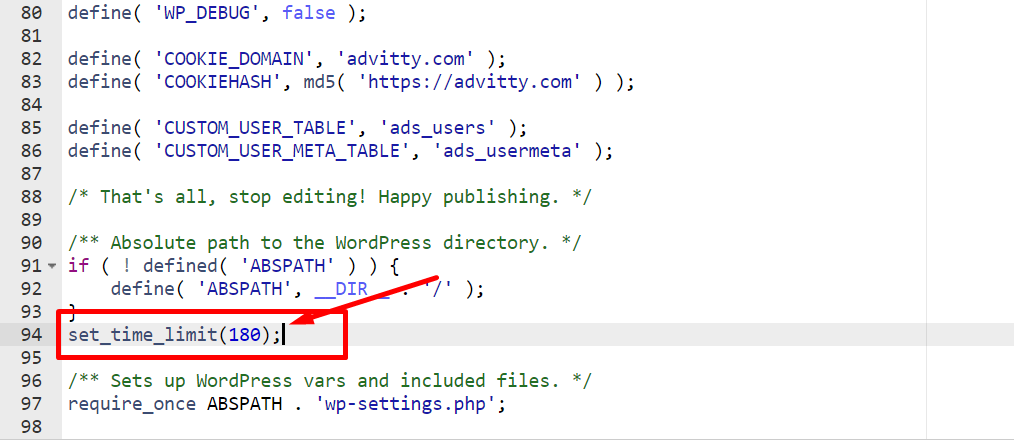
    Add the following to wp-config.php:

    set_time_limit(180);

    Maximum Execution Time

    Method 2: Edit .htaccess:

    Make sure you back up .htaccess before you edit it. 

    Add the following to .htaccess:

    php_value max_execution_time 180

    Method 3: Edit php.ini

    Add the following to php.ini:

    max_execution_time = 180

    5 Things you’ll need to start your YouTube Channel from Scratch

    As our digital landscape is evolving day by day, the need for long and short-form video content is rising exponentially. Also, with people staying in their homes due to the lockdown followed by the Covid-19 pandemic, they have more time on their hands to spend on things other than work. And where are people spending this time?

    They are spending this time on reading blogs, watching YouTube videos, learning various courses online, browsing social media platforms like Instagram, Snapchat, Tiktok, Reddit etc.

    With the continued rise in the consumption of video blogging content, it’s completely understandable that you would have at least once thought of starting your own YouTube channel. After all, it is an intriguing idea. It’s fun, engaging, and even more than that it is a potential gold mine with YouTube’s 2 Billion monthly active user base to tap into.

    If you have put off your dreams of starting your own YouTube Channel for quite a long time now because you’re overwhelmed with the choices you need to make or are panicking because you feel you lack the right skills to succeed, then I am here to ask you not to do that anymore and Start YouTube Channel Now.

    Here are top  things/tips you will need to start your YouTube channel from scratch:

    1. Start right now!

    Start right now Quote

    Trust me there is no better time than to start right now. Rather than procrastinating as to what you need to do, how you need to go about it, and all the other things, you just need to sit down, take a pen and paper and start curating the content you need to or want to put forward. My advice to you is, ready or not, start now. And I’m not telling you this as a New Year’s resolution. Every moment you hesitate or procrastinate, there are thousands of video creators starting their YouTube channel today, and gobbling up all your potential audience. You don’t want that.

    2. Start understanding how YouTube really works, and even acquire some basic skills

    No matter what other people say, if you are serious about continuing with the path in the long run, then my advice to you would be to take this a little seriously and sit down to understand how the platform that you’re about to work on really works. Ironically enough a good place to start learning would be YouTube itself. There are some really good content creators out there who put up good content for you to learn from.

    If you’re worried too much about the video quality of your first video, then let me put this to rest chances are your first video is absolutely going to suck. But you need to go through the process of rigorous practice of making and curating content so that you get into a flow.

    Some various platforms to learn the very basic skills about YouTube and video content are Udemy, Coursera, VidIQ, etc. 

    Recommended Courses For Youtube Mastering on Udemy

    YouTube Masterclass – Your Complete Guide to YouTube

    How To Start a Youtube Channel: Teach Your Passion

    The Complete YouTube Course by YouTubers with 100mn+ Views

    3. Basic Equipments

    Before you start to think that I am going to advise you to get all those fancy and really expensive equipment you’ve so often heard about, don’t worry I am not going to do that. In Fact I am going to advise you on very basic equipment that is going to catapult your YouTube content to a very far extent.

     So,

    Equipment 1: A very basic tripod stand. Trust me if you invest just a little amount of a thousand bucks, it’s going to pay you back in the long run. Tripods now come even as cheap as 300-400 rupees. But it would be better if you buy a good quality tripod right in the beginning, otherwise, you will end up buying a tripod maybe every 6 months or a year, depending on your usage.

    Equipment 2: The second equipment is of course a device to record your videos. But again I am not going to advise you of something which is beyond justifiable. For the beginning, your simple smartphone with a decent quality camera would suffice. Trust me if you’re thinking that you absolutely need to buy a DSLR to record your content then that is not at all true. Let me bust this myth right here and once and for all.

    Equipment 3: The third and last piece of equipment, for now, would be a Mic. But again this is contingent on the fact that you need to record Podcasts or videos which are absolutely the best audio experience for your audience, maybe like a live streaming video or something on similar lines. Other than that you don’t really need a Microphone, because if you’re just a little bit good in your audio mixing and video editing skills then the editing software is going to take care of it.

    And that brings us to your fourth tip…

    4. Basic Editing Software and related skills:

    For you to get started in creating content on a daily basis and to make sure that you deliver quality to your audience you will have to get yourself equipped with some basic editing software and also acquire the basic skills to learn to use them. The very first editing software that I am  going to recommend specifically for people who are going to make and record content using their smartphones would be some apps like Kinemaster, Picsart, Inshot etc. Are you surprised to read this? Don’t be, there are many Youtubers out there who started out just like this and have now reached a very good position in the industry. There is no shame in being a little scrappy at first. In Fact it will prove that you can deliver quality content with even lesser quality resources.

    For people who can spend a little buck in the beginning for you I am suggesting to buy software like Adobe Premiere Pro, Coral, Filmora, Camtesia etc. These are absolutely great software to master and use to create and edit your videos. You can even create and edit short-form video content like for Instagram Reels,  YouTube shorts etc. through these softwares. These softwares are for people who have achieved a preliminary skill status and want to kick their videos up a notch. But the key point to remember is ‘Practice makes man Perfect’.

    5. Develop a Strategy that you can follow and Stick to it.

    Before you go on worrying about the numbers after creating and putting up your content on your channel,  let me clear the air beforehand. If  you really have a vision for your channel in the long-run, then let me tell you that you will need to be patient but you will also need to be smart about it. That smartness entails creating a very well thought out strategy for yourself and your channel.

    Answer these questions for devising that strategy:

    1. What do you want your Channel to achieve on YouTube, and when you answer this think from the perspective of a potential viewer. What do you feel as a viewer you should get out of, from watching your content.
    2. Who is your Target Audience? Again try to be as specific as possible. The minute you have narrowed down to who you are catering or want to cater, you will realise what type of content works best for them and in what way you can provide value to your audience. The idea behind finding your target audience is that you will create a community for yourself that is just exclusive to you and with that you will keep on building trust the more you go deep into it. 
    3. And even more essentially, why should your audience or even potential audience watch your content? There are already a million fitness enthusiasts out there or a hundred thousand game live streamers, how are you going to offer something new and unique to your viewers? What is your Unique Selling Point(USP)? What are you going to stand out from all the clutter and make a long lasting mark?  Think on these lines and you will have figured it out.

    That’s it for this article my fellow readers. Hope you got inspired to start your own YouTube channel as soon as possible through this and also cleared your mind in the process. Remember taking the first step will always be difficult but once you do, you’d be so happy that you took the plunge.