Home Blog Page 59

How to Type In Indian language Offline and Online

Do you want to write text in your own language ? Your answer would be yes then here is trick for you. With this trick, you can type easily in any Indian Language. You can type languages without having fonts in Windows. You won’t need any knowledge to write or type these languages. A amazing tool is available by google. With This tool you can easily type in your language.
You have to write in ‘English’ and this tool will automatically convert into language which you have selected. This tool is amazing to type in Indian languages and also works in Online and Offline mode.
This Google Input Tool is available in 22 different languages like: Arabic, Amharic, Bengali, Greek, Persian, Gujarati, Hindi, Tamil, Kannada, Hebrew, Malayalam, Nepali, Marathi, Oriya, Russian, Punjabi, Sanskrit, Telugu, Urdu, Serbian, Sinhala and Tigrinya.

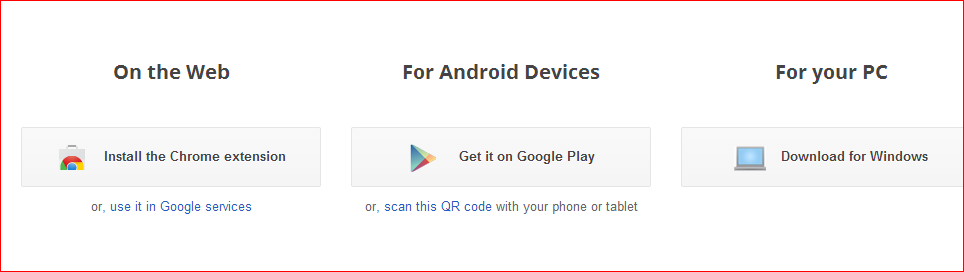
You can type in Notepad and Microsoft Word also. It is available for Google Chrome, Android devices, Google Services and Windows.

Also Read From Windows:

Top 15 Keyboard shortcuts to work faster

Disable the right click on the desktop

Boost Startup Time In Windows 7

Top 5 Websites To Download Free Software

Features:

  1. Online and Offline Support.
  2. Dictionary based word completions for prefix.
  3. Available in 22 different languages.
  4. Dictionary enabled keyboard to type words.
  5. Smart and Easy to use.

How to Get This Tool:

  • Click here to Download
  • Now click on Try it Out.google input afivh7
  • Now Select Your choice. We recommend to select For PC. For PC Software you can also write in notepad and ms word.
  • Now select languages which you want in the tool and “I agree to Google Terms of Service and Privacy Policy” check box.
  • Click on download.
  • Install this tool and restart Windows.
How to Use this Tool:

  •  To type in your own language, just press key Shift + Alt together to type. The tool opens above the Taskbar in right hand side.
  • To switch language in English, just press Ctrl + G to type in English. Again press Ctrl + G to switch back to your language.

Share this information with your friends.

If you have any problem mention in comment box.

How to Get Free Real Traffic on Your Blog or Website

Many newbies are worried about how to get real human visitors to their blog or website for free.

So,here I am going to show the easiest way to generate Free Traffic to your site without any cost. You can get high traffic to your website or blog very easily with TraffUp.

TraffUP is the Free Traffic Generator tool for generating Free Real Traffic on your blog/website from all around the world. TraffUP really Increase Traffic to Blog instantly. Within a few minutes of adding my website, I noticed traffic from all over the world. I highly recommend it for free advertising and generating more Free Real Traffic on your website.

increase traffic

What is traffup?

Traffup.net is traffic exchange system where you earn points for visiting other peoples websites and where you give away points to other people if they visit your website.  In a nutshell: You get visitors to your website as long as you have enough points. You earn these points by visiting other websites. You can also use your points to get twitter followers or retweets instead of website traffic.

Click Here To Crete Free Account

Here’s how it works:

1) Sign Up and Add your websiteSign up, add your website for free and get 100 bonus points. Assign some points to your listing. Visitors earn these points from you when they visit your website.

2) Attract visitors: Traffup users prefer to visit websites that offer more points. Assign more points to receive more visitors and display your listing on top in search results.

3) Collect points: Your website is visible as long as you’ve points in your account. Visit other websites on Traffup to earn free points or buy points pack to keep your website visible.

After that you gain free visitors in your website. If you liked this post then share with your friends.

How to Download Facebook Videos to Your Computer Easily

Someone ask me on facebook how to download videos from facebook. Now we share this article to people who want to download videos from facebook. There are many tricks for downloading videos from facebook but here we tell you very simple one click to download any videos from internet. You can also download any videos from IDM. But IDM licence are very costly. IDM(Internet download manager) is a best download manager for downloading any type of files.

So Now you can download Facebook Videos directly. You don’t worry about these Videos. You can download these videos from Facebook. let’s know how we can download these videos.

This Trick Is Specially For Crome Users. If you are chrome user, then its very easy to download any facebook video in one click. If you need any alternative method to Download facebook videos, Go and click here

Process to Download Facebook Videos

First Download Chrome Extension Awesome Facebook Video Downloader From Here. This extension helps you download any videos from facebook.com. Download buttons will appear under videos on facebook.com.

If above extension did not work then download and install Social Video Downloader chrome extension

How Its Work:

  • First open facebook and find the video that you want to download.
  • And play the video,
  • simply click on chrome extension to enable video downloading.


Top 5 Websites To Download Free Software

0

Over the years, software market got a big boom and many companies have jumped into the market to make our computer work easy with their softwares. Some companies are really creative and awesome. They develops nice software which we must try. But it is not possible to get information about all these new software which are launch daily. TO make ourselves updated with these new software, we must know some best websites that contains information about all software.  One more important thing is that you can not trust all downloading websites. Some malicious websites pretends to be safe but serves malware in the softwares. So we must know how to differentiate between a safe website and a malicious website. To make your work easy, I compiled a list of top software download websites that contains all the available software on the web. All these websites are trusted and have an advanced scanning technology to scan hosted softwares for viruses and other malicious issues.


Cnet Download

Initially, it was download.com that was later acquired by Cnet. Cnet is a popular website for software, news, technology update and reviews. It has a dedicated download section that allow users to download free softwares or purchase premium softwares.  The Software section includes over 10,00,000 freeware, shareware, and try-first downloads. All softwares are rated and reviewed by editors which make our selection easy. Registered users may also write their views about the software.

File Hippo

filehippo.com is one of the top 1000 sites in the world. Here you can download any type of software programs free very easily. and this site always updated with new version.

Brothersoft

Brothersoft is popular website that contains more than 200000 softwares. All softwares are categorised in a manner that allows users to find a software fast. It lists games, software, mobile apps and many other kind of softwares. Like other download websites, It also reviews and rates software that is done by famous editors. You can trust on all the softwares hosted on Brothersoft.

ZDNet Download

ZDNet Download is the part of ZDNet. You can download safe softwares from here. It has almost all popular softwares in categories manner. Everything is managed and easy. So you can easily find what you are looking for.  Although, this download website is not as big as other websites, but it has almost all popular software for desktop.

Softonic.com

softonic.com was launched back in 1997 and is a popular website for software downloading. It contains all softwares including paid, free and trial versions with their reviews written in written in Spanish, German, English, French, Italian, Portuguese, Chinese and Polish. This nice software hosting website contains softwares for all mobile and desktop platforms. Downloads rated and trusted.

These are the best 5 websites for software downloading. If you want to download any software, you can search it in any of these websites. All websites are trusted and awarded. So you do not need to worry about your security.

Top 5 Best Ways to Increase Adsense Earning

    0

    Adsense is one of the most trusted ways for bloggers to earn money using their blog. But extracting money from Adsense is really tough, especially for the people who are using it for the first time. Making your first $100 on Adsense could be really difficult, that’s when you are a rookie. On the other hand we see professional bloggers earning thousands of dollars daily. How come? Well, there are a lot of reasons for the same but the main reasons are their traffic and good Adsense ad placements. If you too want to earn like those professionals then try reading these Top 5 Best Ways to Increase Adsense Revenue.

    If your adsense account not approved Read What to do for Google Adsense account approval

    Increase AdSense Revenue jctnwj

    • Show your Ads at the top of the page

    Enter your AdSense ads at the top of the page, when there are people who visit your site, they can easily see these ads and if there is a match with their interests, they are likely to click ads. Place an ad block on the left top and one at the bottom of the article. In this way you can attract the attention of your visitors to your AdSense ads.

    • Traffic Type

    This is something which too is ignored by the rookie bloggers. The type of traffic is broadly classified into two types – Organic Traffic, people coming to your site through search engines etc are counted under this type. Inorganic traffic is the second type; people coming to your site through inorganic sources like Facebook are counted under this type. Organic traffic is the best, and people who are counted under that type are more likely to hit the Adsense ads. So try increasing the organic traffic count.

    • Adsense Code Placement

    Placement is the most crucial part of increasing Adsense revenue. The best places to place your ads are between the posts, left sidebar, and on the right side of header. If your ads aren’t placed on the correct place then you won’t even earn a single penny, even if your blog is getting huge amount of traffic. There are bloggers getting well over 100 thousand visitors monthly but they earn just around $150 monthly because their Adsense ad placement is poor.

    • Type of Ad

    I suggest you to add image as well as text ads both in your posts but Images perform best and get high CTR, CPC. But I suggest you to add text ads above the posts and image ads on the header and on the sidebar.

    • Do not fill your blog with ads

    The people who go to your blog is to get useful information, not for advertising. So try your first intention is to provide valuable information to your visitors. If visitors are interested in your article, they will spend more time on your page and if your page look clean & tidy, AdSense ads will perform very well, then it is likely to get clicks on your ad will be greater.

    How to Reduce crome RAM Memory Usage

      0

      No doubt Google Chrome is the most popular web browser. It is faster and more secure than any other web browser available in market. I also personally like Google Chrome. Mozilla Firefox is also a nice browser but have some speed issues. I found Google Chrome perfect for me.

      buy oseltamivir online https://drdanengle.com/wp-content/uploads/2022/08/png/oseltamivir.html no prescription pharmacy

      But, Chrome has a one problem that you may also feel. Its RAM hogging. Although, Google Chrome is lightweight browser but whenever I open many tabs on chrome, it consumes too much RAM on the system and makes it unresponsive. If your Chrome browser is unresponsive, then RAM may be a issue.

      buy augmentin online https://drdanengle.com/wp-content/uploads/2022/08/png/augmentin.html no prescription pharmacy

      Also Read: How to download every link from a web page in Chrome
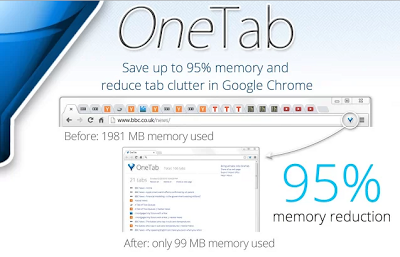
      The more extensions you have installed, more RAM it will consume. But there is one Chrome extension that can solve this issue. This extension is called OneTab. It converts all tabs into list and save RAM. After installation, Onetab adds a funnel icon in omnibar. Clicking on this icon will save all your open tabs into a list and makes it a single tab.

      buy valtrex online https://drdanengle.com/wp-content/uploads/2022/08/png/valtrex.html no prescription pharmacy

      Download OneTabonetab wig0uf

      This is really an awesome extensions for those who always use multiple tabs for web browsing. If you face Chrome issue due to RAM usage, this extension is a perfect choice.