Home Blog Page 47

Create HTML Table With Online HTML Table Generator in Seconds

Hi Guys, Today i will show you a easy way to create html tables. Tables play an important role in web designing.

Creating tables is not a few second task. But here is a solution to create tables in seconds. I am discussing here a online Advanced HTML Table Generator tool that will generate tables in just a second. This online tool is the best way to create css/html tables in no time.

Many wordpress Users use WordPress Table Plugin to create html tables but We recommend to use HTML Table Generator to Create Tables in WordPress.

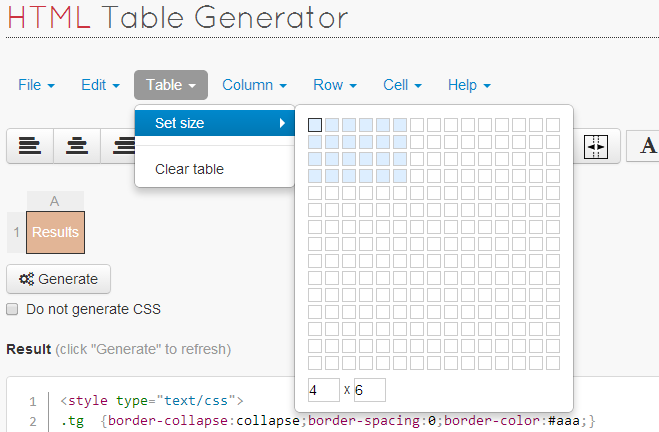
How To Create (Step By Step Guide)

So Lets Start to create your first html table. Read Steps

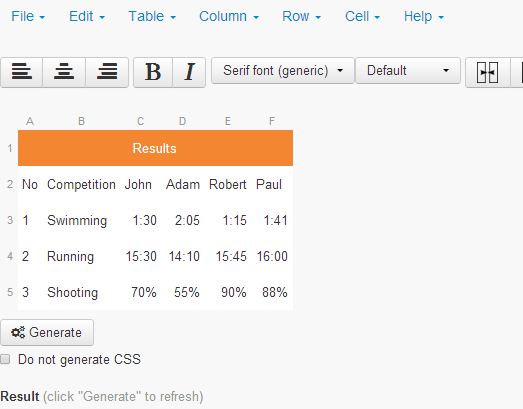
  • Double Click on any Cell and write your value.
  • Press ESC  to stop editing a cell.
  • After Adding Values to all cells Click on Generate Button.
  • You will get table code in the box.
  • Copy Code and paste in your website.
Table Generator

With this easy Online table generator tool you can create html tables and use anywhere html page, wordpress pages, blogger etc.

50 Best Inspirational Quotes for Entrepreneurs

    0

    The definition of success is different for everyone, whether it’s personal or professional we are always looking at improving in some area of our life. We all need some inspiration from time to time and that is why we have compiled a list of 50 Best Inspirational Quotes for Entrepreneurs that will help contribute to your success. These are the Quotes by Famous Entrepreneurs.Quotes for Entrepreneurs

    1. “You have to work hard to get your thinking clean to make it simple. But it’s worth it in the end because once you get there, you can move mountains.”

    Steve Jobs

    2. “If you don’t build your dream, someone else will hire you to help them build theirs.”

    Dhirubhai Ambani

    3. “Your reputation is more important than your paycheck, and your integrity is worth more than your career.”

    Ryan Freitas, About.me co-founder

    4. “Every time we launch a feature, people yell at us.”

    Angelo Sotira, deviantART co-founder

    5. “Money is like gasoline during a road trip. You don’t want to run out of gas on your trip, but you’re not doing a tour of gas stations.”

    Tim O’Reilly, O’Reilly Media founder and CEO

    6. “People who succeed have momentum. The more they succeed, the more they want to succeed, and the more they find a way to succeed. Similarly, when someone is failing, the tendency is to get on a downward spiral that can even become a self-fulfilling prophecy.”

    Tony Robbins

    7. “I have not failed. I’ve just found 10,000 ways that won’t work.”

    Thomas A. Edison

    8. “Great minds discuss ideas; average minds discuss events; small minds discuss people.”

    Eleanor Roosevelt

    9. “If you don’t value your time, neither will others. Stop giving away your time and talents. Value what you know & start charging for it.”

    Kim Garst, Founder and CEO of Boo! Social, a personal branding and social media business consulting firm.

    10. ”A successful man is one who can lay a firm foundation with the bricks others have thrown at him.”

    David Brinkley

    11. “If you can’t feed a team with two pizzas, it’s too large.”

    Jeff Bezos, Amazon founder and CEO

    12. “Here’s to the crazy ones. The misfits. The rebels. The troublemakers. The round pegs in the square holes. The ones who see things differently. They’re not fond of rules. And they have no respect for the status quo. You can quote them, disagree with them, glorify or vilify them. About the only thing you can’t do is ignore them. Because they change things. They push the human race forward. And while some may see them as the crazy ones, we see genius. Because the people who are crazy enough to think they can change the world, are the ones who do.”

    Steve Jobs

    13. “The difference between a successful person and others is not a lack of strength, not a lack of knowledge, but rather a lack of will.”

    Vince Lombardi, 

    14. “Don’t worry about people stealing your design work. Worry about the day they stop.”

    Jeffrey Zeldman, A List Apart Publisher

    15. “The value of an idea lies in the using of it.”

    Thomas Edison

    16. “You don’t need to have a 100-person company to develop that idea”

    Larry Page, Co-Founder of Google

    17. “It’s fine to celebrate success but it is more important to heed the lessons of failure.”

    Bill Gates, Chairman of Microsoft

    18. “Failure is simply the opportunity to begin again, this time more intelligently… A business absolutely devoted to service will have only one worry about profits. They will be embarrassingly large.”

    Henry Ford, Founder of the Ford Motor Company

    19. “Chase the vision, not the money, the money will end up following you.”

    Tony Hsieh, Zappos CEO

    20. “All our dreams can come true, if we have the courage to pursue them.”

    Walter Elias a.k.a. ‘Walt Disney, Co-Founder of Walt Disney Productions

    21. “The most dangerous poison is the feeling of achievement. The antidote is to every evening think what can be done better tomorrow.”

    Ingvar Kamprad, IKEA founder

    22. “Your work is going to fill a large part of your life, and the only way to be truly satisfied is to do what you believe is great work. And the only way to do great work is to love what you do.”

    Steve Jobs, Apple Inc. co-founder

    23. “Always look for the fool in the deal. If you don’t find one, it’s you.”

    Mark Cuban, AXS TV chairman and entrepreneur

    24. “One of the huge mistakes people make is that they try to force an interest on themselves. You don’t choose your passions; your passions choose you.”

    Jeff Bezos, Chairman and CEO of Amazon

    25. “It takes 20 years to build a reputation and five minutes to ruin it. If you think about that, you’ll do things differently.”

    Warren Buffett, Chairman and CEO of Berkshire Hathawa

    26. “Your time is limited, so don’t waste it living someone else’s life. Don’t be trapped by dogma – which is living with the results of other people’s thinking. Don’t let the noise of other’s opinions drown out your own inner voice. And most important, have the courage to follow your heart and intuition. They somehow already know what you truly want to become. Everything else is secondary.”

    Steve Jobs, Co-Founder of Apple

    27. “My biggest motivation? Just to keep challenging myself. I see life almost like one long University education that I never had — everyday I’m learning something new.”

    Richard Branson, Chairman of the Virgin Group

    28. “There’s nothing wrong with staying small. You can do big things with a small team.”

    Jason Fried

    29. “If there’s something you want to build, but the tech isn’t there yet, just find the closest possible way to make it happen.”

    Dennis Crowley, Foursquare co-founder

    30. “Fail often so you can succeed sooner.”

    Tom Kelley

    31. “Nothing works better than just improving your product.”

    Joel Spolsky, Stack Overflow co-founder

    32. “We are currently not planning on conquering the world.”

    Sergey Brin, Google co-founder

    33. “Don’t try to be original, just try to be good.”

    Paul Rand, Graphic Designer

    34. “If you’re interested in the living heart of what you do, focus on building things rather than talking about them.”

    Ryan Freitas, About.me co-founder

    35. “Entrepreneur is someone who has a vision for something and a want to create.”

    David Karp, Tumblr founder and CEO

    36. “Best startups generally come from somebody needing to scratch an itch.”

    Michael Arrington, TechCrunch founder and co-editor

    37. “Don’t play games that you don’t understand, even if you see lots of other people making money from them.”

    Tony Hsieh,  Zappos CEO

    38. “Ideas are easy. Implementation is hard.”

    Guy Kawasaki, Alltop co-founder

    39. “Every day that we spent not improving our products was a wasted day.”

    Joel Spolsky, Stack Overflow co-founder

    40. “Anything that is measured and watched, improves.”

    Bob Parsons, GoDaddy founder

    41. “The secret to successful hiring is this: look for the people who want to change the world.”

    Marc Benioff, Salesforce CEO

    42. “The only thing worse than starting something and failing… is not starting something.”

    Seth Godin, Squidoo founder

    43. Timing, perseverance, and ten years of trying will eventually make you look like an overnight success.”

    Biz Stone, Twitter co-founder

    43. “When I’m old and dying, I plan to look back on my life and say ‘wow, that was an adventure,’ not ‘wow, I sure felt safe.’ “

    Tom Preston-Werner, Github co-founder

    44. “I knew that if I failed I wouldn’t regret that, but I knew the one thing I might regret is not trying.”

    Jeff Bezos, Amazon founder and CEO

    45. “You don’t need to have a 100-person company to develop that idea.”

    Larry Page, Google co-founder

    46. “I doubt I’ll ever go back to corporate work. Once you see the light, there is no turning back.”

    Magnus Jepson, WooThemes co-founder

    47. “A ‘startup’ is a company that is confused about – 1. What its product is. 2. Who its customers are. 3. How to make money.”

    Dave McClure, 500Startups co-founder

    48. “It’s more effective to do something valuable than to hope a logo or name will say it for you.”

    Jason Cohen, Smart Bear Software founder

    49. “All humans are entrepreneurs not because they should start companies but because the will to create is encoded in human DNA.”

    Reid Hoffman, LinkedIn co-founder

    50. “No matter how brilliant your mind or strategy, if you’re playing a solo game, you’ll always lose out to a team.”

    Reid Hoffman, LinkedIn co-founder

    Hope You like the list. These Quotes On Entrepreneurship will help in your success.

    Successful Entrepreneur Quotes, Motivational Entrepreneur Quotes, Inspiring Quotes

    3 Easiest Tricks to Download Facebook Videos

    2

    Hi Guys, Yesterday one of our Facebook Fan messaged us “Hi Admin Can you tell me any way to download facebook pages videos”. So Here I’m going to share super cool and easy tricks to download facebook videos. Few days ago i have also shared a cool tricks to download youtube videos. And many of our readers likes this trick. Many of us use video downloader software but here i am not recommending to use any downloader. In This post I have written 3 easy tricks to download videos from facebook. With These tricks You can also download private facebook videos. download facebook video

    3 Easy Tricks to Download Facebook Videos

    #1st Trick

    Very simple way to download facebook and youtube videos. Read Step by step Guide.

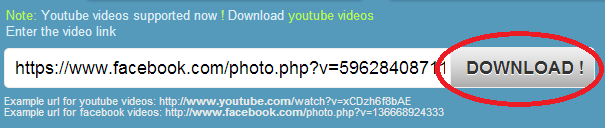
    • First open your facebook video and copy the URL.
    • Then Go to Website https://www.downvids.net/
    • You see a Box there, Now enter your Facebook Video link there.
    • facebook videos
    • Then click the download Button.
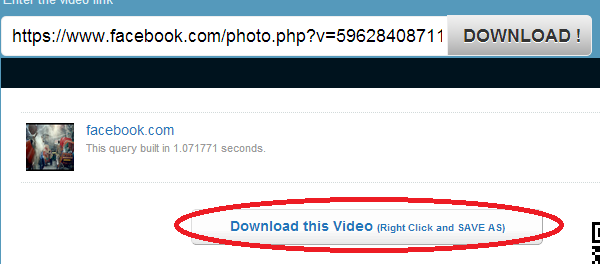
    • After some moments later you see the Facebook video.facebook video download
    • Now Press the Download this Video Button.
    • By Clicking right button you will get many formats to download video.
    • Now save the video and enjoy.

    #2nd Trick

    This is also awesome way to download videos similar to 1st trick.

    • First go to website https://fbdown.net/
    • You will see a box and many of ads. Ignore ads.
    • Copy Video URl and put in box. And click on Download button.download facebook videos1
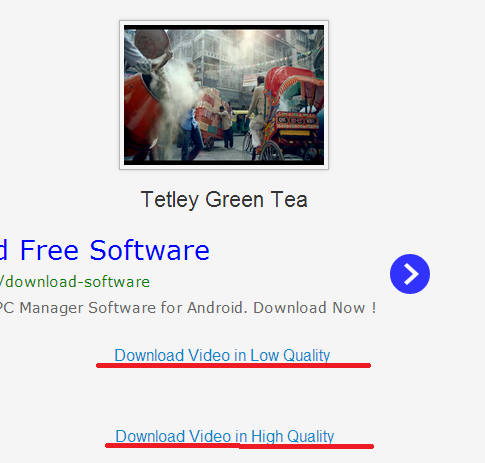
    • After Clicking on Download Button you will redirect t next page. Here you see download links in low or high quality.download facebook videos
    • Download video in low or high quality.

    #3rd Trick

    This trick is specially for crome users. Yes if you are using crome browser. you can download facebook videos in one click. A Cool Crome extension available to download facebook or youtube videos. Follow Steps

    • First install HD Facebook Video Downloader crome extension from Here.
    • After Installation, COpy Video Url then click download and , after right click and ‘save as file’.
    • Download file and enjoy video on your system.

    Hope you like these easy solutions to download facebook videos. Share with your friends.

    Top 15 Must Have Android Apps for Bloggers

    2

    Are you a blogger and want to know which apps are bloggers need. Here we have collected some must have android apps that can help you increase the productivity. There are different tools available on the internet that can help you blogging career but being an Android user, you have to rely on apps. Luckily, there are many apps that are designed for bloggers and blogging platforms.Apps for Bloggers

    Must Have Android Apps for Bloggers

    1 – WordPress

    NO doubt this is the most important application if you are into blogging and using Self Hosted WordPress then you should install the WordPress app in your android phone as well. With the help of this app, you can easily update your blog, reply to comments and remove any post that you want. You can also add new media, make new pages and do much more stuff . This is a MUST have cool android app for WordPress Lovers.

    2 – Blogger

    Blogger is another popular platform that many personal bloggers use. If you have a blog on Blogger, then you should definitely give this app a try. However, the functionality of this app is still very limited as compared to the WordPress app, which is surprising as Google itself is behind this official app of their blogging service.

    You May Like: 5 Unbelievalbe things you can do on Android

    3 – Tumblr

    Tumblr is a micro blogging platform that allows the users to post text, video links, images and quotes to their tumblelog. You can also follow the tumblelogs that you find interesting. The posts of these tumblelogs can be viewed on the dashboard. You can also re-blog the posts so that they can be seen on the user’s tumblelog.

    4 – PayPal

    Running a blog doesn’t mean just writing posts and sharing them with readers. You can also make money with your blog. so you need to become affiliate marketer. So you can sell niche products with your blog. you will need PayPal account because this payment method is accepted all over the world of internet. So Android users will get official PayPal app. With this app you can send / request money. you can manage your PayPal account, Check Balance, Withdraw funds, View transactions etc. Anytime Anywhere.

     5. Google Analytics

    Google Analytics is an amazing tool by Google that is not only free to use but also gives in depth analysis and reports of your blog. With Google Analytics app you can manage your Analytics Dashboard, See real time stats from your blog. Now no need for using your computer to see traffic stats, With this app you can just have a look anytime.

    6. Google AdSense

    If you are Adsense Publisher then this app is must have for your Android. Google AdSense is a great app for viewing AdSense Performance metrics. You can have a look at many AdSense metrics which include CPM, CTR, Page Views, Clicks, Page RPM etc. You can also see How custom channels are performing.

    7. Swiftkey Keyboard

    The default touchscreen keyboard on Android devices is not good enough for writing long blog posts. Swiftkey Keyboard is the Best keyboard and one of the Top downloaded Android app. SwiftKey Keyboard does not just correct the typos you make, it also offers with word predictions and options on the basis of your past typing activities. It is also possible to customize the word predictions by making the keyboard remember your choice of words for Twitter, Facebook, Gmail and for the blog posts.

    8 – Facebook

    Finally, you should also install Facebook in your android phone as well. Being a blogger, I understand how important it can be for you to stay connected with other bloggers through Facebook. With the help of official Facebook app for Android, you can stay connected with your friends and share your thoughts with your readers very easily. If you are traveling and you find something interesting then you can share it with your readers right away with the help of official Facebook Android App.

    9. Facebook Pages Manager

    Facebook Pages Manager is an official best app from Facebook which you can use to manage your Blog’s Facebook Fan page. You can Post new updates, photos, videos etc. You can view notifications, respond to messages and view your page insights. With this app, you can manage multiple pages.

    10. Feedly Reader

    Feedly reader is a great android app for bloggers. With Feedly you can  follow your favorite blogs, news sites, youtube shows, podcasts, tumblr blogs, magazines, ebay listings, hulu shows, recipes, “stocks, easy stores, comics, craiglist updates, 500px channels, flick photos, vimeo shows and more. Feedly is an RSS news reader re-imagined for android phones and tablets. It makes browsing faster and more fun.

    11. Google Drive

    Google Drive allows bloggers to store all kinds of documents including Word documents, Excel spreadsheets, images, audio, videos and many others in the Cloud. Apart from just storing them, the app will sync these documents across multiple devices linked to your Google account.

    12 – LiveJournal

    A blogger is just like a journalist. If you are a blogger/ journalist who loves to travel then LiveJournal is the best app for you. This will act as your own live virtual personal adventure journal. If you have used the desktop version of LiveJournal then it is time to give its android version a try too. I’m sure that you will be impressed with this app. Those bloggers who love to travel and want to share their experience with others should definitely install LiveJournal in their android phone.

    13. Pocket

    As a bloggers, we tend to browse the Internet a lot on smartphones, and sometime we will come across insightful articles and blog posts that we would love to read but cannot due to limited time. Pocket solves this problem by letting us save links that we wish to read later. The app will download a minimalist version of an article, blog post, video or just about everything so that we can come back to them later.

    14. Evernote

    Evernote is a very useful app to capture ideas that come to mind when you are out and about. You can capture an image, write text, do sketches (with Skitch), record an audio clip or create a to-do list with Evernote. All these materials will then synchronized across all your devices so you can be sure that all your notes are easily accessed via your phone, desktop and browser.

    15. WebRank SEO

    WebRank SEO is a must have cool app for all bloggers, With this app you can check your Google Pagerank, Alexa rank, Pages indexed on Google / Yahoo / Bing, Backlinks from google / yahoo / bing, Social shares, tweets, likes etc. All at once.

    These are the top 15 must have android apps for bloggers. I hope you like these apps and gain more with these apps.

    3 Ways a PDF Converter Can be Useful to Web Designers

    0

    Most “Top Tools for Web Designers” list-makers focus on free font websites, color-picker tools, big file sending services, code generators, template galleries, etc. However, a comprehensive list will also include a multi-purpose PDF converter, because such a tool can be of great help both to beginner and professional designers.

    PDF converter software developed by Investintech features three conversion options that are particularly useful to web designers:

    1) PDF to HTML

    When creating websites, designers often pull information from different sources and use it in their work. This often saves them the time they would otherwise spend creating and encoding new graphics.

    A lot of textual, image and video material that circulates on the Internet is in PDF form because of the format’s universal viewing characteristics, so PDFs are commonly used as sources for extracting information and embedding it in a website.

    Able2Extract PDF Converter is known as one of the smoothest PDF to HTML converters that allow users to repurpose their PDFs and generate new web content in three easy steps:

    Open the PDF file.pdf to html

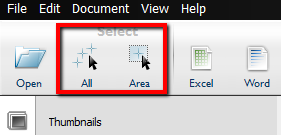
    Select the whole document or only parts you wish to convert.

    pdf converter

    Select the whole document or only parts you wish to convert.pdf converter1

    2) PDF to Images

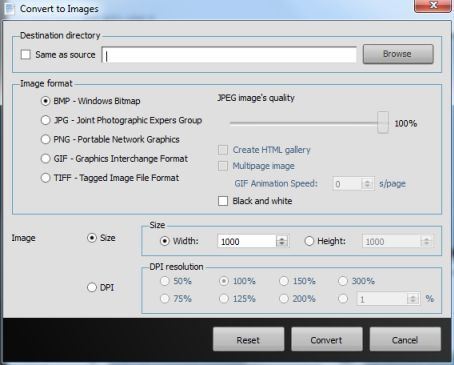
    Another Able2Extract’s feature that web designers can benefit from is PDF to Images conversion option. Users can extract images from PDFs and turn them into any of the five most popular image formats: JPEG, BMP, PNG, TIFF and GIF. This way they can customize their images to suit their needs, create HTML galleries and even create GIF animations.

    The conversion process is the same as in the PDF to HTML conversion, except the users are offered one more step where they can choose additional customization options.PDF to Images

    3) Scanned PDF conversion

    There are two versions of Able2Extract software: Standard and Professional. While the Standard smoothly converts native PDFs into image formats, the Professional version also includes OCR technology and allows users to convert scanned PDF images as well. This is becoming a very popular software feature and one that can particularly interest web designers, photographers and anyone who is working on digitizing their rich print photo history.

    Wondershare Video Converter Ultimate Review: Is Worth or Not

    There are many video converter available in the internet. I am sure you have used some video converters. But Wondershare Video Converter Ultimate is best video converter you will like to use after checking the features of this awesome software.

    Few Days ago, I downloaded Wondershare Video Converter Ultimate for Windows (Mac Version also available) and this one become my favorite because it has much more features. Wondershare now carries the Video Converter Pro, Video Converter Ultimate, DVD Creator and Video Editor in their portfolio. They also do Digital Photography software in the form of the DVD Slideshow Builder Deluxe and Fantashow.

    WonderShare Video Converter Ultimate

    Depth Review

    The Video Converter Ultimate has much more features. The software allows you to convert videos, copy home DVDs, burn DVDs, carry out simple video editing, create videos that are compatible with different devices and share videos online easily.

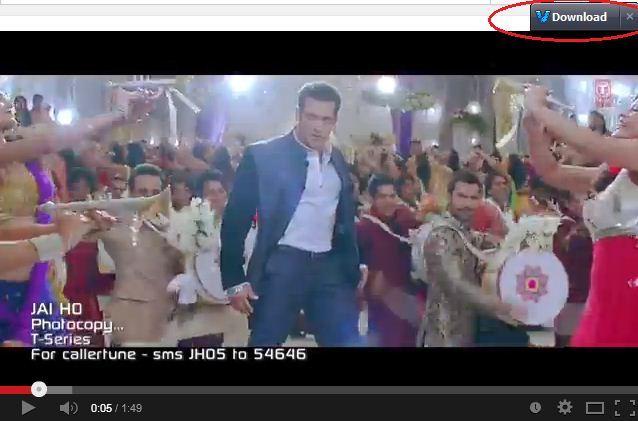
    When starting the software, it checks for updates before continuing to load program. You may also be prompted to install a Chrome browser plugin to add a button to download videos straight from the web. When you play any video then you see a download button above the video.

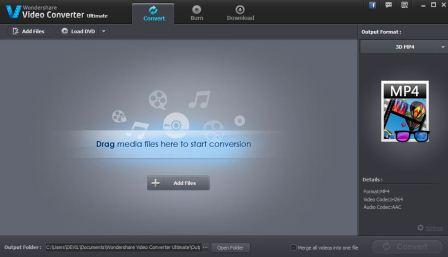
    The black and dark color scheme chosen for the user interface creates a serious tone for the application. There are three main tabs on the top of the application window; the Convert, Burn and Download tabs.

    There is a secondary top menu beneath the main tabs with options to ‘Add Files’ and ‘Load DVD’. These changes to ‘+Add URL’ when in Download tab.

    Features of Wondershare Video Converter Ultimate:

    • Video Conversion:

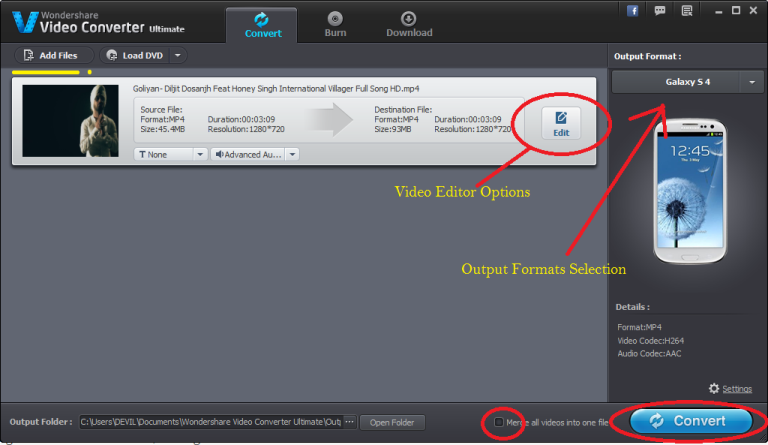
    Video Converter Ultimate can convert multiple videos at once, and preview them all for you while transcoding in small video windows to their left. You need to first ad videos in video converter,  you can also use the ‘Load DVD’ option if you wish to grab videos from your DVD discs. Now set video output. There are many video output formats available, You can select as your choice.

    Wondershare Video Converter

    • Ultimate List of Video Formats

    The Output formats available are grouped into three categories, Favorite, Format and Device. Much More formats available to convert.

    Under Video you will find the following formats: MP4, AVI, WMV, MOV, M4V, MKV, XVID, ASF, DV, MPEG-1, MPEG-2, VOB, WEBM, DIVX, 3GP and 3GP2.

    Under Audio you have: MP3, M4A, AC3, AAC, WMA, WAV, OGG, APE, MKA, AU, AIFF, FLAC, M4B, M4R

    Under HD you get: MP4, AVI, WMV, MOV, MPG, MKV, TS, TRP

    Under Web you can convert for FLV, F4V, SWF, YouTube Video, Facebook Video and Vimeo.

    Finally, under 3D: MP4, WMV, MKV, AVI, YouTube.

    • Video Editor

    Besides conversion you can also use as a editor. video converter also comes with a built in video editor so that you can define its quality. The only problem you will face while using demo version is , its logo on the resultant video.

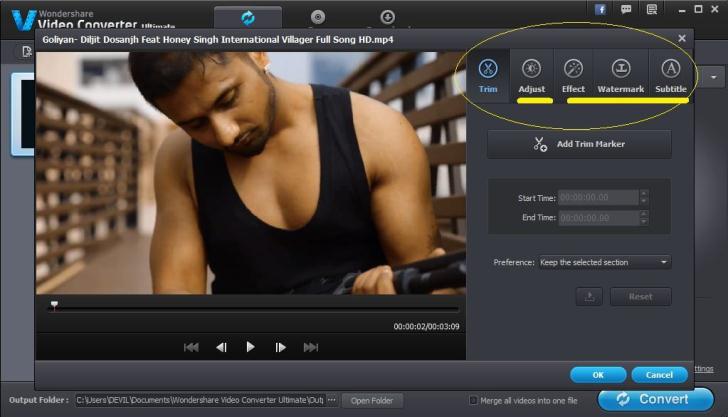
    Once your video or videos are listed in the body of the window, you can click on the Edit button next to each video clip to edit the video. A pop-up window will appear showing the five different edit functions available to you; these are Trim, Crop, Effect, Watermark and Subtitle.

    Add Effects, Watermarks etc. When you have finished editing the video, click the OK button and you will be sent back to the main window.

    Wondershare Video Editor

    • Burn Video

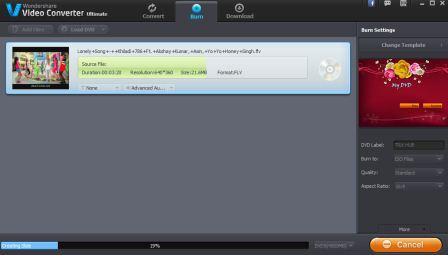
    You can also burn video using data from your hard disk, ISO,IFO images or DVD folder. There’s a decent selection of menu templates, and you can change the text and background image as well as add your own music to the menu.

    burn video

    • Download Videos

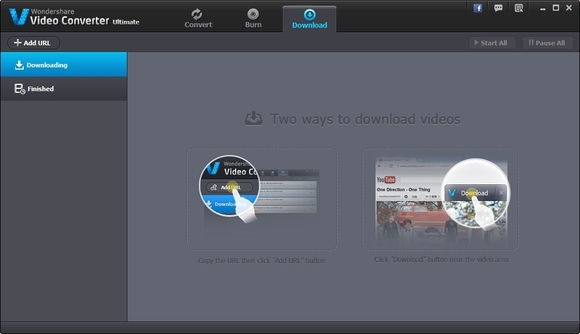
    The third and final tab on the main window is the Download tab. The purpose of this tab is to allow you to download streaming video from the Internet and keep a local copy. wondershare-video-download

    There are two ways to download videos. You can either click on the +Add URL button on the top left and add a URL or install the browser plugin. This will then give you a Download button near the video area on the webpage. Simply click on this and it will send the link to the download page of this application.download video plugin

    Final Verdict

    The Wondershare Video Converter Ultimate is undoubtedly a  fast video converter. Free and Pro Version available, You can use as your choice. I am already using Wondershare Video Converter Ultimate and its work best for me.

    Download Wondershare Video Converter Ultimate