Home Blog Page 35

3 Best Free WordPress Plugins to Enable Front End Post Publishing

0

If you want, your visitors can submit articles, pictures or videos into your site from the front end. If your WordPress site has good traffic and this thing also improve your site. Your users can share their funny pictures to other users of your site. and many things were done. Any users can also submit the guest post.

If you are thinking to add front end post publishing feature in your WordPress site. Then These plugins help you to do this easily. These plugins have strong features so no one can spam you. You can set guest post to publish for pending review. Check out these plugins.

Best Front End Post Publishing WordPress Plugins

#1. User Submitted Posts

User Submitted Posts plugin

This plugin lets visitors to your site (even non logged in visitors) submit text and photos via a public form.

The submitted material goes into your post queue as a Pending post. You can then do anything you like with it – publish it, edit it, delete it, etc.

User Submitted Posts makes it easy to display a public post-submission form virtually anywhere on your site. Use the USP shortcode to display the submission form in any post or page, or use the USP template tag to include the form anywhere in your theme design.

Download Plugin || More Information of this plugin

#2. WP User Frontend

WP User Frontend


The WP User Frontend plugin gives you a number of great options for letting users post on the front end. This plugin gives the user the ability to create new posts, edit their profile all from the site frontend, so the user does not need to enter the backend admin panel to do these things.

You can easily control what they’re allowed to input – i.e. images, titles, body copy, tags, attachments.

This plugin premium version also available.

Download Plugin Free

#3. Frontend Publishing

Frontend Publishing

The Frontend Publishing plugin lets you accept posts from registered visitors. (Visitors must be logged in to submit.)

It comes with a number of helpful controls. For example, you can set minimum and maximum words counts on titles, body content, words in bio, and number of tags. You can also set the maximum number of links in the body content and the in the bio section.

it provides a frontend page where users can access the posts they’ve submitted.

Download Plugin

Top 6 Best Keyword Research Tools to Find Profitable Keywords

Keywords is the main thing to get a high rank. If you are working online and  want to earn real money. You have to take care about keywords and have to add most demanding keywords in your articles. If you have popular and trendy keywords in your posts then it can drive a dramatic traffic to your site particularly on that rich content site.

Keyword research is a practice used by SEOs to find actual search terms and key phrases used by search engine users. Keyword research tools help website owners, webmasters, and SEOs in selecting target keywords and optimizing their websites for search engines. These tools are very important for bloggers and online business. Here I have given some most popular keyword research tools. Some of them are available for free and some are paid.


Best Keyword Research Tools

#1. Long Tail Pro

LongTailPro

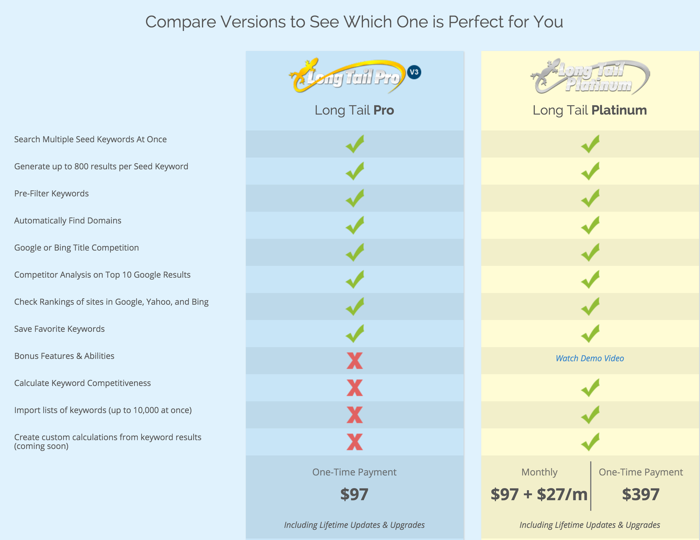
LongTailPro is one of the most popular desktop SEO Tool for Keyword Research. This tool runs on both Windows and Mac. Finding right keywords that generate good organic traffic are the most difficult task. With LongTailPro, you can easily search good keywords, niche research, Competitive keywords. This tool offers 2 plans pro and platinum. Pro cost you $97 (Get $30 Off by clicking on special link or get 10 days Free trial) and platinum cost you $397 one time payment. With any plan, you will receive unlimited updates & upgrades. You can also read review of LongTailPro by Harsh Agrawal.

#2. SEOBook Free Keyword Tool

seobook

SEOBook provides free keyword research tool access after signing up its free registration. You can use this tool and explore the list of keywords free of cost after registration. It suggests daily search volumes by market for Google, Yahoo and Bing. It also provides links to price estimate tools from Google AdWords.

#3. SEMRush Competitors Research Tool

SEMRush tool

This tool is another good tool which allows you to research keywords without signing up or paying any money. This tools also provide information of websites which ranks on top for your search queries. Apart from top websites it also provides CPC distribution, trends, and related keywords report. This tool available for free for trial. If You want to try SEMrush for free. Click on This Special Link.

#4. Traffic Travis

Traffic Travis seo tool

Traffic Travis is a free keyword research tool, You can download this tool free of cost on your PC. Its paid version also available and cost you around 90 USD. But the free version is also good for keyword analysis and research. You can check free and pro version comparison Here.

#5. Google Adwords Keyword Tool

google keywords

This is a good tool by google to research keywords. This tool available free of cost. Go to link and search for new keyword and enter keyword. You will get high performing keywords. You can use Google keyword tool for unlimited keyword searching free of cost.

#6. RavenTools

RavenTools

Raven Tools is a good one keyword research tool on the internet. Aside from the details that you get from the keyword research, you are able to track and store all of the data to keep yourself as organized as possible. Aside from the details that you get from the keyword research, you are able to track and store all of the data to keep yourself as organized as possible.

13 Best Free WordPress Video Themes to Create Video Site

0

Are you want to start a video site with wordpress and searching a free wordpress theme that suite your video site. So Here, We have a collection of top best Free wordpress video themes. But I recommend, If you want your site looks professional then prefer to use premium theme. You can Browse Top Best Video WordPress Themes collection Here.

#1. Novavideo Litescreenshot

Novavideo Lite is a video WordPress theme designed for video/tube site or video blog/portal.

Live Demo || Download

#2. Video Stream

videostream banner

Live Demo || Download


#3. Free WP Tube

v5 responsive

You can turn any wordpress site into video site with this free theme. This theme have lite version available for free and also have paid version with some extra features.

Live Demo || Download


Recommended: 35 Best Responsive Video WordPress Themes

#4. Word Tube WordPress Theme

Download

#5. Wptube 2 Theme

Live Demo || Download

#6. Sundance WordPress Theme

screenshot

A free video theme brought to you by the folks at Automattic. Despite its minimalist design, Sundance was crafted with clean, elegant typography and close attention to detail. The home page offers a featured video carousel. It supports the video post format, widgets, custom background, custom header, custom menus, and a custom link feature for your social media pages.


Live Demo || Download


#7. Cinematic WordPress Theme

Its another free wordpress theme for video site with content slider and mygallery built in, banner positions, page navigation, threaded comments and much more.

Live Demo || Download

#8. Allmed

allmed

Allmed is a theme for video and audio bloggers, with a minimal design, giving you huge scope to turn the design into anything you like. The theme is simply customizable, you can choose unlimited color schemes.


Live Demo || Download

#9. Webvideo

webvideo1

Webvideo is a Video WordPress Theme designed for video site, video blog video Portal. Webvideo is a Fullsize Image and Video WordPress-theme for photographer or designers with a need for showcasing work online.


Live Demo || Download

#10. Socially Awkward

socially awkward

Live Demo || Download

#11. Focus

screenshot

Focus is a great theme for showing off your videos. It supports videos hosted on other sites like YouTube and Vimeo through oEmbed. You can even self host your videos – Focus has a gorgeous custom video player for MP4s. Focus can be used as a standard video blog or even an educational video site.


Live Demo || Download

#12. Nouveau Riche

screenshot

Nouveau Riche is a simple WordPress blogging theme built for the creative minds.It supoorts custom header, post formats (video,audio,gallery,aside and standard), You can also change theme colors using the customizer.


Live Demo || Download

#13. NewGamer

screenshot

A Gaming focused WordPress theme, styled in dark and neat colors. Perfect for Video Game and Entertainment websites. Features:- Large featured images, Custom logo, Custom background, Footer widgets, and Neat typography. NewGamer uses NewTek theme as a base.

Live Demo || Download


6 Best WordPress Auto Blogging Plugins For Content Curation

It is extremely important for every blogger to have fresh content as the visitors will expect something new every time they visit your site.
It is not easy to create fresh content regularly for every blogger because it needs time, research and lot of effort. Also, many bloggers maintain more than one blog to increase their earning, so it’s practically not possible to create new content on a daily basis.
For this, WordPress auto blogging plugins can help you to get new content for your site on complete autopilot, These WordPress plugins create an auto blogging site easily and help you receive fresh content regularly for your site.

Best WordPress Auto Blogging Plugins

#1. WP RSS Aggregator

WP RSS Aggregator is the most popular, effective, easy to use and comprehensive RSS feed aggregator plugin for WordPress. If you want to create a site like Alltop, this plugin can help you to achieve that.

WP RSS Aggregator can display posts from multiple feed sources which will help you to keep your site fresh with new content all the time.
This plugin offers you number of customization option to arrange the feeds according to your need. You can set the feed import time interval, you can choose if you want to display the feed source and date or not, you can set the links to open in a new window to reduce bounce rate and lot more.

Download Plugin

#2.Wordpress Automatic Plugin [Paid]

WordPress automatic plugin posts quality targeted articles, Amazon Products, Clickbank Products, Youtube Videos, Vimeo videos , Feeds posts, eBay auctions, Flicker images, Instagram Images, Pinterest pins, Twitter tweets, Facebook posts and SoundCloud songs on auto-pilot. just install and leave, it will work 24/7 to blog for you.

Download Plugin

#3. FeedWordPress

FeedWordPress is another very effective and user-friendly RSS aggregator plugin for WordPress which will help you to create a top quality auto blogging site with ease.

FeedWordPress is one of the most widely used RSS aggregator plugin that has proven it’s usefulness over a long period of time. The content it syndicates appears as a series of special posts in your WordPress posts database.

The best thing of this plugin, All the incoming categories turned into tags and if there is a new one the system will create a new tag.

Download Plugin

#4. AUTOBLOG by WPMUDev

This auto blogging plugin from wpmudev will help you to post articles from multiple feed sources on your blog to keep your site fresh with new content.

It offers you lot of control as far as post importing process is concerned, you can use word, phrase, expression and tag filters to control what posts import. This plugin also offers you number of add-ons to make your automated blog even more modern and user-friendly.

Download Plugin

#5. WP Robot [Paid]

WP Robot is another outstanding autoblog plugin for WordPress that will help you to create a high-quality content curation site within a couple of minutes.
You can use this plugin with any WordPress theme so that you can define the look and feel of your site and make it look modern and engaging.

This plugin offers you a lot of flexibility in terms of how you want the plugin to find content for you, you can select content depending on your niche or keyword.

Another best part is that this plugin can insert your affiliate links from ebay, Amazon and many other affiliate sources automatically into your posts. So with this plugin you will be able to make money on complete autopilot.

Download Plugin

#6. WPeMatico

WPeMatico is a very easy to use auto blogging plugin which will help you to automatically create posts from the RSS/Atom feeds of your choice.

This plugin offers you nice interface like the default WordPress to manage all the feeds you import. You can import feeds from multiple sources and arrange theme according to categories to make it user friendly.

Download Plugin

Hope these auto blogging plugins help to build powerful blog that run automatically.

10 Best Online & Offline Tools For Funny Photo Effects

Everyone love to edit their photo before posting somewhere. when we capture various photos by Digital camera or Smartphone, then we get very nice photo. But we try to edit these photos for best results. Thare are many online tools available to edit photos.

But Here we talking to add funny effects on photos. Everyone also loves funny photos. If you love to edit pictures by adding funny photo effects, Here in this post i share 10 best tools which help you to make funny photos of your simple photographs. Here i have listed some online and some offline tools to add funny photo effects.  you can create funny photos quickly with just few clicks. 

Top Best Online Tools to Edit PDF Files

Top 5 Best Online File and URL Scanner Sites

Online & Offline Tools for Funny Photo Effects

#1. Funny Pho.to ( Online Tool )

funny+photo

One of the best online tools that can create funny photos within few seconds. If you are looking for free funny photo editor, this tool could be the best option for you because it has hundreds of funny templates which can turn your simple photographs into funny photos quickly. You just have to select template and upload photo and take result.

#2. Funny Photo Maker ( Software )

Funny+Photo+Maker

Funny Photo Maker is a free software that can be used offline to edit your photos and add special funny photo effects. Comes with many useful features with help users making funny photos with just few clicks.

#3. Enjoy Pic ( Online Tool )

Enjoypic

Enjoypic is a useful online funny picture making tool that can be used free of cost. Just upload your photographs or enter web url of your photo and it will turn your photo into funny photo within few seconds. One of the best online photo editors that offers hundreds of premade templates for adding funny photo effects.

#4. Befunky ( Online Tool )

Befunky

Befunky is one of the best online tools which helps users adding funny photo effects , goodies and frames to their photographs. Users can try Befunky service by opening a free basic account. Although free plan has some limitation but good for checking purpose.

#5. Facemorpher Lite ( Software )

FaceMorph

One of the best fun photo editing software that can help you to morph your photos with just few clicks. Users can create funny photographs by using this useful fun photo editor. Facemorpher Lite can be installed on your computer free of cost.

#6. Snap ( Software )

Snap

Basically Snap is a webcam app that creates funny photos of your pictures. You can turn your webcam into a fun booth by installing this app. Although this is a paid software but you can try its trial version free of cost.

#7. Photofacefun ( Online Tool )

Photo+Face+Fun

Photofacefun is one of my favorite online picture editing tools because of its simplicity and tons of templates. You can make hundreds of funny images by using this online tool. Photofacefun offers funny photo effects, frames , facebook covers and profile avatars and wallpapers.

#8. Photofunia ( Online Tool )

PhotoFunia

One of the best funny photo making tools on the internet. It has eye-catching image layouts and results. You can add image results and supports quickly to your own images by using this useful device. The website provides hundreds of eye-catching image layouts.

#9. Photo505 ( Online Tool )

Photo505

Photo505 offers great collection of funny templates which can help users making funny photos easily. Great place to find beautiful and funny photo frames for adding special funny photo effects.

#10. Loonapix ( Online Tool )

Loonapix is one of the most useful websites where users can find funny photo templates which can be used to make your images funny. This site also offers online picture editing tools , photo frames and funny face effects.

7 Best Free WordPress Plugins to Track and Display Post Views

0

New bloggers are tries to know the number of views for the published posts. If you also want to track and display the number of Post Views for your posts, then simply use WordPress Page Views Plugin. Here in this post i have collected few best wordpress Post Views plugins that are available for free to download. They will provide you the complete statistics. you can also display WordPress How Many Views in front end, so your readers also see the post views.

You May Like:

  1. 9 Best Free Optin Form WordPress Plugins to Grow Email Subscribers
  2. How to Enable Shortcodes in WordPress Widgets
  3. 10+ Best Free Contact Us Form Plugins For WordPress


1. WP-PostViews

WP-Post views is a simple plugin that shows you number of views for your posts. When you click on All Posts in your dashboard it display the number of views in a new column. Settings are available, so that you can also exclude author views from the total count.

>>>Download From Here

2. Page View Count

Page Views count Places an icon, all time views count and today views count at the bottom of posts, pages and custom post types on any WordPress website.

>>Download From Here

3. Post Views Counter

Post Views Counter allows you to display how many times a post, page or custom post type had been viewed with this simple, fast and easy to use plugin.

>>Download From Here

4. Baw Post Views Count

This plugin best feature is, it can work with caching plugins. It also have shortcodes to diplay best most viewed posts anywhere in your blog.

>>Download From Here

5. Simplicy post view

Implicy post view is a widget that displays views, category number, character limit in your sidebar. Recovery of thumbnails is also available. This plugin requires JetPack by WordPress.com or Stats plugin by WordPress.com.

>>>Download From Here

6. WP-post-view

WP-post-view tracks the number of views for posts and display them. This plugin counts every view when page is refreshed. It does not track unique visitors.To display the views in your post, simply copy and paste the single line code into your wordpress file.

>>>Download From Here

7. post-views

Post-views is powerful views tracking plugin that supports cache plugins also. It counts the views based the number of visits. It also supports detailed analysis pages and powerful external invoking. You can also import data from WP-postviews plugin.

>>>Download From Here