Home Blog Page 18

Codelobster IDE Review – A Powerful WordPress IDE (Integrated Development Environment)

Content management system WordPress – it is the best choice for those who have decided to start your own personal blog or portfolio site.

WordPress actively used by web studios and independent developers, there is a large number of free plug-ins and high-quality design templates for it.

There is an opinion, that it is very difficult to create and maintain large-scale projects by WordPress, as this can cause performance or security problems. But it is too exaggerated.

Does this mean that WordPress is not suitable for corporate websites and e-commerce sites? No, of course, since such problems may arise when working with any other CMS, if you select the wrong approach to the implementation of the technical part of the project.

Everything depends on the programmer’s skills, and to avoid problems with scaling and support, you can start to write a well-documented code.

For each web masters is important the choice of tools to work to quickly and efficiently add and edit CMS functionality to fit your needs.

Specifically, in order to deal with WordPress, I chose a convenient and light to mastering development environment – Codelobster IDE.

In this article we shall study the work with the CMS WordPress in Codelobster IDE.

Installing the WordPress using Codelobster Wizard

An interesting and useful feature of my IDE is the ability to automatically deploy the project and start working with WordPress in just a few minutes.

We do not need to look for the official website on the Internet and download the latest stable version of CMS, all care about creating and configuring the site incurs the IDE.

So, let’s begin. We will need the HTTP Apache server and the MySQL database server, I use in this article the set of tools for web development XAMPP.

Run Codelobster and go to the main menu. Then select the menu item “File” -> “New” -> “Project”.

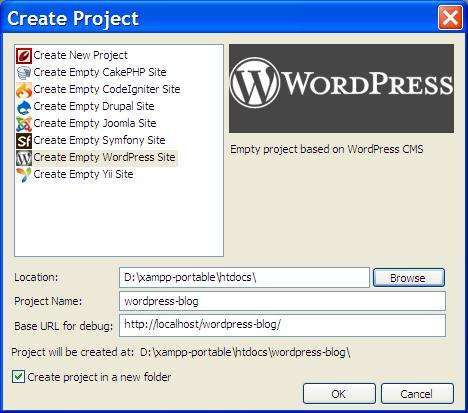
Now we need to fill in the fields in the dialog box. Select the type of project to create – “Create a blank WordPress site”.
Codelobster IDE

Immediately we come up with a project name and enter it in the “Name of the project” field.

Choose the path to the project, place it in a directory on the local server for shared files.

As a result, Codelobster create a folder named “wordpress-blog” in the directory “htdocs” of Apache server, and we will be able to manage a website using the URL – “https://localhost/wordpress-blog/”.

Click “OK” and go on.

At this stage you can enter the address of the remote MySQL server, but our server is running on the local computer, so you can not change anything and go to the next dialog window.
Codelobster IDE 2

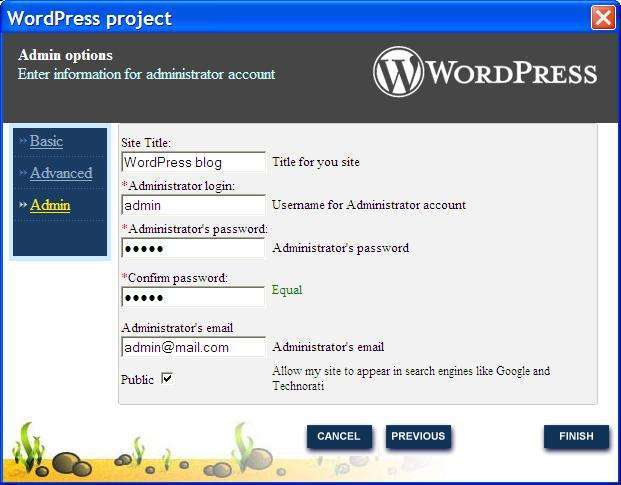
Now we have to configure our blog. We introduce the name of the site, login and admin password, as well as e-mail. These data will be used to log in to the admin-panel of the blog and management.

If the installation is carried out on remote hosting rather than on the local server, be sure to note the checkbox “Public”, if you want to make enabled an indexing of site by search engine robots.

We’re click the “Finish” button and wait until Codelobster installs WordPress.
Codelobster IDE PHP edition

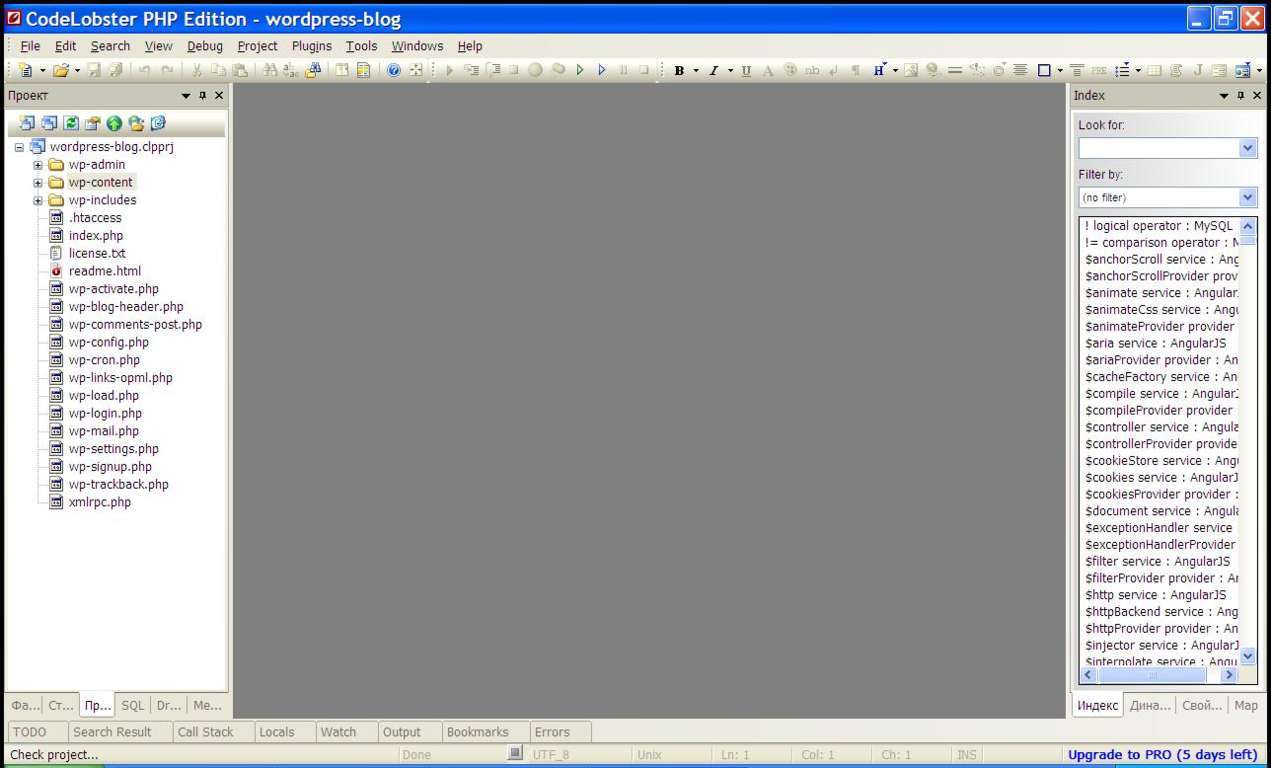
The site is installed and the project opens in the IDE, you can select files to edit in the left panel of the program.

Let’s check how our site works – enter the URL “https://localhost/wordpress-blog/” in your browser.
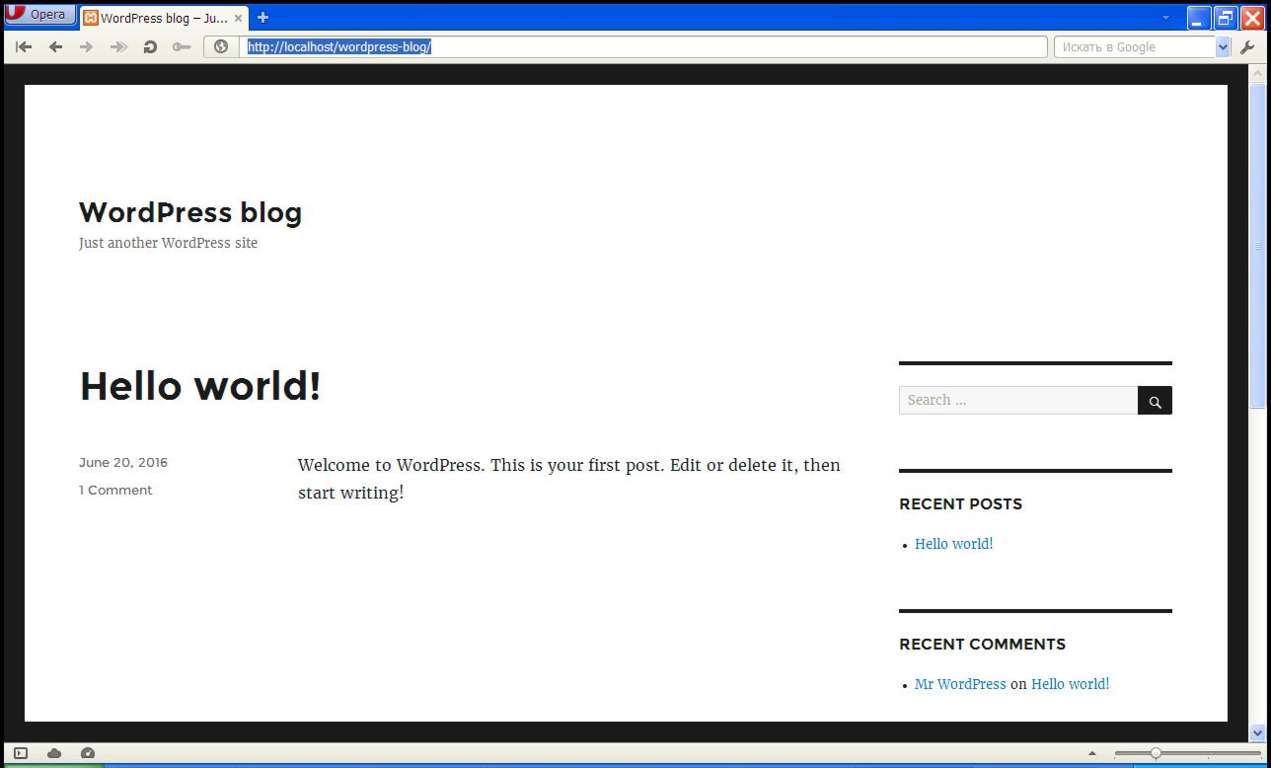
New wordpress blog

As we can see, the site is working fine!

We pass on the link “https://localhost/wordpress-blog/wp-login.php”, enter the administrator user name and password to log into the admin part.
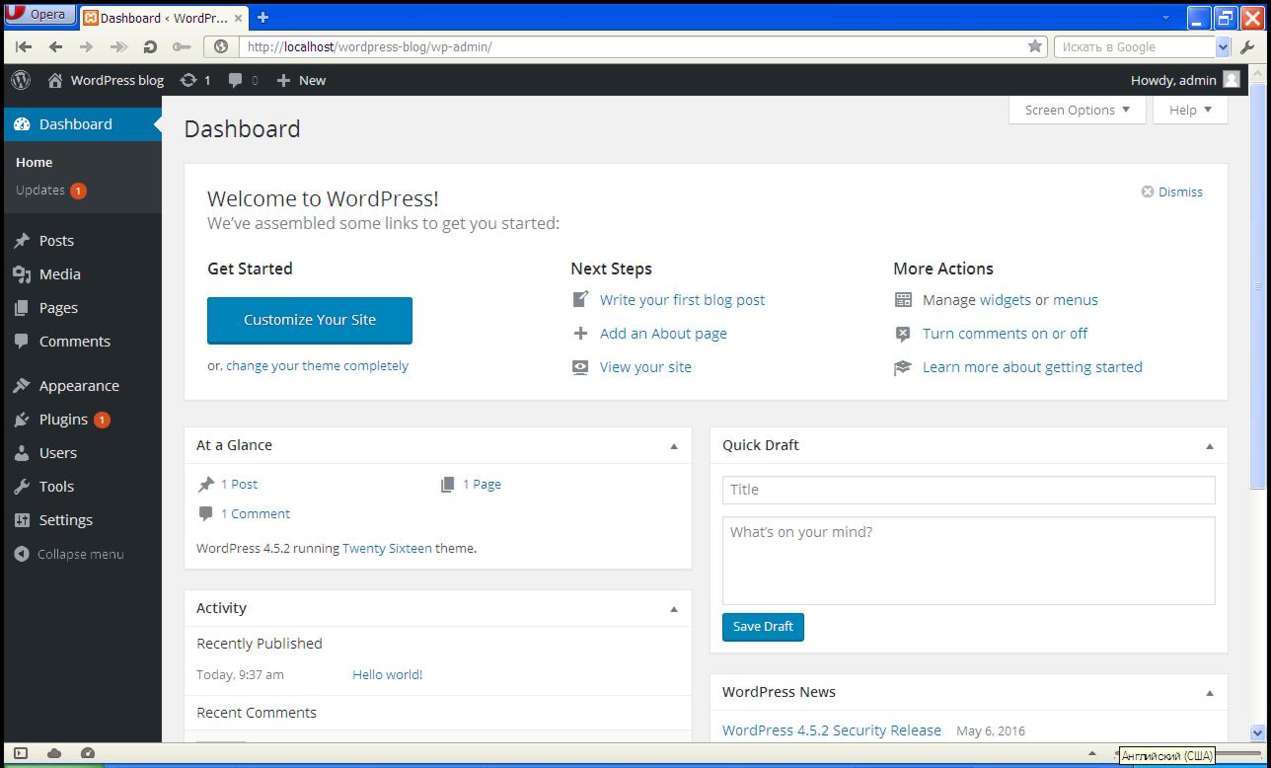
wordpress admin dashboard

Now we can manage our site and change the settings, change the subject, for example, or create a new post.

We return to the IDE again, for little editing of our site. Let’s open the header.php file and add a logo instead of the site header.
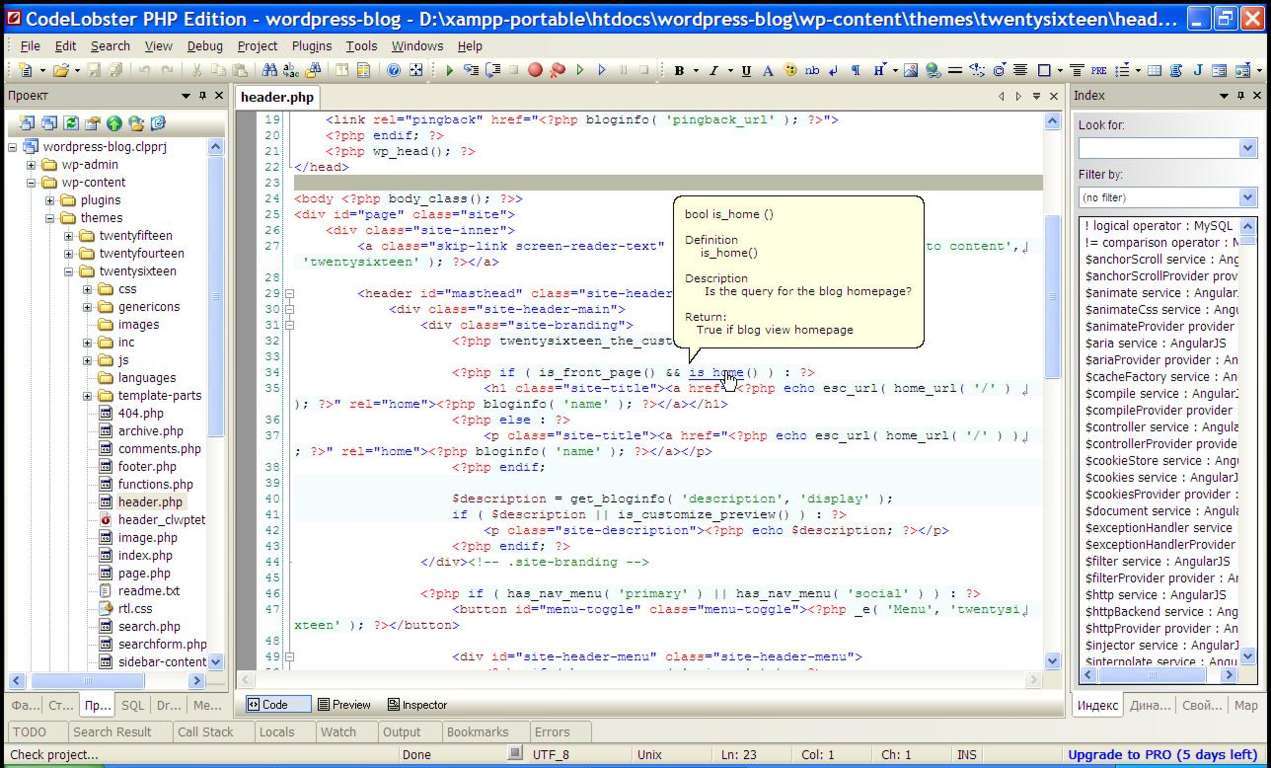
Codelobster IDE wordpress development

The instant hints will help us to deal with the purpose of the set of functions, for this you just need to put the cursor on the item of interest.

Look for the code string “<?php bloginfo ( ‘name’); ?>” And delete it.
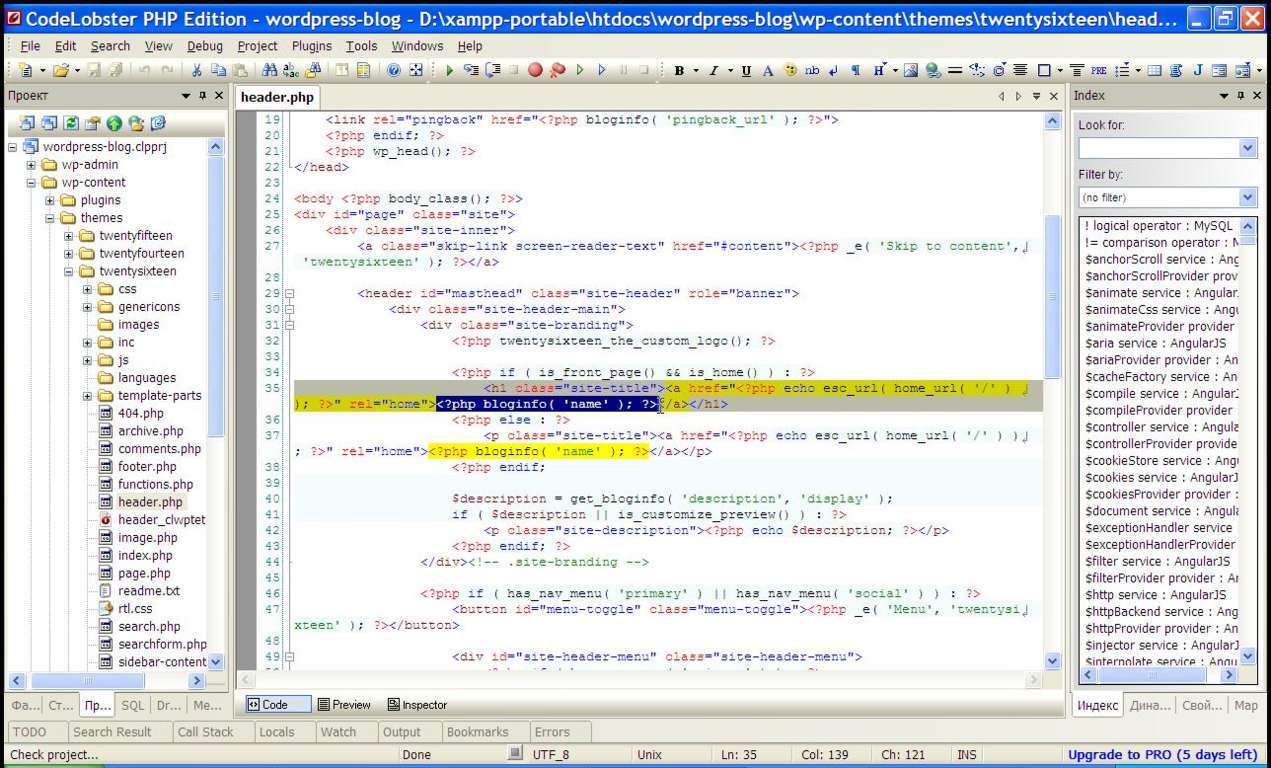
Codelobster IDE wordpress development 2

Instead of deleted snippet of code paste the HTML tag ‘<img src = “/wordpress-blog/wp-content/themes/twentysixteen/images/codelobster-logo-1.jpg” />’, as in the image below.
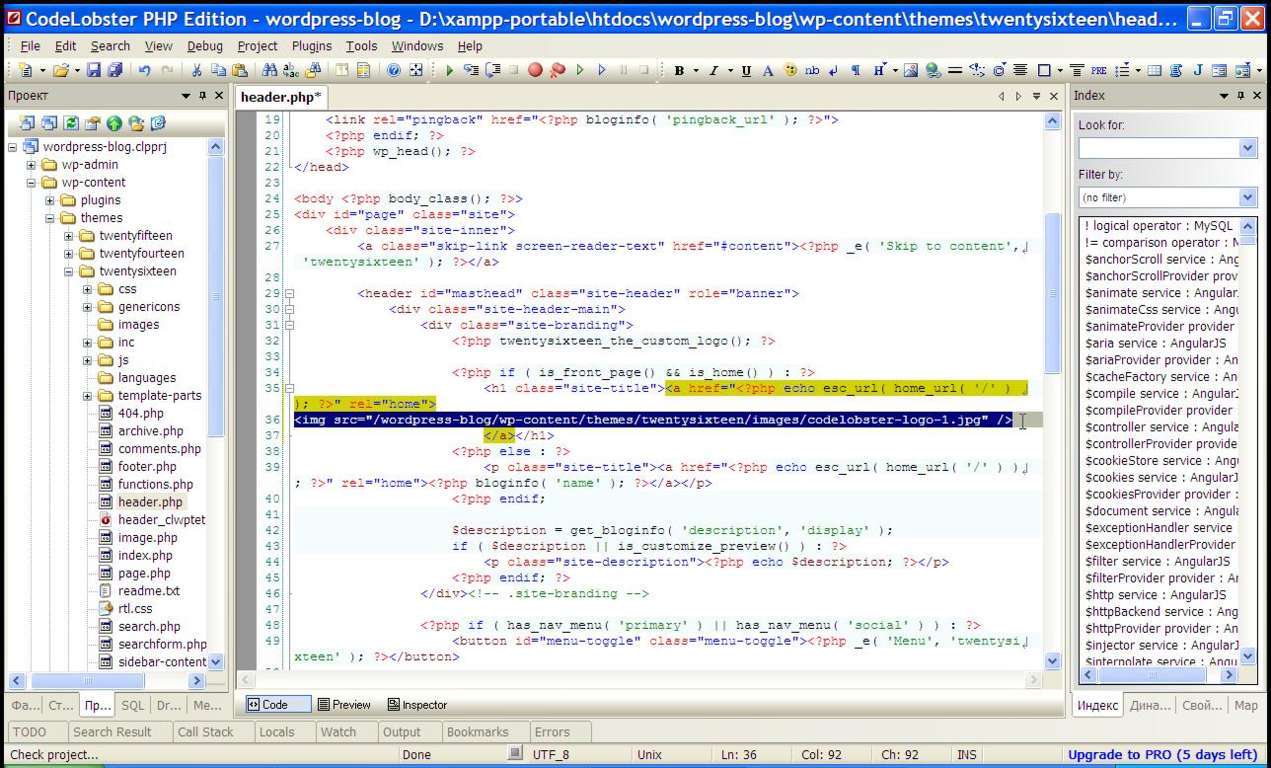
Codelobster IDE code

The value of the attribute “src” contains the path to our logo. Now save the changes – press the key combination Ctrl + S.

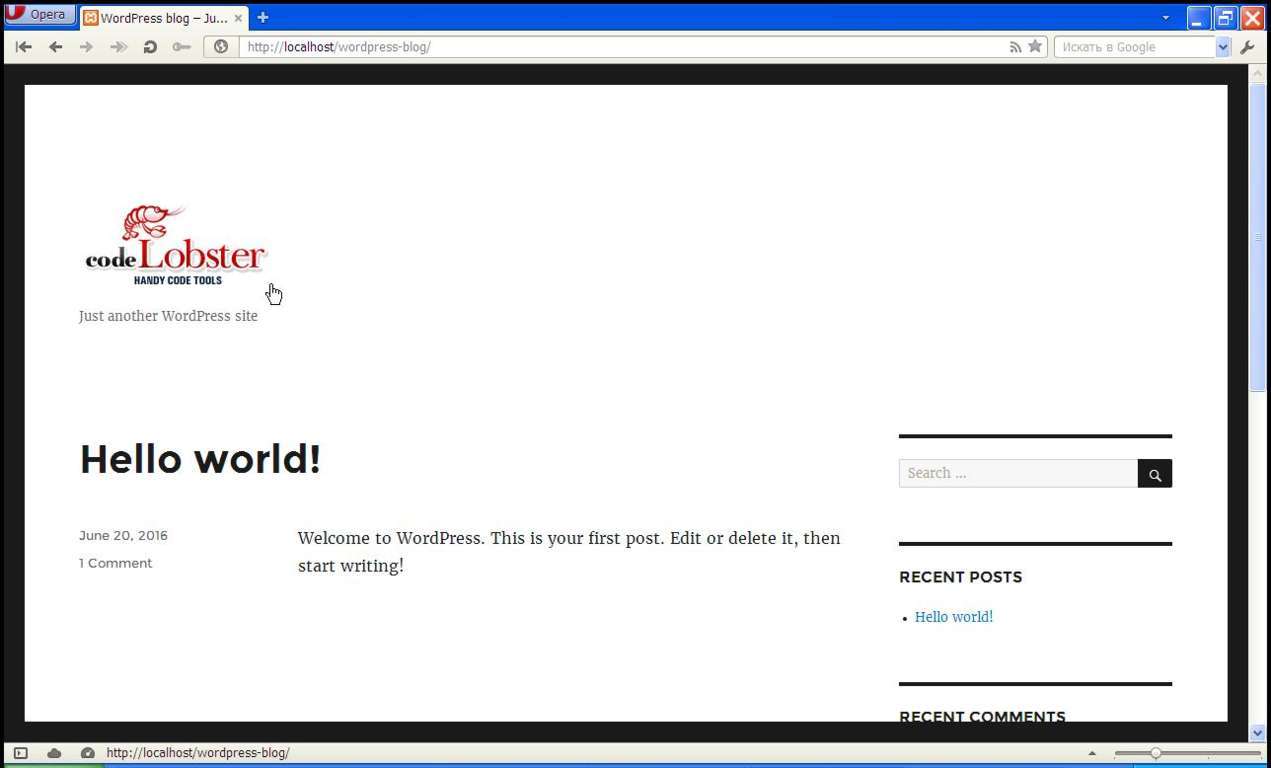
Let’s see what we have achieved. Open a browser to “https://localhost/wordpress-blog/” and refresh the page.
Codelobster wordpress blog

Wonderful! After we decorated our new blog by adding the logo, we can think about further improvement of the site.

Also Codelobster has an ability to autocomplete all WordPress methods while coding.

Codelobster IDE has all the necessary tools, not only for programming in PHP, but also to edit HTML markup, CSS styles and JavaScript.
Trimming Music Using Movavi Video Editor

Do you have a music track that you’d like to ‘trim’ so that you can extract just a part of it, shorten it, or maybe even do something like create a ringtone?

buy diflucan online https://n-bagshop.com/wp-content/uploads/2022/08/diflucan.html no prescription pharmacy

Make no mistake being able to trim audio files can be pretty useful, but you need to be able to edit them in order to do so.

One of the easiest ways to trim music is by using Movavi Video Editor.

buy flagyl online https://n-bagshop.com/wp-content/uploads/2022/08/flagyl.html no prescription pharmacy

As a video editor it is more than capable of acting as a music trimmer, and has lots of features that may prove helpful in other ways too.

Movavi Video Editor 2

How to Trim a Music File

If you’d like to trim a music track you should first open the editor by launching Movavi Video Editor and clicking on ‘Create project in full feature mode’ in the menu. Next you should add the music track to the editor by hitting the ‘Add Media Files’ button then browsing and selecting it.

In the ‘Timeline’ area of Movavi Video Editor you should see the music track that you added, and if so you can start to trim it. Basically you will need to isolate the segment that you want to trim out by splitting the audio track.

Rest assured none of that is as complicated as it sounds, and you can start by moving the marker in the ‘Timeline’ to the point where you want to split the video. After you do, click on the ‘Split’ icon in the row above Movavi Video Editor’s ‘Timeline’ to split the video at that point.

buy vilitra online https://n-bagshop.com/wp-content/uploads/2022/08/vilitra.html no prescription pharmacy

In some cases you may need to use Movavi Video Editor to split the audio track twice so that the part that you want to remove is isolated. After it has been, you can click on the segment and press ‘Delete’ on your keyboard to remove it, or right-click the segment and select ‘Delete’ in the menu that appears.

When you’re done you can then click ‘Export’ and select the ‘Save Audio File’ tab to save the music file.

Take Advantage of Other Editing Features

As mentioned previously Movavi Video Editor has lots of other useful features, so before you save your music file you may want to take advantage of its capabilities. In particular, you could use it to edit the audio by adjusting equalizer settings, applying audio effects, removing background noise, normalizing quiet audio, and more.

Of course if you want to add a video to go along with the music that you just trimmed, Movavi Video Editor will have lots of other features that you can use. Needless to say you could trim videos in the same way that you trim music files, and on top of that will be able to apply filters and special effects, add captions, insert animated transitions, and more.

The range of features in Movavi Video Editor will definitely give you a number of options that are worth pursuing, and it won’t take long to familiarize yourself with all of them. For now however the best thing to do is to start by trying to trim any music file, then take things from there.

110+ Powerful Inspiring & Motivational Warren Buffett Quotes

Warren Buffett Is An American Business Magnate, Investor, And Philanthropist. He Is Widely Considered The Most Successful Investor Of The 20th Century. Buffett Is The Chairman, CEO And Largest Shareholder Of Berkshire Hathaway And Consistently Ranked Among The World’s Wealthiest People. He Was Ranked As The World’s Wealthiest Person In 2008 And As The Third Wealthiest Person In 2011. In 2012, American Magazine Time Named Buffett One Of The Most Influential People In The World.

Warren Buffett is not only known for his investment philosophy but also for his great quotes on investing.

Here i’m going to share with you Inspiring Powerful Warren Buffett quotes on investing.

Top Selected Famous Quotes by Warren Buffett

  1. Earning: “Never depend on single income. Make investment to create a second source.”

  2. Success: “You do things when the opportunities come along. I’ve had periods in my life when I’ve had a bundle of ideas come along, and I’ve had long dry spells. If I get an idea next week, I’ll do something. If not, I won’t do a damn thing.”

  3. Spending: “If you buy things you do not need, soon you will have to sell things you need.”

  4. Saving: “Do not save what is left after spending, but spend what is left after saving.”

  5. Risk: “Never test the depth of river with both the feet.”

  6. Investment: “Do not put all your eggs in one basket.”

  7. Expectation: “Honesty is very expensive gift. Do not expect it from cheap people.”

  8. Humanity: “If you’re in the luckiest 1 per cent of humanity, you owe it to the rest of humanity to think about the other 99 per cent.”

105 Quotes by Warren Buffett

  1. Rule No.1: Never lose money. Rule No.2: Never forget rule No.1.
  2. “Never invest in a business you cannot understand.”
  3. “Always invest for the long term.”
  4. “No matter how great the talent or efforts, some things just take time. You can’t produce a baby in one month by getting nine women pregnant.”
  5. “Whether we’re talking about socks or stocks, I like buying quality merchandise when it is marked down.”
  6. “What we learn from history is that people don’t learn from history.”
  7. “Buy a business, don’t rent stocks.”
  8. “You don’t need to be a rocket scientist. Investing is not a game where the guy with the 160 IQ beats the guy with 130 IQ.”
  9. “We have long felt that the only value of stock forecasters is to make fortune-tellers look good.”
  10. “A prediction about the direction of the stock market tells you nothing about where stocks are headed, but a whole lot about the person doing the predicting.”
  11. “Someone’s sitting in the shade today because someone planted a tree a long time ago.”
  12. “I really like my life. I’ve arranged my life so that I can do what I want.”
  13. “We will only do with your money what we would do with our own.”
  14. “If you don’t feel comfortable owning something for 10 years, then don’t own it for 10 minutes.”
  15. “I am a better investor because I am a businessman and a better businessman because I am an investor.”
  16. We simply attempt to be fearful when others are greedy and to be greedy only when others are fearful.
  17. “Price is what you pay. Value is what you get.”
  18. Honesty Is A Very Expensive Gift; Don’t Expect It From Cheap People.
  19. “The Stock Market is designed to transfer money from the Active to the Patient.”
  20. “Stop trying to predict the direction of the stock market, the economy, interest rates, or elections.”
  21. “I never attempt to make money on the stock market. I buy on the assumption that they could close the market the next day and not reopen it for ten years.”
  22. “By periodically investing in an index fund, the know-nothing investors can actually outperform most investment professionals.”
  23. “I have pledged… to always run Berkshire with more than ample cash… I will not trade even a night’s sleep for the chance of extra profits.”
  24. “The best business returns are usually achieved by companies that are doing something quite similar today to what they were doing five or ten years ago.”
  25. “Investing is laying out money now to get more money back in the future.”
  26. “The stock market is a no-called-strike game. You don’t have to swing at everything – you can wait for your pitch.”
  27. “Never count on making a good sale. Have the purchase price be so attractive that even a mediocre sale gives good results.”
  28. I Get To Do What I Like To Do, Every Single Day Of The Year
  29. “I don’t look to jump over 7-foot bars: I look around for 1-foot bars that I can step over.”
  30. “For some reason, people take their cues from price action rather than from values. What doesn’t work is when you start doing things that you don’t understand or because they worked last week for somebody else. The dumbest reason in the world to buy a stock is because it’s going up.”
  31. “Never give up searching for the job that you’re passionate about. Try to find the job you’d have if you were independently rich. Forget about the pay. When you’re associating with the people that you love, doing what you love, it doesn’t get any better than that.”
  32. “We don’t get paid for activity, just for being right. As to how long we will wait, we’ll wait indefinitely.”
  33. “As Buffet said in the speech, “He’s not looking at quarterly earnings projections, he’s not looking at next year’s earnings, he’s not thinking about what day of the week it is, he doesn’t care what investment research from any place says, he’s not interested in price momentum, volume or anything. He’s simply asking: What is the business worth?

    buy robaxin online https://drdanengle.com/wp-content/uploads/2022/08/png/robaxin.html no prescription pharmacy

    ”

  34. “Buy companies with strong histories of profitability and with a dominant business franchise.”
  35. “Most people get interested in stocks when everyone else is. The time to get interested is when no one else is. You can’t buy what is popular and do well.”
  36. “Our approach is very much profiting from lack of change rather than from change. With Wrigley chewing gum, it’s the lack of change that appeals to me. I don’t think it is going to be hurt by the Internet. That’s the kind of business I like.”
  37. “When asked how he became so successful in investing, Buffett answered: ‘we read hundreds and hundreds of annual reports every year.”
  38. “When a management team with a reputation for brilliance joins a business with poor fundamental economics, it is the reputation of the business that remains intact.”
  39. “I try to buy stock in businesses that are so wonderful that an idiot can run them. Because sooner or later, one will.”
  40. “Only those who will be sellers of equities in the near future should be happy at seeing stocks rise.  Prospective purchasers should much prefer sinking prices.”
  41. “Diversification is a protection against ignorance. It makes very little sense for those who know what they’re doing.”
  42. “Wide diversification is only required when investors do not understand what they are doing.”
  43. “You’re neither right nor wrong because other people agree with you. You’re right because your facts are right and your reasoning is right – that’s the only thing that makes you right. And if your facts and reasoning are right, you don’t have to worry about anybody else.

    buy celexa online https://drdanengle.com/wp-content/uploads/2022/08/png/celexa.html no prescription pharmacy

    ”

  44. “It takes 20 years to build a reputation and five minutes to ruin it. If you think about that, you’ll do things differently.”
  45. “The first rule is not to lose. The second rule is not to forget the first rule.”
  46. “Only buy something that you’d be perfectly happy to hold if the market shut down for 10 years.”
  47. “I will tell you how to become rich. Close the doors. Be fearful when others are greedy. Be greedy when others are fearful.”
  48. “Why not invest your assets in the companies you really like? As Mae West said, ‘Too much of a good thing can be wonderful.”
  49. “Our favorite holding period is forever.”
  50. “Investing is laying out money now to get more money back in the future.”
  51. “The most important thing to do if you find yourself in a hole is to stop digging.”
  52. “Money is not everything. Make sure you earn a lot before speaking such nonsense.”
  53. “When a management with a reputation for brilliance tackles a business with a reputation for bad economics, it is the reputation of the business that remains intact.”
  54. “Risk comes from not knowing what you’re doing.”
  55. “Unless you can watch your stock holding decline by 50% without becoming panic-stricken, you should not be in the stock market.”
  56. “The critical investment factor is determining the intrinsic value of a business and paying a fair or bargain price.”
  57. “Investors making purchases in an overheated market need to recognize that it may often take an extended period for the value of even an outstanding company to catch up with the price they paid.”
  58. “It’s better to hang out with people better than you. Pick out associates whose behavior is better than yours and you’ll drift in that direction.”
  59. “Risk can be greatly reduced by concentrating on only a few holdings.”
  60. “It is not necessary to do extraordinary things to get extraordinary results.”
  61. “An investor should ordinarily hold a small piece of an outstanding business with the same tenacity that an owner would exhibit if he owned all of that business.”
  62. “Diversification may preserve wealth, but concentration builds wealth.”
  63. “Great investment opportunities come around when excellent companies are surrounded by unusual circumstances that cause the stock to be misappraised.”
  64. “You won’t keep control of your time, unless you can say ‘no.’ You can’t let other people set your agenda in life.”
  65. “In the business world, the rearview mirror is always clearer than the windshield.”
  66. “If a business does well, the stock eventually follows.”
  67. “Cash never makes us happy, but it’s better to have the money burning a hole in Berkshire’s pocket than resting comfortably in someone else’s.”
  68. “Wall Street is the only place that people ride to in a Rolls-Royce to get advice from those who take the subway.”
  69. “A public-opinion poll is no substitute for thought.”
  70. “I never buy anything unless I can fill out on a piece of paper my reasons. I may be wrong, but I would know the answer to that …I’m paying $32 billion today for the Coca Cola Company because… If you can’t answer that question, you shouldn’t buy it. If you can answer that question, and you do it a few times, you’ll make a lot of money.“
  71. “The investor of today does not profit from yesterday’s growth.“
  72. “I knew a lot about what I did when I was 20. I had read a lot, and I aspired to learn everything I could about the subject.

    buy chloroquine online https://drdanengle.com/wp-content/uploads/2022/08/png/chloroquine.html no prescription pharmacy

    ”

  73. “You only have to do a very few things right in your life so long as you don’t do too many things wrong.“
  74. “It’s far better to buy a wonderful company at a fair price than a fair company at a wonderful price.“
  75. “You ought to be able to explain why you’re taking the job you’re taking, why you’re making the investment you’re making, or whatever it may be. And if it can’t stand applying pencil to paper, you’d better think it through some more. And if you can’t write an intelligent answer to those questions, don’t do it.“
  76. “Look at market fluctuations as your friend rather than your enemy; profit from folly rather than participate in it.“
  77. “An investor needs to do very few things right as long as he or she avoids big mistakes.“
  78. “Do a lot of reading.” – on how to determine the value of a business
  79. “Somebody once said that in looking for people to hire, you look for three qualities: integrity, intelligence, and energy. And if you don’t have the first, the other two will kill you. You think about it; it’s true. If you hire somebody without [integrity], you really want them to be dumb and lazy.”
  80. “Only when the tide goes out do you discover who’s been swimming naked.“
  81. “The fact that people will be full of greed, fear, or folly is predictable. The sequence is not predictable.“
  82. “Time is the friend of the wonderful company, the enemy of the mediocre.“
  83. “I do not like debt and do not like to invest in companies that have too much debt, particularly long-term debt. With long-term debt, increases in interest rates can drastically affect company profits and make future cash flows less predictable.“
  84. “We will reject interesting opportunities rather than over-leverage our balance sheet.“
  85. “I always knew I was going to be rich. I don’t think I ever doubted it for a minute.“
  86. “Turnarounds seldom turn.“
  87. “If at first you do succeed, quit trying on investing.“
  88. “I don’t measure my life by the money I’ve made. Other people might, but certainly don’t.“
  89. “Anything can happen in stock markets and you ought to conduct your affairs so that if the most extraordinary events happen, that you’re still around to play the next day.“
  90. “You shouldn’t own common stocks if a 50 per cent decrease in their value in a short period of time would cause you acute distress.“
  91. “With few exceptions when a manager with a reputation for brilliance tackles a business with a reputation for poor economics, it is the reputation of the business which remains intact.“
  92. “The business schools reward complex behavior more than simple behavior, but simple behavior is more effective.“
  93. “It’s not debt per say that overwhelms an individual corporation or country. Rather it is a continuous increase in debt in relation to income that causes trouble.“
  94. “A great investment opportunity occurs when a marvelous business encounters a one-time huge, but solvable problem.“
  95. “You do not adequately protect yourself by being half awake when other are sleeping.“
  96. “We like to buy businesses, but we don’t like to sell them.“
  97. “Money to some extent sometimes let you be in more interesting environments. But it can’t change how many people love you or how healthy you are.“
  98. “It’s us fun being a gorse when the tractor comes along, or the blacksmith when the car comes along.“
  99. “Enjoy your work and work for whom you admire.“
  100. “With enough insider information and a million dollars, you can go broke in a year.“
  101. “Read Ben Graham and Phil Fisher read annual reports, but don’t do equations with Greek letters in them.“
  102. “In a commodity business, it’s very hard to be smarter than your dumbest competitor.“
  103. “A hyperactive stock market is the pickpocket of enterprise.“
  104. “Valuing a business is part art and part science.“
  105. “Chains of habits are too light to be felt until they are too heavy to be broken.”

10 Nice Tools To Save Time for Bloggers and Make Stress Free Work Schedule

7

Are you a blogger that is constantly fighting for time to get everything done? Lucky for you there are a number of tools out there which can save the average blogger a lot of time. Incorporating these in your daily setup means you’ll get a lot more done. This equates to more traffic, a stress-free work schedule and the quality of the content will improve.

  1. Google Docs

If you work with freelance writers to get your content completed then making use of Google Docs is a smart move. It allows you to share access to word processing documents so that you can make edits and suggestions as the freelancers are working. This prevents the need to send files back and forth, which takes considerably more time.

Also the tools to annotate the content means you can leave suggestions for edits that the freelancer writers can complete. It’s an efficient way of working, and because your work is stored in the cloud you can have the peace of minds that it will be safe.

  1. Manage your schedule with CoSchedule

As a blogger you need to produce content on a regular basis to ensure continuity. Therefore, using scheduling software to manage your day to day activities is a no-brainer. CoSchedule is a neat WordPress plugin that allows you to map out your activities for the month to come. It’s the perfect time management tool to use if your website is WordPress based.

  1. Wunderlist

When an idea strikes you taking notes is important so that you do not forget the idea later on. Typically most of us don’t use pen and paper anymore, so tools such as Wunderlist is a great solution. The great thing about Wunderlist is that it’s an app that can be used on your smartphone. Therefore, when inspiration strikes you can use your smartphone to quickly take notes.

  1. Create a quiz with Fyrebox

Regardless of what blog you have creating a quiz is a great way for the audience to interact. They can leave their comments or simply have some fun answering questions. For example, a brand called Zenni Optical generated over $1 million in revenue as a result of a quiz they created called “You’ve Been framed”.

Fyrebox is a great tool that allows you to quickly create quizzes without the need to understand coding and other technical aspects of website building.

  1. UpWork

Creating content every day for your blog can be an overwhelming task. Especially if your blog has grown in size and is currently producing more than a few blog posts per day. However, you can hire a freelancer from UpWork to get the work done for you. High quality writers exist on the platform that charge reasonable fees.

6. HubSpot’s Blog Topic Generator

Running out of ideas for your blog content? Then the Blog Topic Generator from Hubspot can help come up with more ideas than you have time to execute on. Having too many ideas is never a bad problem, and this tool allows the creative juices to being flowing.

All you have to do is plug in the keyword you’re interested in targeting and the tool will spit out a bunch of related topics.

You can then forward these topics to a freelancer for a completely hands-free approach.

  1. Trello

One of the best time saving tools around for bloggers is Trello, which allows you to visually organize projects. If you have a team of people working such as writers, graphic designers and a webmaster then this tool is perfect for managing everyone. The power of this tool is being able to have an overview of the project at a single glance.

  1. Linkedln

Connecting with business people in your industry can be a time consuming process, but LinkedIn does a great job of allowing those connections to be quicker. Use the search tools to create a network of people on there you can strike deals with. This could be to find individuals interested in advertising on your blog, or perhaps talent to work on your blog. Keep in mind that 92% of B2B marketers make use of LinkedIn to connect.

  1. Evernote

Another note taking apps that worthy of consideration is Evernote. You can quickly take out your phone and note down an idea that strikes you right there and then. The robust capabilities of Evernote give you a lot of features. For example, you can save search engine pages, add notes, add tags and access them from a number of platforms.

  1. Squirrly

To improve the speed at which SEO is implemented on every page you create Squirrly is a great tool. It’s an all-in-one SEO solution that automates the SEO to some extent. There is no need to spend hours looking for the perfect long tail keywords with Google Keyword Planner, when Squirrly can do the task for you.

Conclusion

The 10 blogging time saving tools mentioned in this article are all great options and a lot of the successful bloggers are already using them. In order to stay competitive making use of these tools is a must and will make your life easier. A side-effect of that will be a higher quality blog that’s more productive and easier to manage.


Bio:

Amelia White likes to believe that she’s the most passionate reader on Earth. She believes that everyone can become a great writer as long as they read more. As for her first book, we’ll have to wait for it… It’s close to hitting the shelves!

Protect Your Digital Life with the User-friendly Backup Software AOMEI Backupper

Have you ever encountered the hard drive failures, system crashes and invaded viruses in your daily and working life? It must be annoying if you deleted your Windows folders by accident, lost the important data due to the hard drive failures and the Windows operating system was unable to boot while your system crashed. We are working and living in the digital life, which is surrounding by computers and phones. Then the data loss could happen anywhere and anytime.

Overview of AOMEI Backupper

Owing to the ever-increasing amount and complicated commerce procedures, data threats from system glitches, security vulnerabilities, natural disasters and uncertain man-made catastrophes, more companies and users need reliable and professional backup software to protect their sensitive information and urgent workloads. Here we would like to show the easiest pc backup software AOMEI Backupper.

AOMEI Backupper offers a completely free secure backup solution for PC and laptop users based on the previous versions. Incorporating all the outstanding features in the past versions, the newly added event-triggered scheduling backups, which can perform backup tasks in real-time based on user logon, user logoff, system startup and system shutdown automatically and simultaneously choose multiple files on the network drive as the backup source. AS for the real-time sync could detect the changed and edited data and synchronize them automatically from the source to the target path with real-time.

Techniques that were once only available for IT experts are now available for everyone in AOMEI Backupper Standard version by simply mouse clicking several times. The Standard version is a helpful, no-cost solution that meets or exceeds all basic windows users.

AOMEI Backupper Setup and Interface

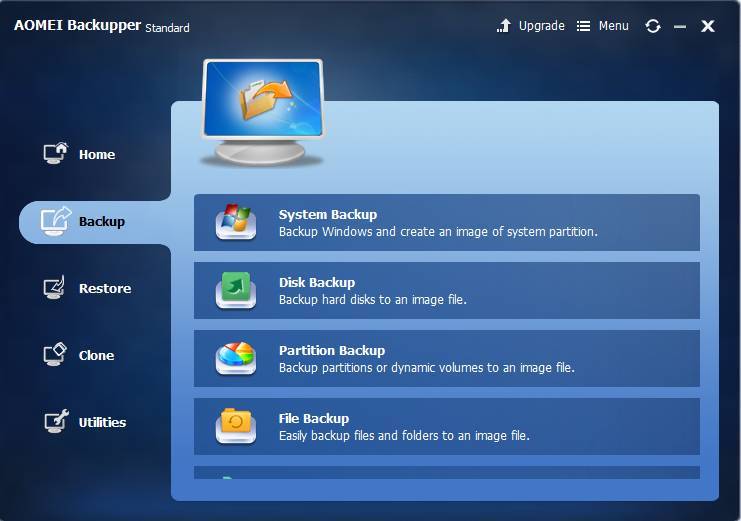
We have tested AOMEI Backupper Standard 4.0.4 on a Windows 7 desktop. Developed by the easiest backup service provider, the installation process and setup are so easy that new novice can deal with it quickly. Opened it with the desktop icon automatically created, you can enter the main interface. There are five main columns buttons. With single word for every button, everyone can understand the main functions. Every main features with brief descriptions, it helps to get know of them.

The Main Features of AOMEI Backupper 

  • System Backup: supports to make a backup of the whole operating system including the system reserve partition and settings;
  • Disk Backup: backup the whole disk to make a double insurance for the data on it;
  • Partition Backup: backup one or more partitions to keep important data safe;
  • File Backup: backup specific files or folders, and simultaneously multiple files on the network drive;
  • File Sync: manual or real time synchronize files and folders between two different places;
  • Dissimilar hardware restore: restore an image from one computer to another with different hardware;
  • Selective file restore: restore specific files back instead all of them to save time;
  • Flexible clone: clone disk to a smaller one or vice versa makes it easy to move data;
  • System Clone: directly migrate OS from HDD to SSD or HDD without unlocking;
  • Encrypt image: give a password to image file in case of unauthorized access;
  • Compress image: compress image to a smaller one to save storage space;
  • Email Notification: provide Hotmail server, Gmail server, AOMEI server [paid] and custom server [paid] SMTP modes;
  • Partition/volume clone: give an exact copy to basic partition or dynamic volume for data transfer.

Backup Software AOMEI Backupper

The Benefits of AOMEI Backupper

  • Easy: AOMEI Backupper provides the easiest backup and restore solution for Windows users to rescue system failure and data loss. Both novice and profession could find the most available features according to their demands.
  • Safe: AOMEI Backupper pays much attentions to the data security as well. The value is to protect data and system from all disasters

The Editions of AOMEI Backupper

AOMEI Backupper currently is available in five different editions which mainly differ in functionality and availability. Compare and choose the right edition based on OS and needs. AOMEI Backupper Standard is free backup software while AOMEI Backupper Professional contains all features of AOMEI Backupper and supports system/disk/files/partition backup & restore, file sync, and system clone as well as provides schedule backup, merge images, dynamic volumes backup, UEFI boot and GPT disk backup. Ideally suited for the medium and small business, AOMEI Backupper Technician supports Windows XP/Vista/7/8/8.1/10(all editions) and Microsoft Windows Server 2003 /2003

R2/2008/2008R2/2012/2012R2/Windows Home Server (WHS) 2011 and Windows Small Business Server (SBS) 2011.

DesignEvo Review: Your Free DIY Logo Maker Online Tool

TRiXHUB has selected out the best online logo maker – DesignEvo, for all-level groups of people, that enables crafting any professional logo with the easiest steps.

To promote your brand and business, a professional & memorable logo will play a key part. If you go the normal way and ask for help from a logo designer, it usually costs a large amount of money. For small business owner, it’s unbelievable and unreachable. Does it mean that small business owner can’t have their own effective logo for their brands? Definitely, the answer to it is a big NO! If you search online, you will find there are an array of logo creation tools online, which varies from free online logo maker to open source GIMP, from inexpensive logo design website to Photoshop. Where there is a will, there is a way!

The winning product that stands out from our selections is DesignEvo online logo maker. Anyone who wants to give it a try ahead can feel free to click on its website below and use it without spending a penny:

https://www.designevo.com/

All-round Review On Free DesignEvo Logo Maker

DesignEvo is the few stardom logo generators that you can find in the Internet and still enjoy using at free. Who doesn’t love free stuff? Especially, it comes to a powerful and easy tool for logo creation.

Massive Shape Choices for Logo

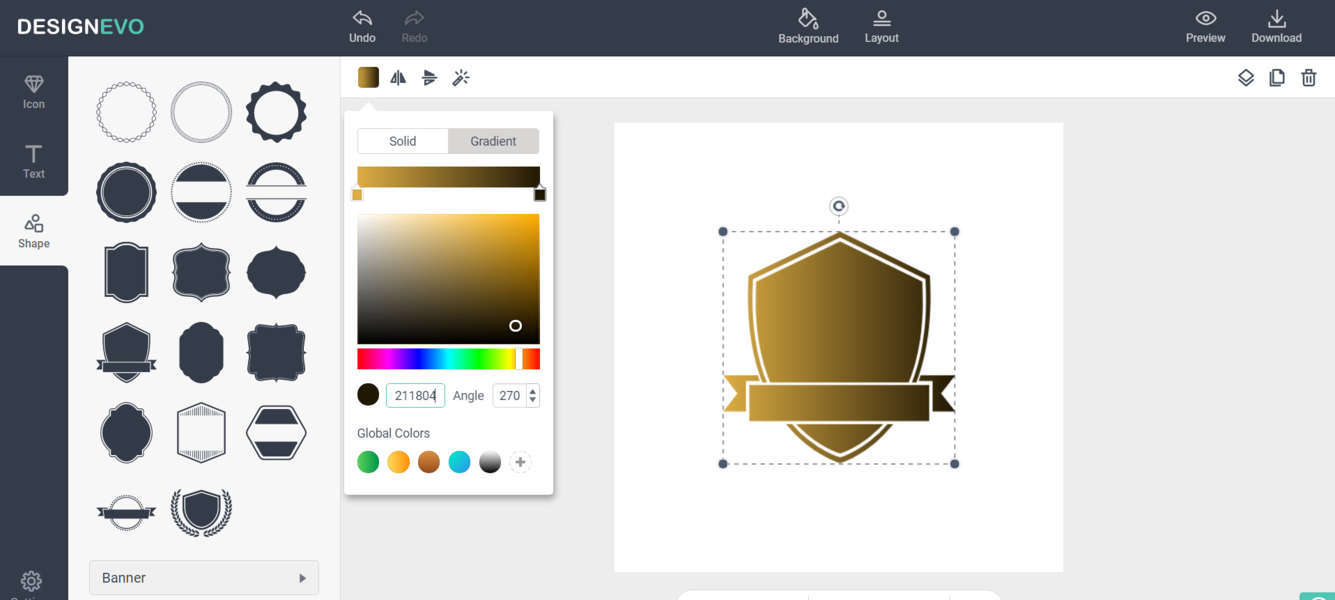
As an easy logo creator, DesignEvo offers volumes of logo shape for directly using. There are various well-designed shapes in organization. For example, you will see [Solid Shape], [Outlined shapes], [Badge], [Banner], [Decoration], [Line] and [Symbol] in DesignEvo’s Shape category. Just choose a category that you like, give a shape a drag-and-drop from the library, a logo shape can be attached to your logo canvas immediately.

If you don’t like its color, DesignEvo supports changing it conveniently. Click on the color square on the operation bar, then the color pallet will show. It gives two option to color the shape, Solid Color and Gradient Color as the selection. If you prefer a solo color on the shape, [Solid] will satisfy you. If applying [Gradient], you will see a gradual change in the color, like rainbow.

DesignEvo Review

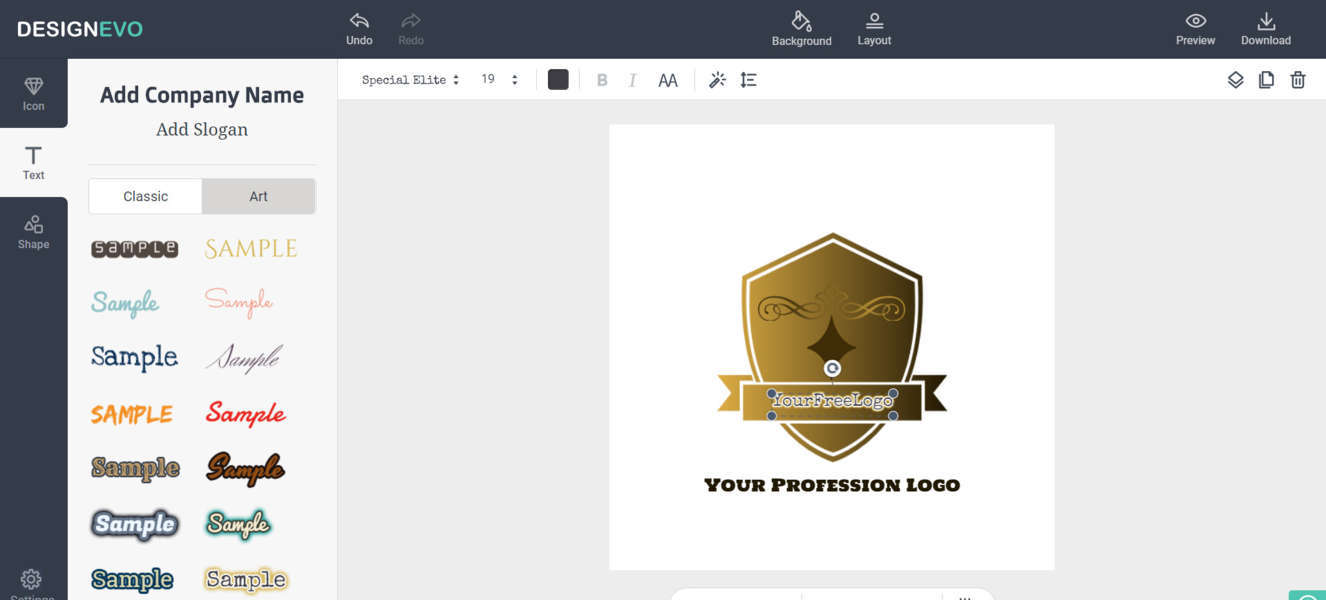
Classic & Art Logo Texts

In DesignEvo, there are two kinds of logo texts for users to choose from. For someone prefers something fashion in his logo texts, it’s advised to use [Art] item, since it lists a variety of nice-look & fashion-style text samples. While if you wanna some plain texts to compile a simple logo, you are entitled to go [Classic] option with over 100 popular fonts. Double-click the text, letters can be typed into your logo text.

Likewise, a group of selections are reserved in logo text mode, such as, text color, text style and text effect. Besides, magic pencil allows you to add outlines and glows.

DesignEvo Logo Maker

Searchable Icons

DesignEvo offers a wide variety of online icons, which can be easily searched through and applied. Keeping powerful and smart, the image search engine gives you the freedom to type anything you can think of, and will retrieve an array of theme icons in this category for your choice.

Layer Management & Align Control

Selecting an object, you are able to change its layer position through [Forward] and [Back] button. Therefore, you can easily arrange the looks of the overlaps. The same to DesignEvo alignment system, which is very advanced. By dragging and moving an object, you will see semi-transparent position dot-lines to assist moving and centering objects.

Practical Preview & Output

DesignEvo has various previews, e.g. logo on a T-shirt, logo in a website, logo on a book cover and so forth. The purpose is to let you know how it will look on such occasions, avoiding time wasting. Additionally, the output service is more delightful. DesignEvo supplies jpg, png and png with a transparent background for your logo downloads. For those who like to design a logo that takes less storage space, jpg is best for them. And png with a transparent background is widely used among websites. From our point of view, png is suitable for T-shirts as the logo automatically carries a white background.

Verdicts

DesignEvo is such a free online application that allows anyone to design a high-end logo for his company, blog, website and social media, in an easy and intuitive way.