Home Blog Page 43

7 Best Free Password Managers and Form Fillers in 2015

[su_dropcap style=”simple” size=”5″]P[/su_dropcap]assword Manager is a software tool that will help user to remember all his passwords. As we all know that today’s life is so full of technology that from banking to shopping we have numerous passwords or PIN or pass codes. It is actually very difficult to remember all these passwords and names, especially if you are an internet user too. One solution to this problem is that, you may write them down and store it in your PC but that’s risky as anyone can read that and gain access to your valuable data, Here I’m listing top 5  password manager which will store your valuable data in encrypted form with a master password and only you can access that, hence its completely secure.

Recommended: Top 5 Best Online File and URL Scanner Sites

Password manager can protect your logins and passwords, PIN codes, credit card numbers and much more. You can also access online all your passwords anywhere in this world with your master password.

List of top 7 Best Free Password Manager


#1. LastPass

LastPass! Its wonderful. I’m a big fan of this awesome tool. I’m always prefer lastpass for password managing. LastPass is a Free Password Manager 2015 which makes your browsing secure and easier. It is integrated with high class and very fine encryption algorithms to keep your data protected and secure. Except the user, no one else could decrypt the information. Not only can it create strong passwords, it can also store unlimited passwords. It can import passwords from other password managers and has ability to manage data from multiple computers. It is a very effective software program. Latpass browser extensions are also available for online uses.

[su_button url=”https://lastpass.com/misc_download.php” target=”blank” style=”stroked” background=”#db1234″ size=”8″]Download LastPass[/su_button]

#2. RoboForm

RoboForm password manager is a freeware which reliably and safely stores passwords on your PC or laptop. The passwords can be both online and offline. It has fine features and a very fine user interface. It not only auto-logs the user into online accounts but also completes online registration and checks out forms with a single click. It is probably one of the oldest and uses strong Encryption algorithms like BlowFish and AES for complete security and protection.

[su_button url=”https://www.roboform.com/download” target=”blank” style=”stroked” background=”#db1234″ size=”8″]Download RoboForm[/su_button]

#3. Sticky Password

Sticky Password can easily help you organize your accounts, passwords and personal data. It is highly flexible and works with all popular browsers, including Internet Explorer, Firefox and Google Chrome (and others), which means that no matter what your browser preference is, you can take advantage of one-click form filling, automatic logins and auto-save features. The software also works with your bookmarks and can import data from LastPass and RoboForm. Stiky password available for free and also paid version available.

[su_button url=”https://secure.avangate.com/affiliate.php?ACCOUNT=LAMANTIN&AFFILIATE=50957&PATH=https%3A%2F%2Fwww.stickypassword.com%2F” target=”blank” style=”stroked” background=”#db1234″ size=”8″]Download Sticky Password[/su_button]

#4. Dashlane

Keeping track of passwords and making them secure is startlingly simple with Dashlane’s free password manager. Automatically import your passwords from Chrome or any other browser into your secure password vault. Save any missing passwords as you browse. Make a new password right within your browser. You can download Dashlane password manager for free. but Dashlane also provide some premium features. When you need you can extend functionality.

[su_button url=”https://www.dashlane.com” target=”blank” style=”stroked” background=”#db1234″ size=”8″]Download Dashlane[/su_button]

#5. KeePass

KeePass Password manager is a free open source software which helps you to store your valuable passwords in a highly secure encrypted database whose key to decryption is only with you. You can lock all your passwords in one master key, so that you can unlock all the information with one single master password. It has strong password generator and requires no installation. It is a very handy tool that makes your password management very easy.

[su_button url=”https://keepass.info/download.html” target=”blank” style=”stroked” background=”#db1234″ size=”8″]Download KeePass[/su_button]

#6. LockCrypt

LockCrypt is also a freeware password manager for Windows OS. To store passwords,phone numbers, PINs and other private and personal information, this account management program provides a secure, central database. It uses Cipher Block Chaining and AES encryption which makes it very secure and reliable. It has strong password generator and native translations into Spanish, German etc. with a secure clipboard to protect passwords.

[su_button url=”https://www.lockcrypt.com/download” target=”blank” style=”stroked” background=”#db1234″ size=”8″]Download LockCrypt[/su_button]

#7. Password Safe

Password Safe is another freeware password management tool which can manage your old passwords, quickly generate new passwords, organize them, retrieve and store them in one single master combination. Through this software the users can keep their passwords encrypted on their computers.

[su_button url=”https://sourceforge.net/projects/passwordsafe/files/” target=”blank” style=”stroked” background=”#db1234″ size=”8″]Download Password Safe[/su_button]

These Free Password manager works on all devices and browsers.

Tags: Password Manager for Windows 8, Free Password Manager Windows 8, Best Password Manager App, Windows 8.1 Password Manager

Top 10 Female CEOs in The World: Yoy Need to Know

    0

    1. Hilary RowlandHilary-Rowland

    The 33-year old self-taught programmer is the CEO of eClick Interactive Inc and NewFaces.com, the first free online portfolio tool, both

    started in ’95 at age 15. The 5’9” svelte blonde heads Project Migration, selling her jewellery designs to eliminate poverty in Africa.

    buy hydroxychloroquine online https://health4painrelief.com/wp-content/uploads/2022/08/png/hydroxychloroquine.html no prescription pharmacy

    2. Marissa MayerMarissa-Mayer

    The Yahoo! boss is worth $300 million, being the youngest Fortune 500 CEO. This 37-year old blonde tycoon is a former spokesperson and executive for Google, and graduated from Stanford.

    3. Jennifer HymanJennifer-Hyman

    She founded the website Rent the Runway in 2009. This 31-year old brunette’s creation allowed everyday women to rent high-fashion gowns and return them at a margin of the original price.

    4. Tory BurchTory-Burch

    The 46-year-old fashion designer is also a philanthropist and entrepreneur. She runs her own fashion label, ‘Tory Burch’ and started the ‘Tory Burch Foundation’ to aid lower income families, and promotes women’s economic development.

    5. Dylan LaurenDylan-Lauren

    She started Dylan’s Candy Bar, which is the world’s biggest candy store. This 38-year old Duke alum states that it is themed around Willy Wonka’s Chocolate Factory, and now has branches in Orlando, New York City, Houston, and Long Island.

    6. Victoria RansomVictoria-Ransom

    The blonde New Zealander founded Wildfire in 2008, which was primarily a travel and adventure company. The Harvard MBA graduate developed it into a strong business with 400 employees and sold social media marketing software to large clients such as Pepsi, Publicis, Sony, and Unilever. With Alan Chuard, the co-founder, she sold Wildfire to Google for a reported 0 million.

    7. Leslie BlodgettLeslie-Blodgett

    The founder of Bare Escentuals, she transformed it into a $1.7 billion business with the introduction of bareMinerals, the healthy cosmetics alternative line. Along with QVC on late-night shows, her sales escalated tremendously.

    8. Jesse DraperJesse-Draper

    The 27-year-old actress is a talk show host, producer, and writer for the Valley Girl Talk show, while performing CEO duties for ValleyGirl Inc. She graduated from UCLA, majoring in films and television.

    9. Tyra BanksTyra-Banks

    The 39-year-old is the CEO of Bankable Enterprises, producing shows and handling talent in the fashion industry. The 5’10 former supermodel also started TZONE in 1999, which aims to develop life skills and leadership qualities.

    10. Claire ChambersClaire-Chambers

    The 32-year-old founder of Journelle Lingerie earlier worked as a management consultant. She sought to merge the fashion and lingerie industries. As is acknowledged by the greater civilizations, women are, and will remain the dominant and more intelligent species in terms of humility, vision, and humanity. As simple men, the endeavor to emulate, protect, and support them through all they require would go a long way.

    7 Great Ways to Become a Successful Blogger

    0

    With the advancement and boom of digitization, internet penetration and social media, another upcoming trend has gripped individuals as well as small and businesses alike- it’s the subtle art of blogging.

    At its core, a blog is a website or a webpage that is frequently updated with relevant content users enjoy engaging with and sharing on social media. Small businesses are slowly turning to running blogs to increase user engagement, generate interest and get noticed by the youth. However with thousands of bloggers out there, it’s not everyone’s cup of tea to become a successful blogger and offer something unique that stands apart.

    If you’re an individual who likes sharing his ideas and views with the world, or a business using the medium of blogging to engage with customers, there are a few tips every blogger can keep in mind for better user engagement:

    Exploit Social Media

    Use Social Media to the hilt because that is where your audience is present. Your audience is viewing you on a digital platform and that’s why you must exploit the power of social media to reach your users be it Facebook, Google +, Twitter, LinkedIn or Tumblr, make sure your ideas see the light of day on maximum social media platforms to reach as much crowd as possible.

    Understand SEO Nuances

    Writing creative ideas is one thing, but getting noticed by the Google search engine is another. Make yourself well versed with SEO to know exactly what your users are looking for. It’s very important to come under the Google Search scanner if you want your audience to find you and this can only be done by incorporating keywords that your audience would search for.

    Use Referral Schemes

    One of the great ways to get traffic and popularity is by using referral schemes from websites like CashKaro. If you’re a blogger who writes about mobiles, you can add the URL to buy mobiles using discount coupons from CashKaro.com. This will drive traffic and you will earn referral points that will allow you to earn money with every purchase your reader makes through CashKaro. Such keywords will also help your blog get a higher visibility in Google Search Engine Result Page. (SERP)

    Keep the Blog Up to Date

    Keep your blog constantly updated as this is what drives customers to continuously come and look for new content and new ideas. Interact with your viewers, if they leave comments, comment back where possible, answer their queries, thank them for the appreciation, and keep the communication two way and not one way. When your consumer feels he’s part of the loop, he’ll definitely make it a point to share it with others as well gaining you better popularity and credit scores.

    Be Highly Relevant

    Being relevant is a key factor for your blogs success. People like to read up fresh and new content in an interesting and engaging manner. If you’re able to use a current news item and turn it around into something interesting for your readers, chances are you’ll get a good view for that blog. People don’t want to read the same news a few days later hence make sure you’re relevant. If you’re a product company selling laptops, keep up with major sales to make your audience aware that they can purchase your laptop at Amazon, using Amazon India Coupons to let them earn a good discount with other benefits such as cash back which will in turn make your post relevant and popular and chances are your readers will share it with their friends as well because who can refuse a good offer?

    Understand the Audience Vernacular

    The trick is to reach out to your customer in their language. Don’t always be product oriented, throw in something different now and then and let your audience enjoy your content and make them eagerly wait for the next post.

    Be Original and Interesting

    If you’re able to get audience loyalty, there is nothing better than that for any blogger. Don’t write in a language your audience is unable to understand. Instead if your audience is young and dynamic then use quirky lines, one liner jokes, catchphrases and catchy words to get good views and feedback. In short don’t be a bore!

    Blogging is a great way to get the message out to users and customers and if done the right way can get hundreds of people to like, comment and share your ideas that will in turn help generate more traffic for you. Hence remember at the end of the day, content is king! If you write well and know the inside tricks of the trade, you’ve got it all covered!

    5+ Best URL Shortener / Bio Link Scripts to Create Own Shortener Site

    If you want to create your own url shortener like tinyurl or bitly. Then Here is a list of some of the best free and premium PHP url shortener scripts available. You can use any sricpt and make your url shortener easily. You can make unique url shortener services. These PHP URL shortener scripts let’s you create your own short URLs for your domains so users recognize your site instantly, for example yoursite.com/j2Sh4b or custom link. 

    Here are some features; user management system giving users the opportunity to register, login, recover and change password, edit their profiles, create short URLs, social media share buttons, QR code generators, custom database and file backup and much more.

    1). phpShort – URL Shortener Platform (Premium Recommended)

    68747470733a2f2f73332e656e7661746f2e636f6d2f66696c65732f3238383935373732352f507265766965772f39392e706e67

    phpShort is a new and very powerful Premium URL Shortener PHP script. You can use this script to run your link shortening service.

    This script have lots of premium features like

    • Shorten links, one at a time, or in bulk. Add custom aliases, protect them with passwords
    • Organize your links into Spaces to easily manage them
    • Brand your links with your own domains and increase your click-through rate
    • Get analytics insights for your links about your audience Location, Language, Browser, Platform, Device, Source, and Social media
    • GEOGRAPHIC TARGETING – Target your audience by redirecting them based on their geographical location.
    • PLATFORM TARGETING – Target your audience by redirecting them based on the platform their using.
    • And there are many more.

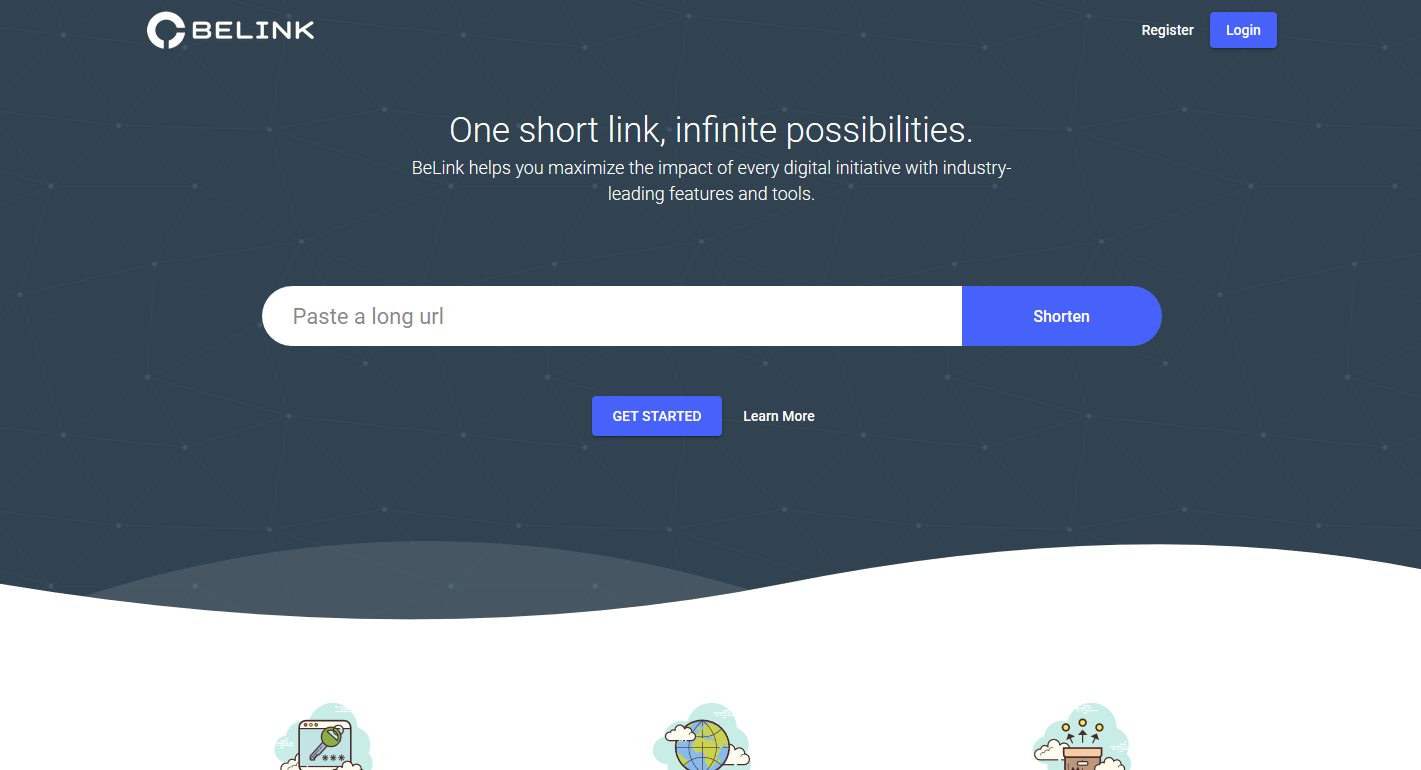
    2). BeLink – Ultimate URL Shortener

    BeLink

    BeLink is the highest quality and most advanced Bio Link script ? url shortener application currently available. It can be used to easily create your own public or private url shortener website in minutes without any coding knowledge.

    It features a clean and more design, high quality code and unmatched feature set. Read more about the features below and try the demo site to see why BeLink is easily the best choice.

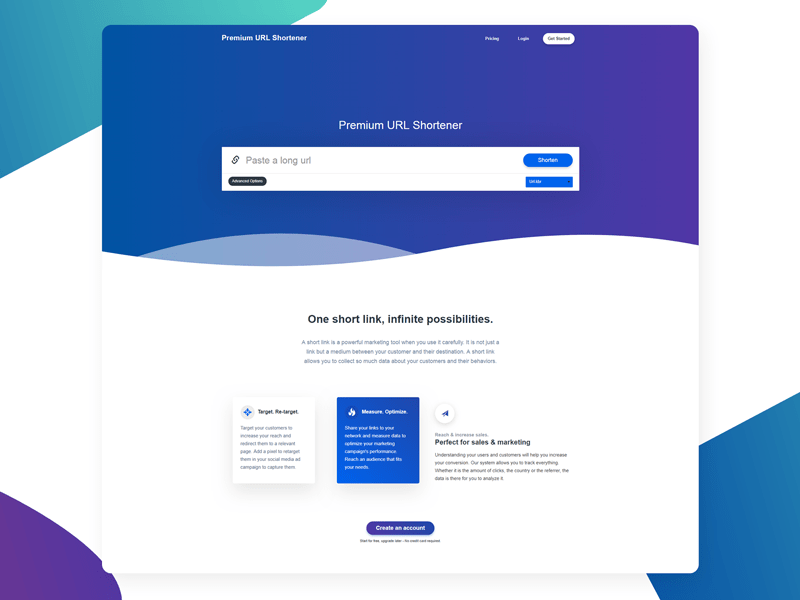
    3). Premium URL Shortener

    Premium URL Shortener

    Premium URL Shortener is a PHP URL shortener script packed with many unique features. It has been built from scratch with performance in mind. Some of the features include geotargeting, premium membership, powerful dashboard and admin panel and a series of CMS tools to help you build your dream. Furthermore, it will keep getting better with each update!

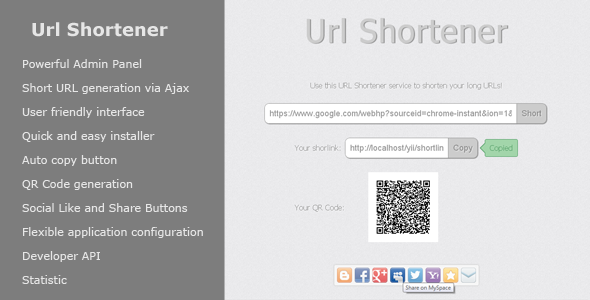
    4). URL SHORTENER BY FORZA020

    frontend

    This is advanced URL Shortener, which allows you to create your shorts URLs, for example domain.name/a3vd. Also users will have possibility to share links in popular social networks or save link as a QR-Code. In addition, this application has admin panel. You can easy customize any part of application starting with language and ending with social settings. Also flexible and advanced url search module, in admin panel, makes your work easier to control URLs.

    5). Short URL (Free)

    Short URL comes as a free PHP URL Shortening Script with MySQL in the backend. Using Short URL you can shorten long URLs. A short URL can be specified, or you can set the script to generate a random short URL. It has a neat interface, and the script allows administrators to edit, search, and delete URLs in the Admin Panel.

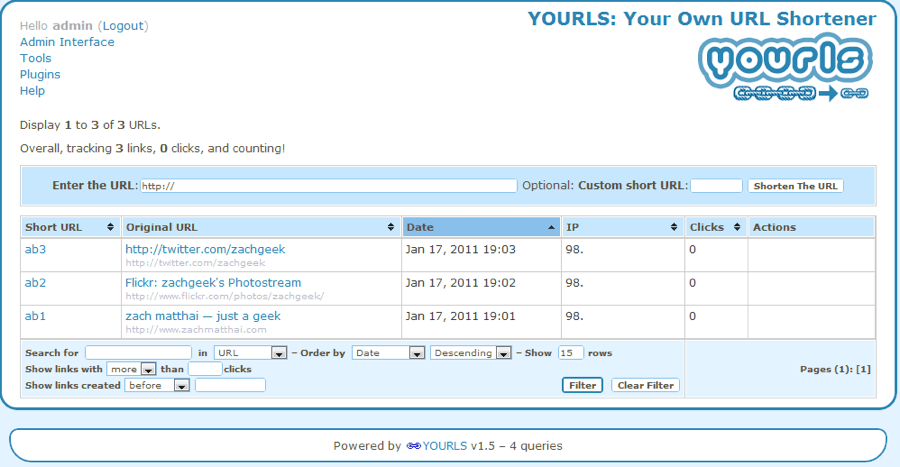
    6). YOURLS (Free)

    YOURLS script

    Run your own URL shortening service using this FREE powerful YOURLS PHP Script. In fact, YOURLS stands for Your Own URL Shortener. Running YOURLS is fun, easy, and useful too. It even provides you the opportunity to brand your short URLs. YOURLS comes as free and open source software. It is a small set of PHP scripts that will allow you to run your own URL shortening service (a la TinyURL or Bitly).

    10 Must Follow Tips to Make Secure Online Transactions

    Internet has made our life easier.

    Now we can do most of our tasks direct from our systems or smartphones. 

    Now we can do many things sitting at home like  online shopping, book railway tickets, movie tickets, money transfer etc. In India, online shopping business is growing too fast. We use our cards to make online transactions.

     But providing financial information for online activities can also put your money and your identity at risk.


    secure online transactiona
    online transaction

    To protect your online banking accounts, you should be aware of threats and know how to protect yourself online.

    Here are some tips, you can follow and make your online transactions fully secure.

    1. Always check Payment gateway and Page URL: The first thing you have to check Page url and payment gateway. payment gateway asks to select appropriate bank and options. There are few payment gateways that are popular enough and well-known. On those, you can pay.

    But be sure to check the URL. Sometimes hackers use phishing to make fake page looks exact the same as original website. While payment, it always connect to bank, at this moment, you must check the bank login URL and make sure website run on https protocol. More Information for HTTPS.

    2. Use Virtual Keyboard for Better Security: All banking websites support virtual keyboard. If you are using any public computer or your friend’s computer you should use virtual keyboard. This will protect your password from keylogger.

    3. Use Strong Password: Choose a strong password filled with numbers, symbols, and lowercase/uppercase letters. and also change your passwords in every 1-3 months. The more often, the better.

    4. Use Updated Antivirus: Always keep up-to-date antivirus and firewall security programs. Scan your computer frequently and check to make sure your firewall is turned on before shopping online, paying bills, or accessing your bank accounts.

    5. Use a trusted third-party service: Use a trusted third-party service, such as PayPal, Skrill to help protect your private information during secure online transactions. These sites provide dispute services and secure financial transactions for a small fee.

    6. Download Apps from Official Stores: If you use your smartphone for online shopping or any other transaction, you should always download smartphone apps from official app store. There are many fake stores are available online which contains apps binded with Trojan. So it is risky to use apps from these fake app store. Official apps have all original apps then why to take risk. If you are android user then always use google play store not others. Android users also visit https://www.androidhunk.com/ for android tips.

    7. Avoid Public Computers and Public Wi-Fi Hotspot: Although, you are following all tips written above, it is recommended not use public computers for making online transactions. In many shopping malls and hotels, we can get free wi-fi hotspot. We should avoid using these wi-fi networks for online transactions.  Its best to do your shopping at home, from your own computer.

    8. Don’t use one-click or easy-pay payment options. Make sure every transaction requires your password.

    9. Consider using prepaid debit cards for your online secure transactions.

    10. Always log out after accessing your shopping or banking accounts, then close your browser. Don’t allow your computer to store your usernames and passwords for shopping and banking sites.

    If you are following all the given tips, you are secure enough. Try to use tips every time you shop online and then make transactions without any worry. I also encourage people to use Internet and make life easier, But Follow some tips and enjoy the new age of Internet.

    7 Best SPAM Protection WordPress Plugins (Anti Spam Plugins)

    Spam are a big problem for anyone with a WordPress site. Whether yours is a simple website with a few pages or a multi-user platform that hosts tons of user-generated content. Spam on the other hand will hurt your credibility with search engines as well as human web visitors. So as a wordpress user Spam protection is important to us. You can use any anti spam wordpress plugins to protect your site from spams.spam protection wordpress plugins

    Here we listed 7 Best WordPress Anti Spam Plugin. use anyone of these and Stop WordPress Spam and improve google ranking.

    1). Akismet

    Akismet is a very popular anti spam plugin that will help even the beginner WP user to eliminate spam.

    While the number of downloads shouldn’t necessarily mean anything as far as effectiveness goes, I have used and loved Akismet greatly. I feel that the millions of users who downloaded the plugin feel the same way.

    Akismet is free for small WordPress blogs but you will need to part with a 5-dollar-a-month fee for big commercial websites.

    Major features in Akismet include:

    • Automatically checks all comments and filters out the ones that look like spam.
    • Each comment has a status history, so you can easily see which comments were caught or cleared by Akismet and which were spammed or unspammed by a moderator.
    • URLs are shown in the comment body to reveal hidden or misleading links.
    • Moderators can see the number of approved comments for each user.
    • A discard feature that outright blocks the worst spam, saving you disk space and speeding up your site.

    >>>Download Akismet

    2). WP-reCAPTCHA

    reCAPTCHA is a free CAPTCHA service that protects your site against spam, malicious registrations and other forms of attacks where computers try to disguise themselves as a human; a CAPTCHA is a Completely Automated Public Turing test to tell Computers and Human Apart. reCAPTCHA comes in the form of a widget that you can easily add to your blog, forum, registration form, etc.

    WP-reCAPTCHA uses a unique system that utilizes archaic word combination for its CAPTCHA as opposed to a majority of anti-spam plugins that use the same flawed verification system. This is probably why people, read Google, Facebook and Twitter, love it so much.

    >>>Download WP-reCAPTCHA

    3). Spam Free WordPress

    Spam Free WordPress is yet another lethal anti-spam plugin that is just about guaranteed to keep your site free of spam.

    SPAM Free WordPress is one of the best anti-spam plugins according to the developers who claim that it can block all cases of automated spam without false positives whatsoever. Hello Akismet?

    For what it’s worth, the SPAM Free WordPress plugin has great features including zero-reliance on CAPTCHA, low database load especially during heavy server traffic and IP address blacklisting. Sounds pretty cool if you ask me.

    >>>Download Spam Free WordPress

    4). Growmap Anti Spambot Plugin (G.A.S.P)

    This plugin will add a client side generated checkbox to your comment form asking users to confirm that they are not a spammer. It is a lot less trouble to click a box than it is to enter a captcha and because the box is genereated via client side javascript that bots cannot see, it should stop 99% of all automated spam bots.

    A check is made that the checkbox has been checked before the comment is submitted so there’s no chance that a comment will be lost if it’s being submitted by legitimate human user.

    >>>Download G.A.S.P

    5). WP-SpamShield Anti-Spam

    An extremely powerful and user-friendly WordPress anti-spam plugin that eliminates comment spam, trackback spam, contact form spam & registration spam.

    Most of the spam hitting your blog originates from bots, but quite a bit comes from humans too. This plugin works like a firewall to ensure that your commenters are in fact, human, and that those humans aren’t spamming you.

    >>>Download WP-SpamShield Anti-Spam

    6). Anti-spam

    Anti-Spam plugin not use any filling captcha system or ticking checkbox. This plugin works as a WordPress Spam Filter Plugin. Anti-spam plugin blocks spam in comments automatically, invisibly for users and for admins.

    • no captcha, because spam is not users’ problem
    • no moderation queues, because spam is not administrators’ problem
    • no options, because it is great to forget about spam completely

    Plugin is easy to use: just install it and it just works.

    >>>Download Anti Spam

    7). Anti-spam by CleanTalk

    CleanTalk is an anti-spam protection 4 in 1 for WordPress that protects login, comments, contact and WooCommerce forms all at once. You don’t need to install separate anti-spam plugins for each form. This allows your blog to work faster and save resources. After installation you will forget about spam, CleanTalk plugin will do all the work. You won’t have to deal with spam, CleanTalk will do this for you automatically.

    CleanTalk is a transparent anti-spam protection, they provide detailed statistics of all entering comments and logins. You can always be sure that there are no errors.

    >>>Download Anti Spam by CleanTalk