Home Blog Page 38

How to Delete, Disable or Limit WordPress Post Revisions

0

Hello guys, After a long time I’m here to write a tutorial to delete wordpress post revisions.

Post revisions increase your database size and does bad effect on your site.

Post revisions are the auto saving drafts that are automatically stored in your databases. Whenever you are writing a post on WordPress, it creates post revisions when you click on “drafts”. The more you have a habit of clicking on drafts while writing posts the more space it takes on your databases.

Don’t create burden on your databases by ignoring your post revisions. Deleting post revision also improve your wordpress blog loading time.

So either disabling or limiting your WordPress post revisions can solve the solution. Here’s what you exactly need to do to limit WordPress post revisions to limit the burden on your databases.

How to Disable Post Revision

Step 1: Go to your WordPress root directory.

Step 2: Open wp-config.php

Step 3: Add the following code

define(‘AUTOSAVE_INTERVAL’, 300 ); // seconds
define(‘WP_POST_REVISIONS’, false );

This will disable your future WordPress posts revisions and increases your auto save interval from 60 seconds to 300 seconds (that means your posts will be auto saving every 5 minutes instead of each and every minute). You can also the increase the time count if you want by replacing the number.

How to Limit WordPress Post Revisions

If you want to limit the number of post revisions then add this code

define('WP_POST_REVISIONS', 3);

Change the number 3 of your choice which you want.

How To Delete Previous Post Revisions

If you want to delete post revisions and associated data that is already in the database. So you will need access to your DB, either through command line ‘mysql’ or better with phpMyAdmin interface.

Select your database and execute this query:

DELETE a,b,c
FROM wp_posts a
LEFT JOIN wp_term_relationships b ON (a.ID = b.object_id)
LEFT JOIN wp_postmeta c ON (a.ID = c.post_id)
WHERE a.post_type = 'revision'

This will remove all revision posts and associated objects from the database.

After this I recommend you to OPTIMIZE tables (in phpMyAdmin just mark all tables and select Optimize) to compact your database.

Hope this tutorial will help you to Speed Up WordPress Load Time by disabling wordpress post revisions.

20+ Best Free & Premium Contact Form 7 Plugin Extensions

0

Previous we posted some best contact us form plugins collection. and we selected contact form 7 in first position. this plugin really deserve to be in 1st position. It has awesome features and the best thing is this plugin available for FREE. And you can also improve their functionality with their extensions. Here we have collected some good contact form 7 extensions which helps you to add newsletter, woocommerce order, popup message, reCaptcha, confirm email field and many other things on your contact page.

Premium Contact Form 7 Plugin Extensions

Storage for Contact Form 7

Contact Form 7 Storage plugin stores copies of all Contact Form 7 submissions (including attachments) in your WordPress database. All form entries and leads will be stored safely even if your e-mail goes down or e-mail messages go missing or get deleted.

https://codecanyon.net/item/storage-for-contact-form-7-/screenshots/7806229

Ninja Kick

Ninja kick WordPress contact form plugin uses different custom forms, it adds hidden form with push/sliding revealing information on every page of your website. Easily set up different options such as color scheme, label style, select between 30 built – in backgrounds, or even whole theme. The built – in form can be easily extended with additional labels such as company, phone, address, email and subject.

https://codecanyon.net/item/ninja-kick-wordpress-contact-form/full_screen_preview/6598780

Contact Form 7 Popup Message

Popup Message Addon is an addon for contact for 7. Using this addon you can replace your validation and success messages into beautiful popup message to attract visitors.

This useful add-on will allow you to select between 10 preset themes (color schemes) to instantly change the overall look of your Message.

https://codecanyon.net/item/contact-form-7-popup-message/full_screen_preview/11311062

WPCRM

WPCRM is ideal way to increase conversion for the leads received from contact form7 and woocommerce. It adds request quote button on woocommerce product page allowing store owner to provide customer quote.

https://codecanyon.net/item/wpcrm-crm-for-contact-form-7-woocommerce/full_screen_preview/12717499

Google Maps Integration

This WordPress plugin is created to display Google maps as a field for Contact form 7 plugin. The visitors can easily mark any number of circle, markers, polygon, poly line or rectangle on Google maps and submit them on contact form 7. It generate a KML file automatically based on user’s input on the Google maps and attach it with the email send by contact form 7.

https://codecanyon.net/item/google-maps-integration-using-contact-form-7/full_screen_preview/9689105

Free Contact Form 7 Extensions

Contact Form 7 Honeypot

This WordPress plugin will add basic honeypot anti – spam functionality to thwart spambots without the need for an ugly captcha. It is a great plugin to reduce spam email on your website. You can also use quiz option available in contact form 7 to reduce spam email.

https://wordpress.org/plugins/contact-form-7-honeypot

Contact Form 7 Integrations

This plugin Integrates Contact Form 7 with a cloud-based contact management database.This plugin extension is built for professional websites using Contact Form 7 and manages form submissions and leads generated from your Contact Form 7 forms.

https://wordpress.org/plugins/contact-form-7-integrations/

Contact Form 7 Dynamic Text Extension

Contact form 7 dynamic text extension make the contact form 7 plugin more awesome by adding dynamic content capabilities. It let you to create pre – populated fields based on other values. This WordPress plugin provides a more elegant solution that leaves the contact form 7 plugin intact. It allows the dynamic generation of content for a text box via any shortcode. Some other features of this WordPress plugin are as follows.

Contact Form 7 – Dynamic Text Extension

Better WordPress reCAPTCHA

This plugin utilizes Google reCAPTCHA to help your blog stay clear of spams. You can use this plugin with Akismet and Contact Form 7.

https://wordpress.org/plugins/bwp-recaptcha/

Contact Form DB

Contact form DB plugin saves contact form database to your WordPress database and provides and administration page and shortcodes to view and display the data. You can easily capture form submissions from contact form 7 plugin, Jetpack contact form plugin, Gravity forms plugin, and many more.

https://wordpress.org/plugins/contact-form-7-to-database-extension/

Contact Form 7 Widget

With this WordPress plugin, you can easily add contact form 7 by using a widget so no shortcodes are needed. It allows you to save time and energy implementing and using contact form 7.

Widget Contact Form 7

Contact Form 7 Newsletter

With this plugin you can Easily integrate email marketing with the Contact Form 7 plugin. When users contact you, they get added to your newsletter!

https://wordpress.org/plugins/contact-form-7-newsletter/

Contact Form 7 – Success Page Redirects

This WordPress plugin provides a straight forward method to redirect visitors to success pages or thank you pages, if their messages are successfully delivered. If no message is sent or if there is any error, the user will be not redirected to any page.

Contact Form 7 – Success Page Redirects

Flamingo

Flamingo WordPress plugin is specially created to be a total CRM package. You can easily manage contact list and messages listed via contact form plugins. It is available in many different languages.

Flamingo

Contact Form 7 MailChimp Extension

This WordPress plugin is specially integrated with contact form 7 with Mailchimp. You can easily add form submissions to predefined lists in Mailchimp, using it latest API.

Connect Contact Form 7 and Mailchimp

Contact Form 7 Style

Contact form 7 style WordPress plugin supports custom styling, which can be easily managed via admin dashboard. It also has some predefined templates such as simple pattern, Valentine’s Day, Christmas that can be easily activated on your contact form 7 plugin.

https://wordpress.org/plugins/contact-form-7-style/

Jquery Validation For Contact Form 7

This plugin adds jquery validation to your contact form 7. You will be able to validate extra validation rules like: url, date, credit card, phone number in the contact form 7 fields.

Jquery Validation For Contact Form 7

Contact Form 7 Modules

Contact form 7 modules will add hidden fields to contact form 7 plugin. You can easily choose the value of the hidden field dynamically populated in your form when you are contacted. When someone contacts you using your contact form 7 contact form, you will have more information about their visit. Some other features of this WordPress plugin are as follows.

Contact Form 7 Modules

Contact Form 7 Select Box Editor Button

Do you want use one contact form for all your contacts? Then, this WordPress plugin will help you to do the same and without modifying the contact form 7 extension. It guides to set up contact form 7, enter the contacts there, and then adds an editor button by which you can easily link a specific contact form.

https://wordpress.org/plugins/contact-form-7-select-box-editor-button/

Contact Form 7 Campaign Monitor Extension

This plugin Automatically add form submissions to predetermined lists in Campaign Monitor, using its latest API. This Campaign Monitor Extension supports multiple mailing lists and API Keys.

https://wordpress.org/plugins/contact-form-7-campaign-monitor-extension/

Contact Form 7 – PayPal Extension

This WordPress plugin allow you to put a PayPal submit button in your contact form 7 so users will be redirected to PayPal easily and quickly. It is a great extension for those WordPress site owners who want to add fast online payment facility on their web portals.

Accept PayPal Payments using Contact Form 7

Contact Form 7 City Field Extension

Contact form 7 city field extension provides one new tag types for contact form 7 plugin. It will add a text input field to contact form 7 and monitors that fields for character entries. As the user enter the text, autocomplete returns place predictions in the form of a dropdown pick list.

Contact Form 7 City Field Extension

Contact Form 7 Lead info with country

Contact form 7 lead info with country helps you to track the users who fills out a form. The lead tracking info includes original referrer, form page url, landing page, user ip, country of the user and browser.

Lead info with country for Contact Form 7

Contact Form 7 Signature Addon

This plugin adds a new field type to the Contact Form 7 plugin and allows users to add an handwritten signature to the message via a signature pad.

Contact Form 7 Signature Addon

Contact Form 7 Confirm Email Field

This “Contact Form 7 confirm email field” plugin extends the “Contact Form 7” plugin to verify email address which is entered second time.

Contact Form 7 Confirm Email Field

Contact Form 7 GetResponse Extension

Contact Form 7 GetResponse extension is a simple yet useful plug-in to integrate Contact Form 7 with GetResponse. Using CF7 form, contacts can be automatically added to GetResponse campaigns.

Contact Form 7 GetResponse Extension

How To Record/ Capture Desktop Screen With VLC Media Player

There are many free tools for desktop screen recording. Did you know, VLC Media Player is also perfectly capable of recording our screen, without any third-party apps.

VLC is the most popular Open Source media player which is well-known for its wide range of features and compatibility to various media formats. Almost every Windows user uses VLC player as the default media player.

But only a handful of people are aware that VLC can even record the desktop without the need of additional software. Yes! you heard it right.

You can record your desktop screen in the desired media format with the required frame rate. We accept that there are many software available. But  you must remember that VLC is absolutely free and you don’t need to install any other software in your PC just for recording screen occasionally. So, Let’s do a screen recording with VLC media player.

Download & Install VLC Media Player

We know you already installed VLC media player. But if you don’t have, you can download latest version of VLC From https://www.videolan.org/

How to Record Desktop Screen With VLC

Follow the steps to record desktop screen.

  • Open VLC Player in your PC.
  • In VLC player, open Media settings and then select “Stream“.
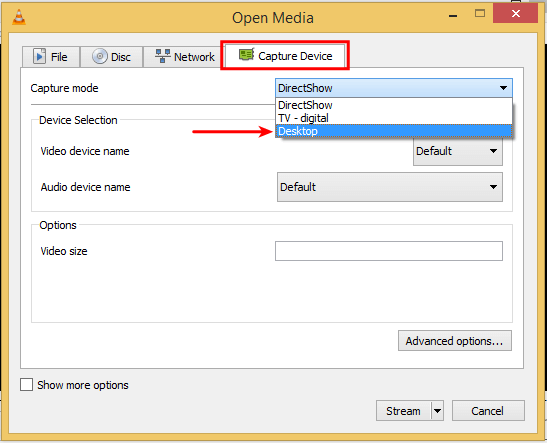
  • A dialog box will open There, we select the “Capture Device” tab, and select “Desktop” as our capture mode.

Screen Recording with VLC Media Player

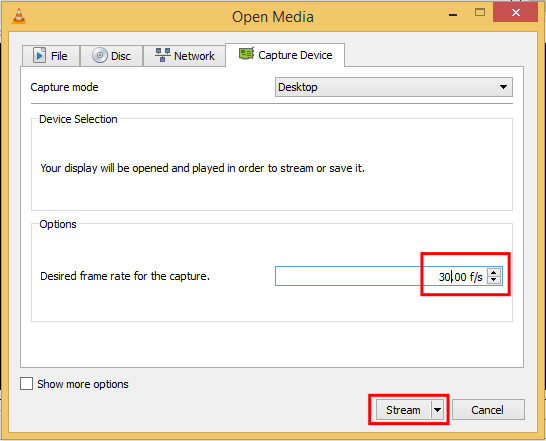
  • After selection of “Desktop” as capture mode reveal some new options. change the desired frame rate for the capture from the useless 1 frame per second to a reasonable number. Like 20-30 f/s. Then Click on Stream.

Screen Recording with VLC Media Player1

  • A stream output wizard will open to mention the source. You can leave it intact, so hit Next.
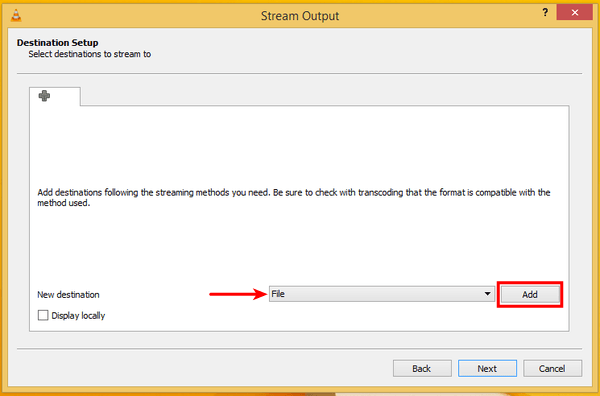
  • Now in “New destination” make sure “File” is selected and then click on Add.

Screen Recording with VLC Media Player2

  • Browse to the location where you want to save your output file and enter the file name completely with extension (Eg. video.mp4).
  • Now Next, Under the profile choose the video format, The default MP4 is good enough, but you can select multiple other options. Then click on next button.
  • Now click on the Stream button to start the recording. Minimize the VLC player and continue with your work.
  • Once you are done with the recording click on the Stop button in the VLC player to stop recording.
  • That’s it.

Pros of VLC screen recording

  • The biggest advantage of VLC as a screen recording solution is that it works on every platform VLC is available on, on Windows, Mac, and Linux.
  • Also, since for many of us VLC is the default media player, or at least we have it installed, we don’t need any extra software to do a screen recording.

Cons of VLC screen recording

  • VLC won’t record sound, just picture.
  • It will record the complete desktop, we can’t select just part of it, or change the recording’s resolution.
  • There is no indication of how long we have recorded, or any indication that we are recording the screen, for that matter.
  • We can’t pause the recording, we must just stop it altogether.
  • There is no limit but the limit of the disk’s capacity.
  • And, last but not least, VLC doesn’t offer any editing whatsoever, not even basic cuts. We need to use additional software for that.

10+ Best Free & Pro Domain WHOIS Lookup PHP Scripts

With Domain Whois Lookup tool we can get information of domains and websites. there are many popular domain whois search tools available. But if you are thinking to build your own whois lookup site then here are few Free and Premium PHP scripts to easily build whois lookup site. Free script have limited features But premium scripts are more powerful. If you are going for professional look, We recommend to use Premium Whois Lookup Scripts.

You may also Like: 10+ Best URL Shortener Scripts to Create Own Shortener Site

Free Whois Lookup Scripts

#1. Whois Lookup Script

A PHP script for performing WHOIS lookups on domain names. This script available for free to download and also has premium version. Free version has some limitations But Premium version have lots of more options. You can display adsense ads or godaddy affiliate links.

[su_button url=”https://whoislookupscript.com/” target=”blank” style=”flat” background=”#37cc36″ color=”#ffffff” size=”9″ radius=”0″ icon_color=”#c7f2fc” rel=”nofollow”]MORE / INFO[/su_button]  [su_button url=”https://whoislookupscript.com/demo.php” target=”blank” style=”flat” background=”#37cc36″ color=”#ffffff” size=”9″ radius=”0″ icon_color=”#c7f2fc” rel=”nofollow”]DEMO[/su_button]

#2. php easy: whois lookup script

Whois Lookup Script is intended to lookup for domain registrant data for all top-level domains (both generic and country-code types are supported, 158 TLDs in total), and also for IP whois lookups. Update: now provides only unique whois results and cuts off comments when querying different whois servers for IP data

[su_button url=”https://www.phpeasycode.com/whois/” target=”blank” style=”flat” background=”#37cc36″ color=”#ffffff” size=”9″ radius=”0″ icon_color=”#c7f2fc” rel=”nofollow”]MORE / INFO[/su_button]  [su_button url=”https://www.phpeasycode.com/showdemo.php?target=/whois/whois.php” target=”blank” style=”flat” background=”#37cc36″ color=”#ffffff” size=”9″ radius=”0″ icon_color=”#c7f2fc” rel=”nofollow”]DEMO[/su_button]

#3. Domain Search

You can easily find available, and expired domains with this tool. You only need to enter a keyword like your name without spaces, or use hyphen’s instead of spaces, and it will automatically search for available top level domains.

[su_button url=”https://programs.orgfree.com/php/whois_lookup/index.php” target=”blank” style=”flat” background=”#37cc36″ color=”#ffffff” size=”9″ radius=”0″ icon_color=”#c7f2fc” rel=”nofollow”]MORE / INFO[/su_button]  [su_button url=”https://programs.orgfree.com/php/whois_lookup/index.php” target=”blank” style=”flat” background=”#37cc36″ color=”#ffffff” size=”9″ radius=”0″ icon_color=”#c7f2fc” rel=”nofollow”]DEMO[/su_button]

#4. CJ Domain Whois

The script allows users to lookup domain name availability. The script can be used as part of a web sites ordering process or can be used to redirect traffic to an affiliate. The script is fully customisable using style sheets.

The CJ Domain Whois is multilingual, currently supporting English, French, Dutch, Arabic, German and Swahili!

[su_button url=”https://www.cj-design.com/products/free-downloads/php-scripts/cjdomainwhois” target=”blank” style=”flat” background=”#37cc36″ color=”#ffffff” size=”9″ radius=”0″ icon_color=”#c7f2fc” rel=”nofollow”]MORE / INFO[/su_button]  [su_button url=”https://www.cj-design.com/demos/cjdomainwhoisv1/index.php” target=”blank” style=”flat” background=”#37cc36″ color=”#ffffff” size=”9″ radius=”0″ icon_color=”#c7f2fc” rel=”nofollow”]DEMO[/su_button]

#5. Max’s Whois

Max’s Whois is a semi professional domain whois script which allows you to check domain availability before registration. The script supports the most important tlds like .com, .net, .org, .biz, .info, .name, … A list of almost 100 tlds are included as well. Installation and setup is very simple. You only need to upload the files to your webserver and set the relevant tlds.

[su_button url=”https://www.phpf1.com/product/domain-whois-script.html” target=”blank” style=”flat” background=”#37cc36″ color=”#ffffff” size=”9″ radius=”0″ icon_color=”#c7f2fc” rel=”nofollow”]MORE / INFO[/su_button]  [su_button url=”https://www.phpf1.com/product/domain-whois-script.html” target=”blank” style=”flat” background=”#37cc36″ color=”#ffffff” size=”9″ radius=”0″ icon_color=”#c7f2fc” rel=”nofollow”]DEMO[/su_button]

#6. PHP Whois script

PHP script to get whois information from whois server. This script supports IP whois and 140 tlds and cc-tlds

[su_button url=”https://99webtools.com/blog/php-whois-lookup-class/” target=”blank” style=”flat” background=”#37cc36″ color=”#ffffff” size=”9″ radius=”0″ icon_color=”#c7f2fc” rel=”nofollow”]MORE / INFO[/su_button]  [su_button url=”https://99webtools.com/blog/php-whois-lookup-class/” target=”blank” style=”flat” background=”#37cc36″ color=”#ffffff” size=”9″ radius=”0″ icon_color=”#c7f2fc” rel=”nofollow”]DEMO[/su_button]

#7. FunkWhois

FunkWhois – A whois domain lookup tool. Can be configured for single tld or multiple tld look up. Can display the owners details for domains already registered and has the option to link to your registration script.

[su_button url=”https://www.3ascripts.co.uk/whois/index.htm” target=”blank” style=”flat” background=”#37cc36″ color=”#ffffff” size=”9″ radius=”0″ icon_color=”#c7f2fc” rel=”nofollow”]MORE / INFO[/su_button]  [su_button url=”https://www.3ascripts.co.uk/whois/whoisx.php” target=”blank” style=”flat” background=”#37cc36″ color=”#ffffff” size=”9″ radius=”0″ icon_color=”#c7f2fc” rel=”nofollow”]DEMO[/su_button]

Premium Whois Lookup Scripts

#8. Whois Script

Whois Script is a powerful PHP based script to fetch all the information about a domain instantly and efficiently through AJAX. Script is fully responsive based on bootstrap 3 and adjustable on any mobile or tablet screen. This script is intended to lookup for domain registrant data for all top-level domains (both generic and country-code types are supported, 158 TLDs in total), and also for IP whois lookups.

[su_button url=”https://codecanyon.net/item/whois-script/10572196?ref=trixhub” target=”blank” style=”flat” background=”#37cc36″ color=”#ffffff” size=”9″ radius=”0″ icon_color=”#c7f2fc” rel=”nofollow”]MORE / INFO[/su_button]  [su_button url=”https://codecanyon.net/item/whois-script/full_screen_preview/10572196?ref=trixhub” target=”blank” style=”flat” background=”#37cc36″ color=”#ffffff” size=”9″ radius=”0″ icon_color=”#c7f2fc” rel=”nofollow”]DEMO[/su_button]

#9. Bulk Whois Domain Script

This script now comes with 450+ tlds and a built in modal pop up for the whois of domains. This script also have feature for Bulk Alexa rank checker, Bulk Google Pagerank Checker, Bulk domain availability checker. With this script you can check unlimited domains to see whether they are available to register or not.

[su_button url=”https://codecanyon.net/item/bulk-whois-domain-availability-checker-script/6446220?ref=trixhub” target=”blank” style=”flat” background=”#37cc36″ color=”#ffffff” size=”9″ radius=”0″ icon_color=”#c7f2fc” rel=”nofollow”]MORE / INFO[/su_button]  [su_button url=”https://codecanyon.net/item/bulk-whois-domain-availability-checker-script/6446220?ref=trixhub” target=”blank” style=”flat” background=”#37cc36″ color=”#ffffff” size=”9″ radius=”0″ icon_color=”#c7f2fc” rel=”nofollow”]DEMO[/su_button]

#10. Bulk Domain Checker + Whois Lookup

Bulk Domain Checker + Whois Lookup build with simple coding , simple structure and easy to use.Domain checker support Domain recommendation that allowing you to set custom words, insert you list of some word and then script will be randoming and insert your words into base domain name, or checking another exetsions first if domain name have been registered before. You can display advertisements and also earn affiliate commission on domain sales.

[su_button url=”https://codecanyon.net/item/bulk-domain-checker-whois-lookup/4428543?ref=trixhub” target=”blank” style=”flat” background=”#37cc36″ color=”#ffffff” size=”9″ radius=”0″ icon_color=”#c7f2fc” rel=”nofollow”]MORE / INFO[/su_button]  [su_button url=”https://codecanyon.net/item/bulk-domain-checker-whois-lookup/full_screen_preview/4428543?ref=trixhub” target=”blank” style=”flat” background=”#37cc36″ color=”#ffffff” size=”9″ radius=”0″ icon_color=”#c7f2fc” rel=”nofollow”]DEMO[/su_button]

#11. Webmaster Tools

Webmaster Tools is lightweight and easy to install PHP Script which contains a collection of webmaster tools developed to help with their daily chores. The application have 18 built-in unique services which can be easily configured to your own needs. We can say this script is all in one PHP script.

[su_button url=”https://codecanyon.net/item/webmaster-tools/4567057?ref=trixhub” target=”blank” style=”flat” background=”#37cc36″ color=”#ffffff” size=”9″ radius=”0″ icon_color=”#c7f2fc” rel=”nofollow”]MORE / INFO[/su_button] [su_button url=”https://codecanyon.net/item/webmaster-tools/full_screen_preview/4567057?ref=trixhub” target=”blank” style=”flat” background=”#37cc36″ color=”#ffffff” size=”9″ radius=”0″ icon_color=”#c7f2fc” rel=”nofollow”]DEMO[/su_button]

#12. AtoZ SEO Tools

A to Z SEO Tools is a Search Engine Optimization Tools. This script have more than 50 SEO Tools to keep track your SEO issues and help to improve the visibility of a website in search engines. It also has feature to check whois database. you can use this script to build whois checker site as well as many other features.

[su_button url=”https://codecanyon.net/item/atoz-seo-tools-search-engine-optimization-tools/12170678?ref=trixhub” target=”blank” style=”flat” background=”#37cc36″ color=”#ffffff” size=”9″ radius=”0″ icon_color=”#c7f2fc” rel=”nofollow”]MORE / INFO[/su_button] [su_button url=”https://codecanyon.net/item/atoz-seo-tools-search-engine-optimization-tools/full_screen_preview/12170678?ref=trixhub” target=”blank” style=”flat” background=”#37cc36″ color=”#ffffff” size=”9″ radius=”0″ icon_color=”#c7f2fc” rel=”nofollow”]DEMO[/su_button]


30 Fun & Interesting Facts About the Internet- World Wide Web

We use internet everyday. Without Internet we feel we are dying. Everyone is on Facebook. Google or Bing is your default search engine. Almost everyone have that one embarrassing video on YouTube. But how much do you really know about the Internet revolution?

Lets find out how all this began with this list of funny, amazing and interesting facts about the internet:

  1. The work behind the internet began back in 1960’s at MIT. The first message ever transmitted over the internet was LOG. Why? The user had attempted to type LOGIN but the server couldn’t take the heavy load and crashed after G.
  2. The first web page created was this .This webpage contains information about the “World Wide Web” project and how you can make a simple webpage with links.
  3. The Amazon logo is indicating you can get everything from A to Z (look at the arrow).
  4. The first ever banner ad invaded the Internet in 1994. The ad was part of AT&Ts “you will” campaign, and was placed on the HotWired homepage.
  5. The first emoticon, created in 1979, was a rather simple -) and didn’t really look like a face. 3 years later, was proposed by Scott Fahlman.
  6. The first music sharing service, Napster, went live in 1998.
  7. Since the creation of the internet, file sharing has been a major issue for the authorities. During 1989, McGill University shut-down their FTP indexing site after they discovered that their website was responsible for over half of the traffic going from America to Canada.
  8. As of 2010, Google says that the Internet today contains about 5 million terabytes of data and claims it has only indexed around 0.04% of it all!
  9. A single Google query uses 1,000 computers in 0.2 seconds to retrieve an answer.
  10. 16% to 20% of the searches Geoogle gets each day have never been Googled before.
  11. Over half of all the downloading and uploading online is file sharing that is often considered illegal.
  12. To copy the entire internet to a disc, it would take over one billion DVD’s. And if you want to save it on the more powerful Blu-Ray discs it would take about 200 million of them.
  13. About one-third of all internet searches are pornography content. It is estimated that 80% of all images on the Internet are of naked women.
  14. Approximately 250 billion emails are sent everyday, out of which 80% are pure spam.
  15. About 20-25 hours of video are uploaded to YouTube from around the globe each minute.
  16. The first ever YouTube video was uploaded on April 23rd 2005,by Jawed Karim (one of the founders of the site) and was 18 seconds long, entitled “Me at the zoo”.
  17. The very first spam email was sent in 1978, when DEC released a new computer and operating system, and a DEC marketeer decided to send a mass email to 600 users and administrators of the ARPANET. The guy who had typed it all in didn’t quite understand the system, and ended up typing the addresses first into the Subject, which then overflowed into the To: field, the CC: field, and finally the email body too! And thus, after that the term “spam” was coined.
  18. The internet took a total of 4 years to reach an audience of 50 million; it took radio 38 years, and television 13 years.
  19. Each day, about 20 million people “tweet”. and Twitter has 250 million users.
  20. The first tweet was sent on March 21, 2006 by Jack Dorsey:
  21. Today, the Internet is 8,844 days old. Check HowOldIsTheInter.net to keep up to date.
  22. “Gangnam Style” by Psy is still the most viewed YouTube video of all time. It’s been viewed over two billion times.
  23. The first email was sent in 1971 by Ray Tomlinson to himself. He doesn’t remember what it said. And The first spam email was sent in 1978 over ARPNET by a guy named Gary Thuerk. He was selling computers.
  24. The first registered domain was symbolics.com.
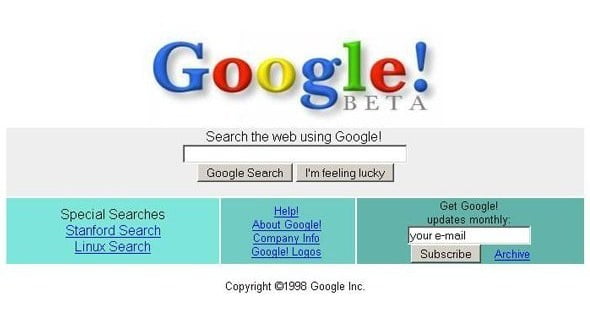
  25. This is what Google looked like in 2004.

    google in 2004
    This is what Google looked like in 2004
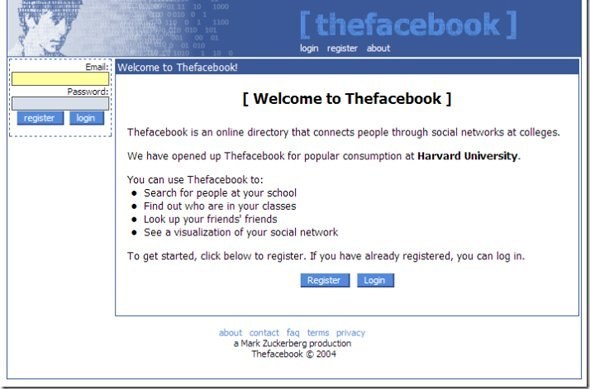
  26. This is what Facebook looked like in 2004.

    facebook in 2004
    This is what Facebook looked like in 2004
  27. 10% of sex offenders use online dating.
  28. 33% of female online daters have had sex on the first online date.
  29. One million babies have been born from people who met on Match.com.
  30. The most expensive keyword for Google AdWords is “insurance.”

PS: All these information is collected from Other Internet Sources.

If you know any other surprising fact about the Internet, you can share with us in comments.

1200+ Cosmo Mini PNG Icons FREE Download to use On Your Website

Icons are very important part of web design.

It helps in making design more attractive. Looking for free icons for your next web project? You are at right place. Here, I am sharing an icon set that contains more than 1200 icons. This icon set is called Cosmo Mini.

Cosmo Mini is a free set of 1262 flat icons that has items from many categories (devices, filetypes, actions, badges, foods..). They are sized 40*40 px, available in PNG format and most of them are mono-colored.

Cosmo Mini comes with 1262 icons. These icons covers everything related to devices, food, vehicles, actions, badges, filetypes and many other thing you need.

Icons are sized 40×40 px. All these icons are available in PNG format and most of the icons are mono colored. Icons are put in folders in categorized manner. So, searching for icons is also very easy.

These icons are also available in high resolution. But you will have to pay for it.

These icons are free to use in any kind of commercial or non-commercial project unlimited times.

Download From here