Home Blog Page 10

डिजिटल बिजनेस कार्ड क्या है और इसके लाभ, निःशुल्क क्यूआर डिजिटल कार्ड बनाएं

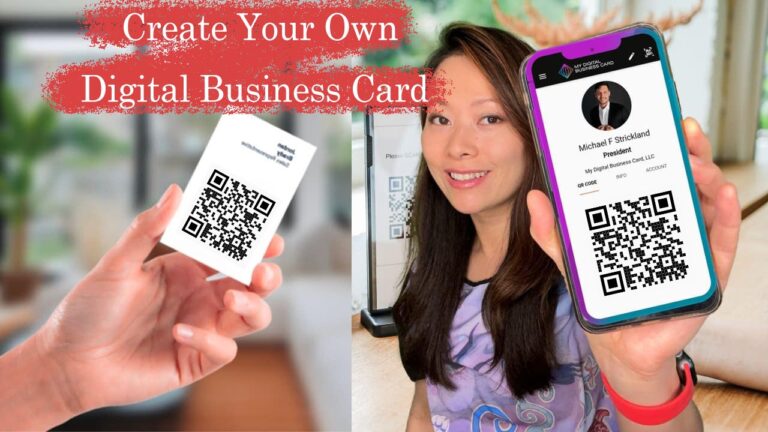
हम जानते हैं कि कागज़ के विज़िटिंग कार्ड अब पुराने हो चुके हैं और आजकल सब कुछ डिजिटल हो गया है।  डिजिटल बिज़नेस कार्ड  या  डिजिटल इंटरएक्टिव विज़िटिंग कार्ड  या  मिन वेबसाइट  को आधुनिक तकनीक के युग में संभावित ग्राहकों तक व्यवसायों की पहुँच बढ़ाने के लिए पेश किया जाता है।

इन डिजिटल बिजनेस कार्डों को स्मार्टफोन, टैबलेट और डेस्कटॉप जैसे बहुउद्देशीय उपकरणों के लिए विकसित किया जा सकता है।
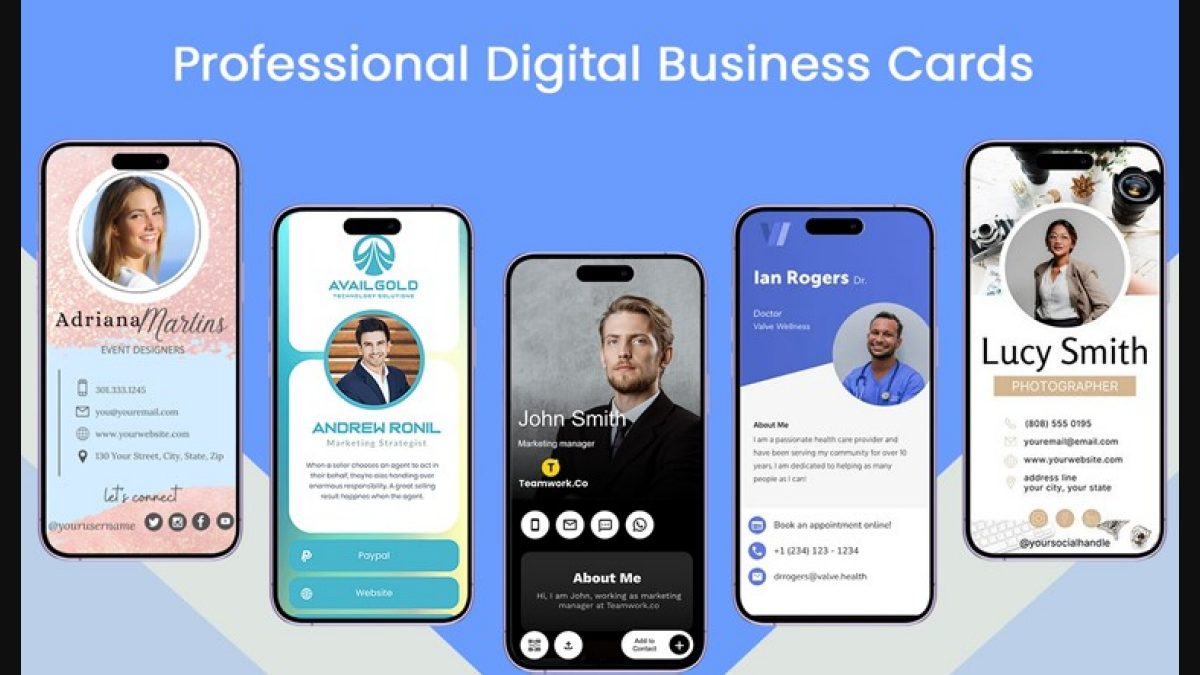
डिजिटल बिजनेस कार्ड

हम जानते हैं कि आज हर व्यक्ति के पास मोबाइल फोन है और अधिकांश लोग अपना अधिकतम समय सोशल मीडिया प्लेटफॉर्म पर बिता रहे हैं।

डिजिटल बिजनेस कार्ड में सोशल मीडिया पर जानकारी साझा करने के लिए बहुत सारे इंटरैक्टिव विकल्प शामिल किए गए हैं।

डिजिटल बिजनेस कार्ड / डिजिटल विजिटिंग कार्ड क्या है?

डिजिटल बिजनेस कार्ड  एक इंटरैक्टिव फ़ाइल है जिसमें आपके और आपके संगठन के बारे में सभी आवश्यक जानकारी होती है।

सरल शब्दों में, डिजिटल बिजनेस कार्ड या डिजिटल विजिटिंग कार्ड किसी कंपनी या व्यक्ति के बारे में व्यावसायिक जानकारी वाले कार्ड होते हैं।

इन डिजिटल बिजनेस कार्डों में इंटरैक्टिव तत्व शामिल हैं, जैसे,

  • सोशल मीडिया लिंक
  • उत्पाद एवं सेवाएं
  • भुगतान विवरण
  • छवि गैलरी
  • यूट्यूब वीडियो लिंक
  • ग्राहक प्रतिक्रिया प्रपत्र  और
  • जानकारी फॉर्म

डिजिटल बिजनेस कार्ड किसके लिए उपयुक्त हैं?

ये कार्ड सभी प्रकार के व्यवसाय मालिकों (छोटे, मध्यम, बड़े) और उद्यमियों के लिए उपयुक्त हैं – जो अक्सर अपने व्यक्तिगत और व्यावसायिक संपर्क विवरण और व्यावसायिक जानकारी आदि साझा करने के लिए अपने भौतिक विजिटिंग कार्ड साझा करते हैं।

डिजिटल बिजनेस कार्ड व्यवसाय (कौशल) उन्मुख पेशेवरों के लिए सबसे अच्छा विकल्प हैं जैसे: डिजिटल मार्केटर, आर्किटेक्ट, चार्टर्ड अकाउंटेंट, बिजनेस कंसल्टेंट, रियल एस्टेट एजेंट, कलाकार, बीमा सलाहकार, घरेलू सेवाएं, इलेक्ट्रीशियन, प्लंबर, बढ़ई आदि।

आइये गहराई से देखें:

क्या आप अपने उत्पादों और सेवाओं को बेचने के लिए अपने संभावित ग्राहकों को स्मार्ट और सुरुचिपूर्ण इंटरैक्टिव बिजनेस कार्ड से प्रभावित करना चाहते हैं?

डिजिटल बिजनेस कार्ड आपको अपने ग्राहकों तक अपना संदेश सबसे रणनीतिक तरीके से पहुंचाने में मदद करेंगे।

इसके लिए लाभदायक:

  1. व्यवसाय स्वामी (लघु, मध्यम, बड़े पैमाने पर):  व्यवसाय स्वामी जो व्यवसाय प्राप्त करने के लिए संभावित ग्राहकों को कॉल करते हैं और/या उनसे व्यक्तिगत रूप से मिलते हैं।
  2. बिक्री पेशेवर:  स्वतंत्र बिक्री पेशेवर, फील्ड स्टाफ और बिक्री अधिकारी।
  3. सॉफ्टवेयर और आईटी:  वेब डिजाइनर, डिजिटल और सोशल मीडिया मार्केटर्स, फ्रीलांसर, अंशकालिक जॉबर्स जो व्यवसायियों से मिलते हैं या उनसे बात करते हैं।
  4. विपणन एजेंसियां:  विज्ञापन एजेंसी, ब्रांडिंग एजेंसी, समाचार पत्र, मुद्रण और मीडिया योजना हाउस।
  5. सलाहकार:  आर्किटेक्ट, इंटीरियर डिजाइनर, चार्टर्ड अकाउंटेंट, वित्त और अन्य सलाहकार।
  6. इवेंट और ट्रैवल्स:  इवेंट मैनेजमेंट, टूर्स और ट्रैवल एजेंसियों या कंपनियों के पेशेवर।
  7. वित्त एवं  रियल एस्टेट ब्रोकर्स और बीमा सलाहकार।
  8. शिक्षा और प्रशिक्षण:  कॉर्पोरेट प्रशिक्षक, शैक्षिक कार्यशालाएं, मानव संसाधन सलाहकार और शिक्षक, ट्यूटर, कोचिंग सेंटर, अध्ययन मंडल।
  9. स्वास्थ्य और सौंदर्य:  जिम, ब्यूटीशियन, सैलून, आहार विशेषज्ञ, छवि सलाहकार योग और नृत्य पेशेवर।

हमारा डिजिटल बिजनेस कार्ड प्लेटफ़ॉर्म कार्ड डिज़ाइन करना सरल, सुविधाजनक और विश्वसनीय बनाता है। सिर्फ़ 5 मिनट
में अपनी ज़रूरत की चीज़ें बनाएँ 

यह डिजिटल बिजनेस कार्ड  स्मार्ट, सुरुचिपूर्ण और किफायती है।

एक डिजिटल बिजनेस कार्ड हमेशा आपकी जेब में रहता है, कभी फटता नहीं है, और कभी खत्म नहीं होता।

आपका डिजिटल विजिटिंग कार्ड आसानी से अपडेट किया जा सकता है

आसानी से और कुशलता से डिजिटल/वर्चुअल बिजनेस कार्ड कैसे बनाएं

अब तक आप डिजिटल बिजनेस कार्ड के महत्व को समझ गए होंगे, अब आइए जानें कि कुछ आसान चरणों में एक कुशल डिजिटल बिजनेस कार्ड कैसे बनाया जाए।

पहले डिजिटल बिजनेस कार्ड बनाना एक मुश्किल काम था जिसे केवल कुछ तकनीकी विशेषज्ञता वाला व्यक्ति ही बना सकता था। हालाँकि, प्रौद्योगिकी के विकास के साथ ये बोझिल कार्य कोई भी व्यक्ति बहुत कम समय में कर सकता है।

कुछ ऑनलाइन वेबसाइट की मदद से आप आसानी से अपना डिजिटल बिजनेस कार्ड बना सकते हैं। ऐसी ही एक वेबसाइट है DigitalPata.com , जिसमें कुछ बेहतरीन फीचर्स के साथ एक इंटरैक्टिव इंटरफ़ेस है जैसे कि बिजनेस के घंटे, फोटो गैलरी, भुगतान विवरण, गूगल मैप्स इंटीग्रेशन, यूट्यूब लिंक इंटीग्रेशन आदि जोड़ना।

यदि आप digitalpata.com का उपयोग करके डिजिटल बिजनेस कार्ड बनाने के बारे में अधिक जानना चाहते हैं तो पूरा लेख पढ़ने के लिए यहां क्लिक करें ।

डिजिटल बिजनेस कार्ड की उत्कृष्ट विशेषताएं:

  • किसी के साथ भी कार्ड साझा करें, असीमित बार
  • कार्ड को असीमित बार अपडेट करें.
  • ई-कॉमर्स ऑनलाइन स्टोर
  • खाते की फोटो
  • उपलब्ध टेम्पलेट्स में से कोई डिज़ाइन चुनें
  • 5 उत्पाद या सेवाएँ
  • गैलरी में 10 तस्वीरें
  • सोशल मीडिया लिंक
  • यूट्यूब वीडियो गैलरी में 5 वीडियो
  • छवियों के साथ उत्पाद.
  • भुगतान अनुभाग
  • संपर्क प्रपत्र शामिल

एक बिज़नेस कार्ड, अनंत संभावनाएँ

  1. वन-क्लिक कॉल:  अपने फ़ोन के ज़रिए कॉल करने के लिए
  2. वन-क्लिक व्हाट्सएप:  अपने कॉन्टैक्ट में नंबर सेव किए बिना मैसेज भेजें
  3. सिंगल  क्लिक ईमेल:  एक क्लिक पर उत्पाद या सेवा के बारे में अधिक जानने के लिए ईमेल भेजें
  4. वन-क्लिक नेविगेट:  यह विकल्प ग्राहक को स्थान प्राप्त करने और गूगल मानचित्र के माध्यम से नेविगेट करने की अनुमति देता है
  5. संपर्क में जोड़ें:  ग्राहकों को संपर्क सहेजने की अनुमति देता है।
  6. वेबसाइट और सोशल लिंक:  यह ग्राहकों के साथ सभी लोकप्रिय सोशल मीडिया लिंक साझा करने का एक बहुत ही शक्तिशाली और अभिनव विकल्प है।
  7. असीमित शेयर:  यह विकल्प ग्राहक को अपने दोस्तों के साथ उत्पादों और सेवाओं को संदर्भित करने की अनुमति देता है
  8. ऑनलाइन स्टोर:   सूचीबद्ध/जोड़े गए उत्पाद ऑनलाइन स्टोर द्वारा बेचे जाते हैं।
  9. अद्यतन करना आसान:  परिवर्तन कभी भी, कहीं भी अद्यतन किए जाते हैं।
  10. फोटो गैलरी:  हम उत्पादों या सेवाओं की तस्वीरें जोड़ सकते हैं।
  11. यूट्यूब वीडियो गैलरी:  5 यूट्यूब लिंक जोड़े गए हैं।
  12. भुगतान अनुभाग:  भुगतान अनुभाग में, हम पेटीएम, जीपे, फोनपे नंबर और क्यूआर कोड जोड़ते हैं
  13. पूछताछ फॉर्म:  यह फॉर्म नाम और ईमेल दर्ज करके किसी भी उत्पाद या सेवा के बारे में पूछताछ करने की अनुमति देता है।

क्या आप एक व्यवसायी / उद्यमी हैं, या पेशे से जुड़े विशेषज्ञ हैं? कम कीमत पर विश्व स्तरीय डिज़ाइन किए गए बिज़नेस कार्ड के साथ अपने व्यवसाय को बढ़ावा दें..!

Top 51 Warren Buffett Quotes For Your Business Success

Warren Buffett quotes

Warren Buffett  is an American business magnate, investor, and philanthropist. He is widely considered the most successful investor of the 20th century.

Buffett is the chairman, CEO and largest shareholder of Berkshire Hathaway and consistently ranked among the world’s wealthiest people. He was ranked as the world’s wealthiest person in 2008 and as the third wealthiest person in 2011. In 2012, American magazine Time named Buffett one of the most influential people in the world. 

Warren Buffett best quotes

Source: Wikipedia

Recommended: 50 Best Inspirational Quotes for Entrepreneurs

Top 15 Must Have Android Apps for Bloggers

Top  51 Best Quotes from The Leader Warren Buffett

  1. Rule No. 1: Never lose money; Rule No. 2: Don’t forget Rule No. 1
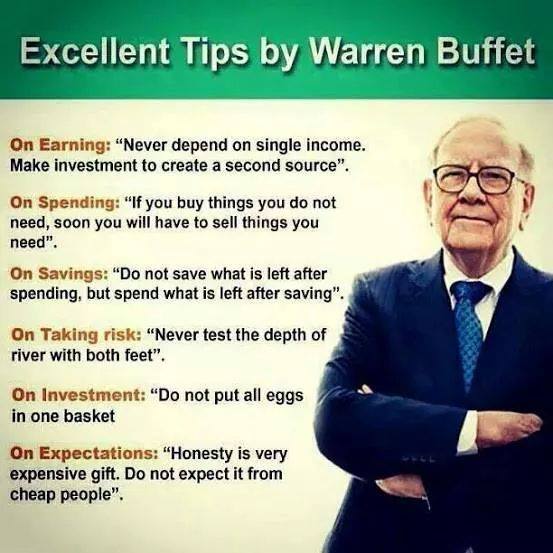
  2. Honesty is a very expensive gift; don’t expect it from cheap people.
  3. If you buy things you do not need, soon you will have to sell things you need.
  4. I made my first investment at age eleven. I was wasting my life up until then.
  5. Somebody once said that in looking for people to hire, you look for three qualities: integrity, intelligence, and energy. And if you don’t have the first, the other two will kill you. You think about it; it’s true. If you hire somebody without [integrity], you really want them to be dumb and lazy.
  6. It takes 20 years to build a reputation and five minutes to ruin it. If you think about that you’ll do things differently.
  7. It’s nice to have a lot of money, but you know, you don’t want to keep it around forever. I prefer buying things. Otherwise, it’s a little like saving sex for your old age.
  8. Wall Street is the only place that people ride to in a Rolls-Royce to get advice from those who take the subway.
  9. The most important thing to do if you find yourself in a hole is to stop digging.
  10. Long ago, Ben Graham taught me that ‘Price is what you pay; value is what you get.’  Whether we’re talking about socks or stocks, I like buying quality merchandise when it is marked down.
  11. I try to buy stock in businesses that are so wonderful that an idiot can run them.  Because sooner or later, one will.
  12. There seems to be some perverse human characteristic that likes to make easy things difficult.
  13. Never test the depth of the water with both feet.
  14. It’s better to hang out with people better than you. Pick out associates whose behavior is better than yours and you’ll drift in that direction.
  15. I am a better investor because I am a businessman, and a better businessman, because I am no investor.
  16. I get to do what I like to do, every single day of the year.
  17. Someone’s sitting in the shade today because someone planted a tree a long time ago.
  18. Never depend on a single income.  Make investments to create a second source.
  19. Be fearful when others are greedy, and greedy when others are fearful.
  20. Life is like a snowball. The important thing is finding wet snow and a really long hill.
  21. In the business world, the rearview mirror is always clearer than the windshield.
  22. Do not save what is left after spending, but spend what is left after saving.
  23. If you’ve been playing poker for half an hour and you still don’t know who the patsy is, you’re the patsy.
  24. No matter how great the talent or efforts, some things just take time. You can’t produce a baby in one month by getting nine women pregnant.
  25. You only have to do a very few things right in your life so long as you don’t do too many things wrong.
  26. Should you find yourself in a chronically leaking boat, energy devoted to changing vessels is likely to be more productive than energy devoted to patching leaks.
  27. You only find out who is swimming naked when the tide goes out.
  28. Never ask a barber if you need a haircut.
  29. Risk comes from not knowing what you’re doing
  30. In the business world, the rear view mirror is always clearer than the windshield.
  31. When forced to choose, I will not trade even a night’s sleep for the chance of extra profits.
  32. Money will not change how healthy you are, or how many people you love.
  33. Never invest in a business you cannot understand.
  34. It’s far better to buy a wonderful company at a fair price than a fair company at a wonderful price.
  35. If you don’t feel comfortable owning something for 10 years, then don’t own it for 10 minutes.
  36. Do not put all eggs in one basket.
  37. I always knew I was going to be rich.  I don’t think I ever doubted it for a minute.
  38. Diversification is a protection against ignorance.  It makes very little sense for those who know what they’re doing.
  39. Most people get interested in stocks when everyone else is.  The time to get interested is when no one else is.  You can’t buy what is popular and do well.
  40. Opportunities come infrequently.  When it rains gold, put out the bucket, not the thimble.
  41. A public-opinion poll is no substitute for thought.
  42. Focus on your customers and lead your people as though their lives depended on your success.
  43. Investing is simple, but not easy.
  44. Things you like to do should be a hobby of yours, but things the world does should be a business of yours.
  45. Successful investing means knowing when to buy, when to sell and when to rent.
  46. Investing in yourself is the best thing you can do.  Anything that improves your own talents; nobody can tax it or take it away from you.
  47. We will reject interesting opportunities rather than over-leverage our balance sheet.
  48. If past history was all there was to the game, the richest people would be librarians.
  49. Either hold a rock concert, or a ballet; but don’t hold a rock concert and advertise it as a ballet.
  50. The happiest people do not necessarily have the best things; they simply appreciate the things they have.
  51. Chains of habit are too light to be felt until they are too heavy to be broken.

How to Create QR-Based Clickable Digital Business Card

Have you ever wondered about how to create your own digital business card? We in the iTechcube.com have bring the solution for you. We will guide you step by step to create your own digital business card or Mini Website (Personal Portfolio Website)

If you want to know more about Digital Business Card and its features read our article on What is Digital Business Card & its Benefits

Steps to Create Your Digital Business Card

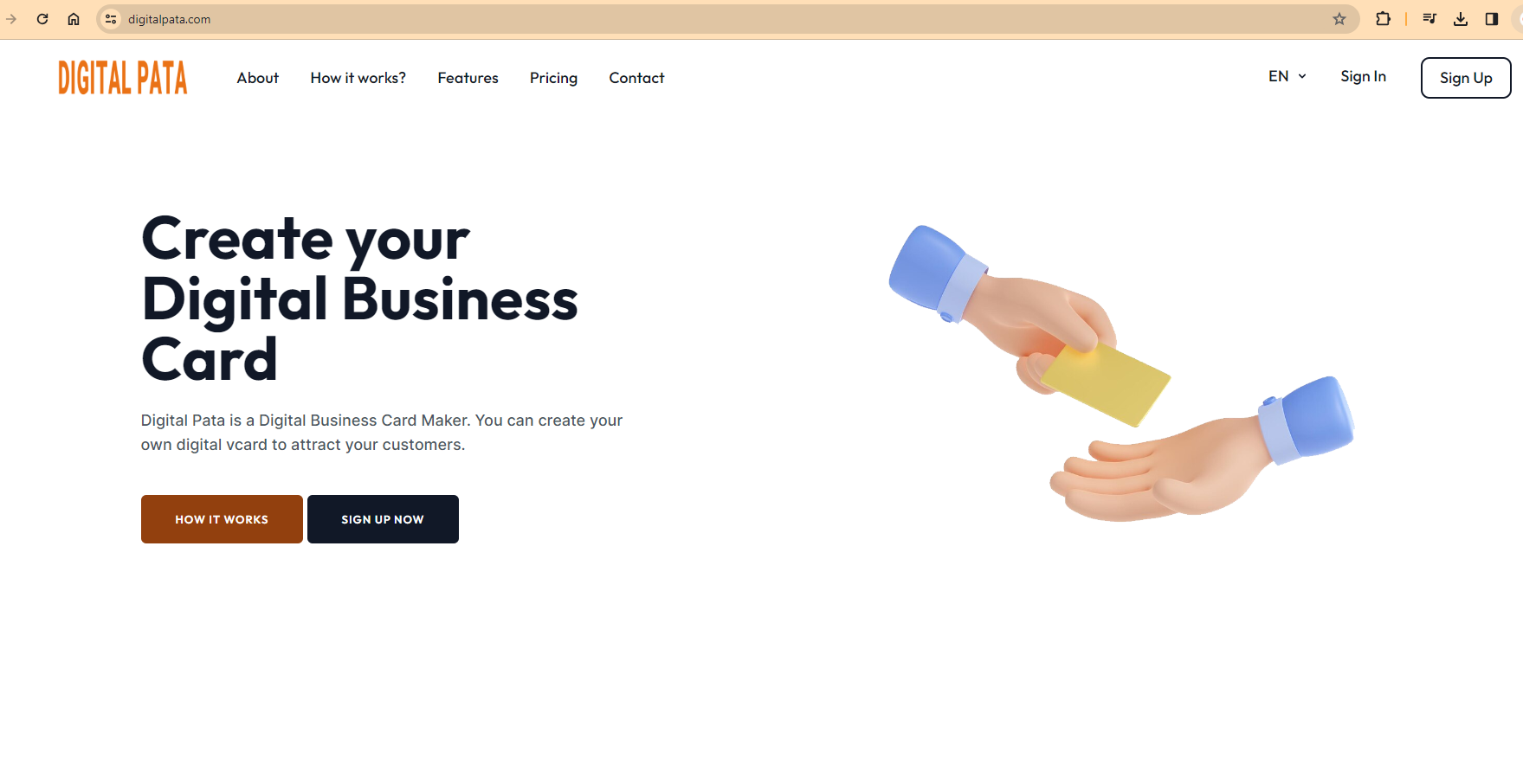
Step1- Go to DigitalPata.com. It is a popular website to create digital business card in simple and easy steps.

Digital Business Card

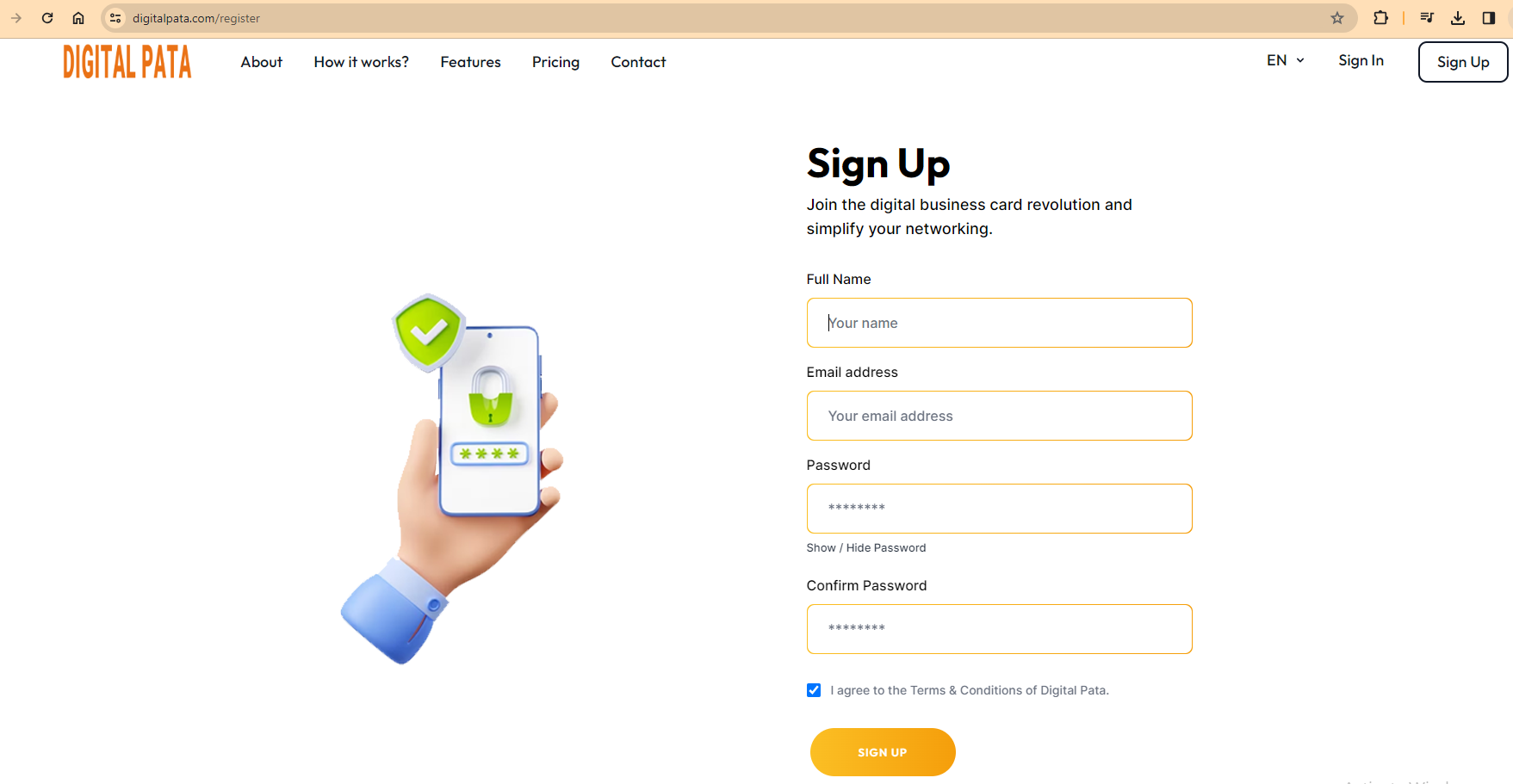
Step 2- Create an account by clicking on sign-up button. You can sign up using your name and E-mail address or you can directly sign up using your Google account. Type your name, E-mail and desired password to sign up with DigitalPata.com

image 1

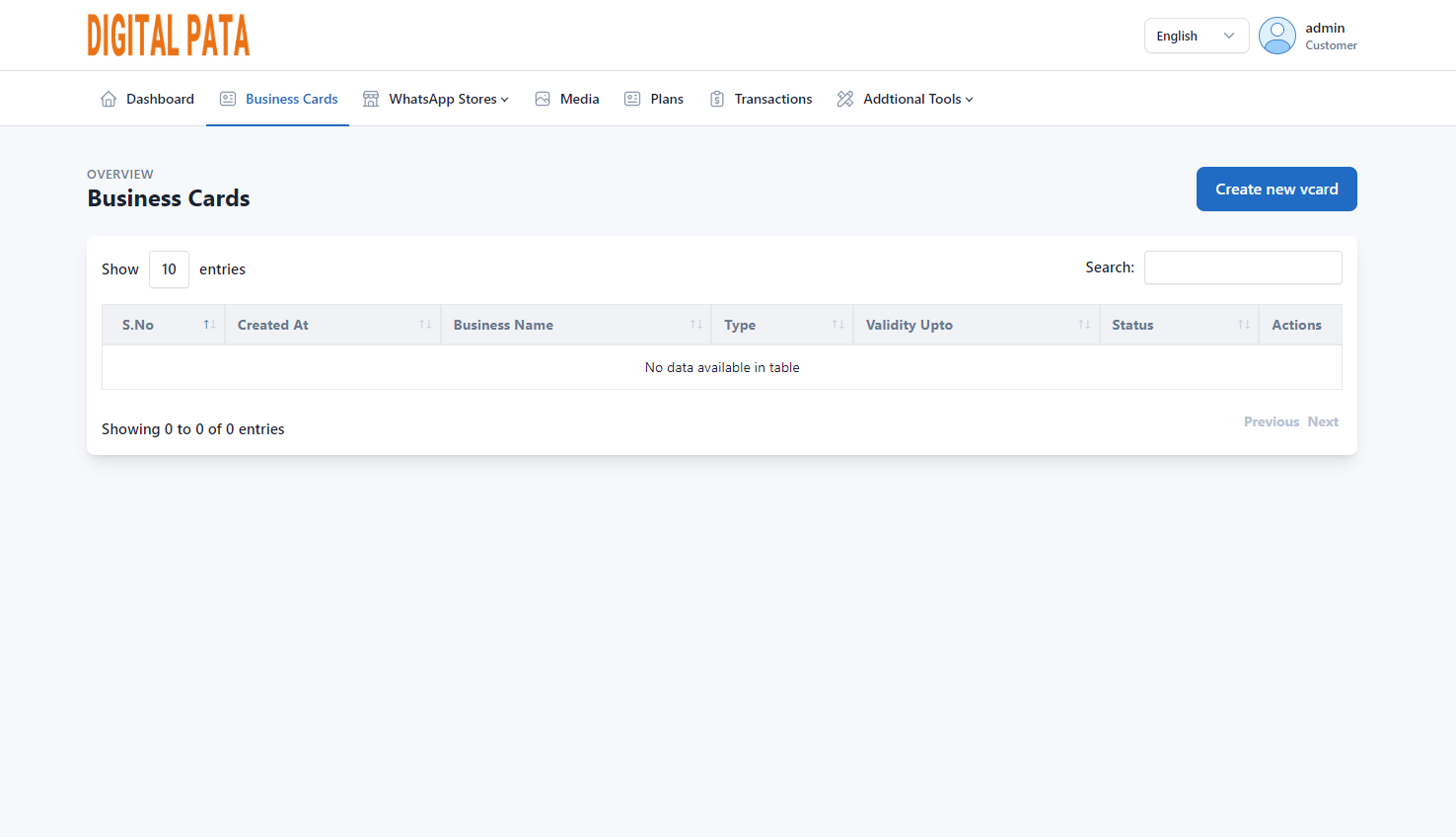
Step 3- After signing up on the website click on Business cards tab, you will be headed to the following window where you can create your digital business card (vcard). Click on Create new vcard button shown in the screen.

digital pata

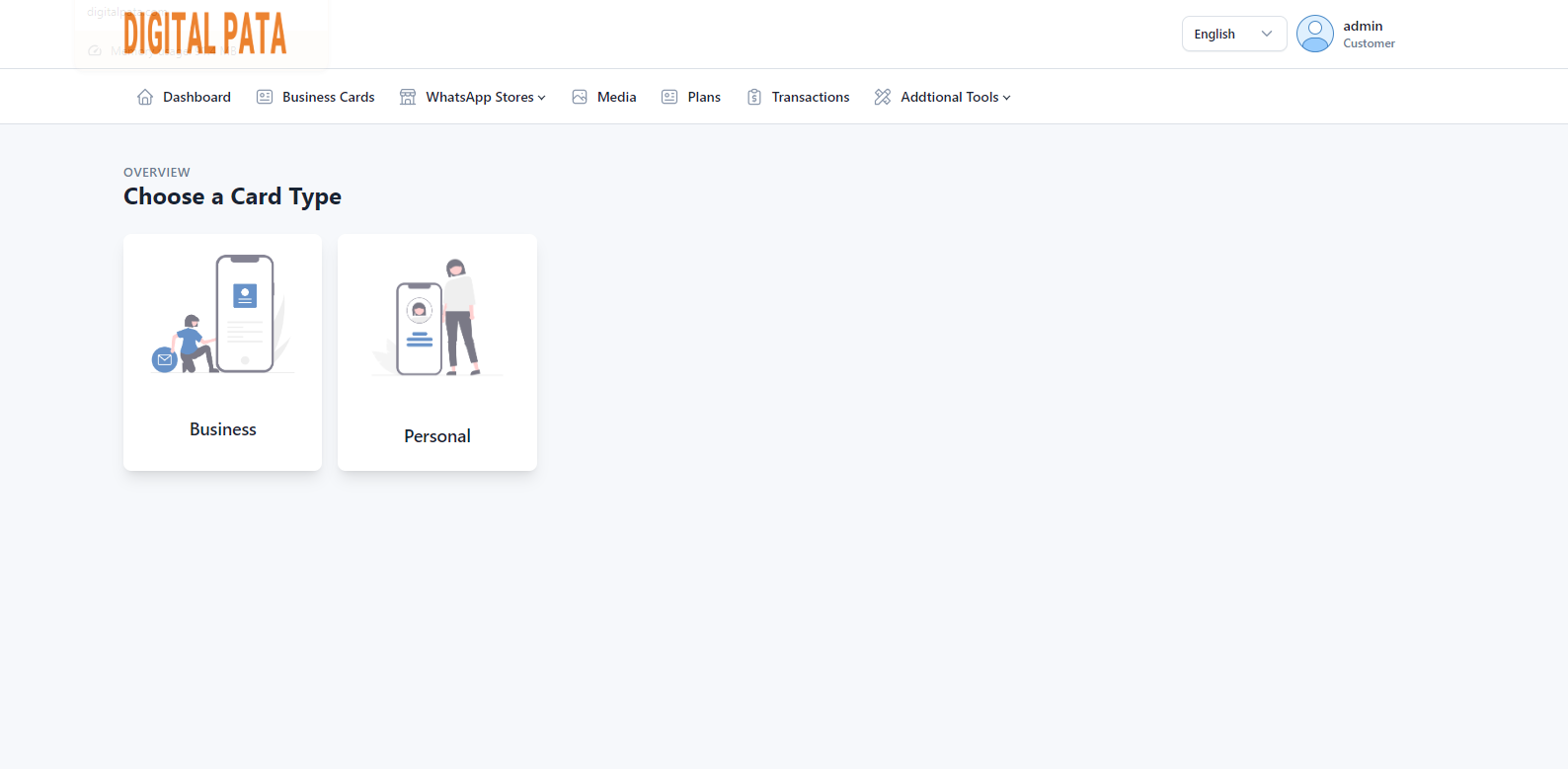
Step 4- Choose the card type. You can choose business card or personal card. Business Card is for entrepreneurs and personal card is for professionals.

image 5

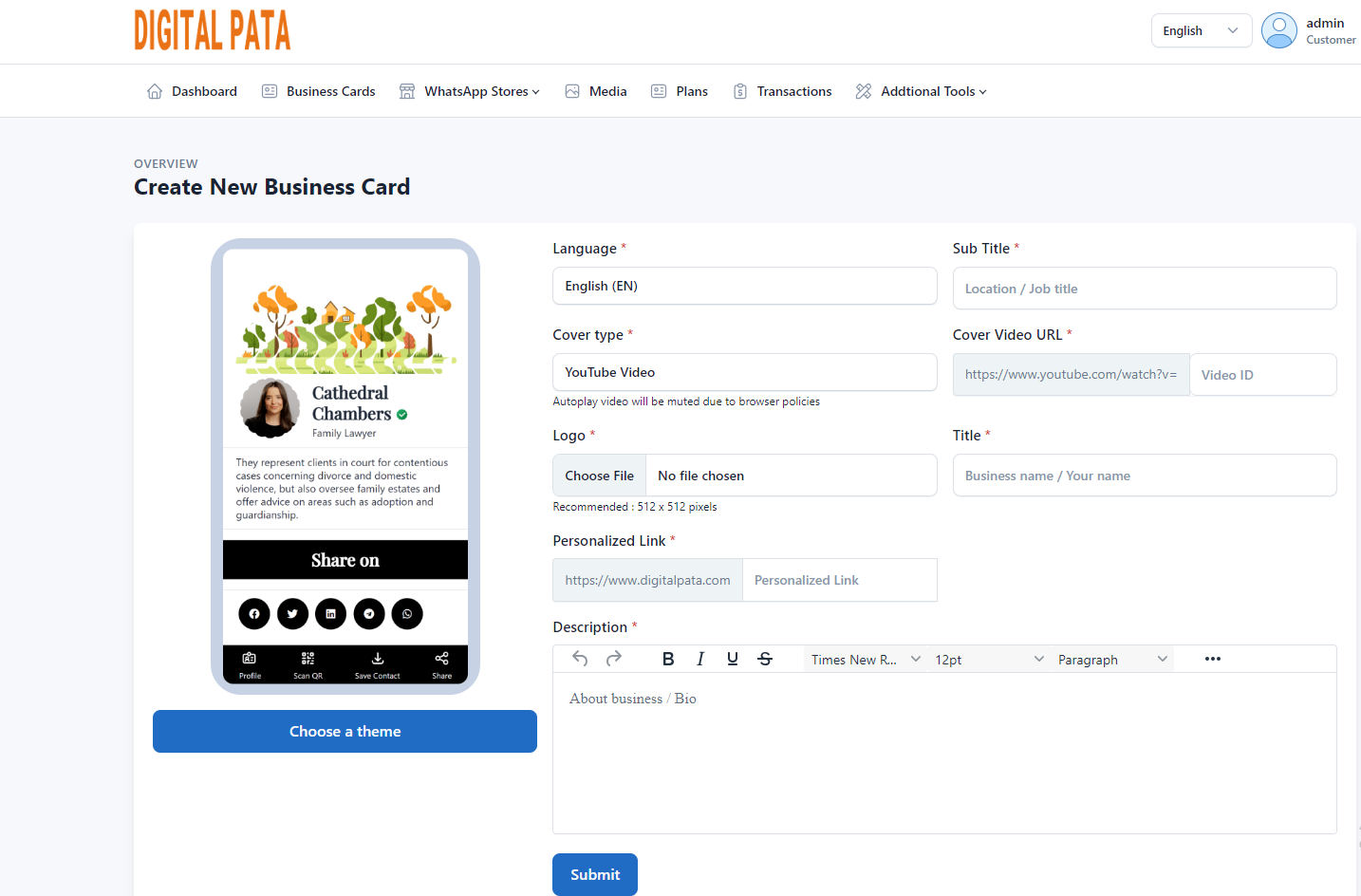
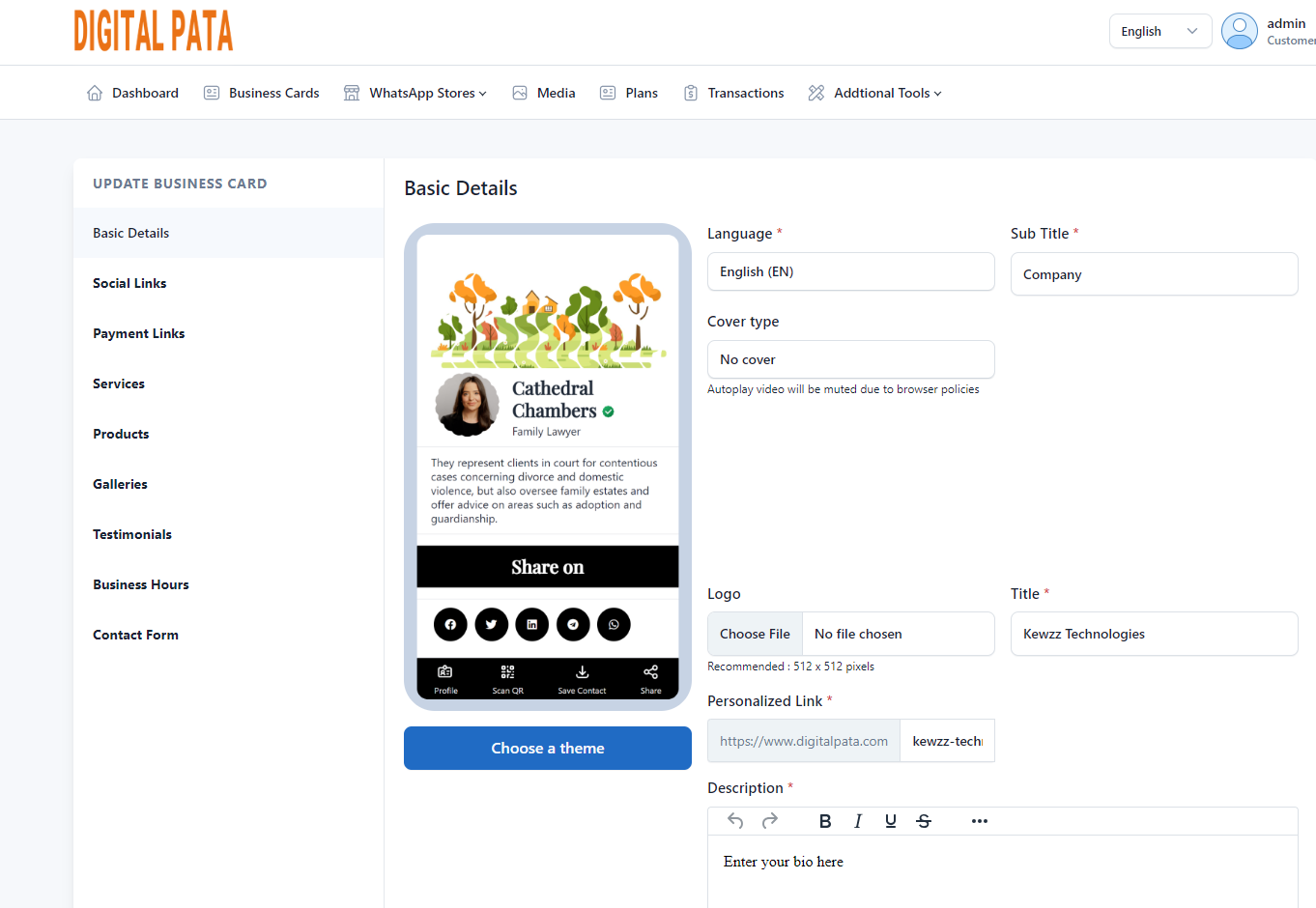
Step 5- Now you have come to the window where you have to fill the details of your business. Fill the details as you want them to appear in your digital business card. You can also embed the link of YouTube video or choose a photo as the cover type. Choose the logo of your business and enter the name of the company. You can also add the details of the your business in the description box.

qr business card

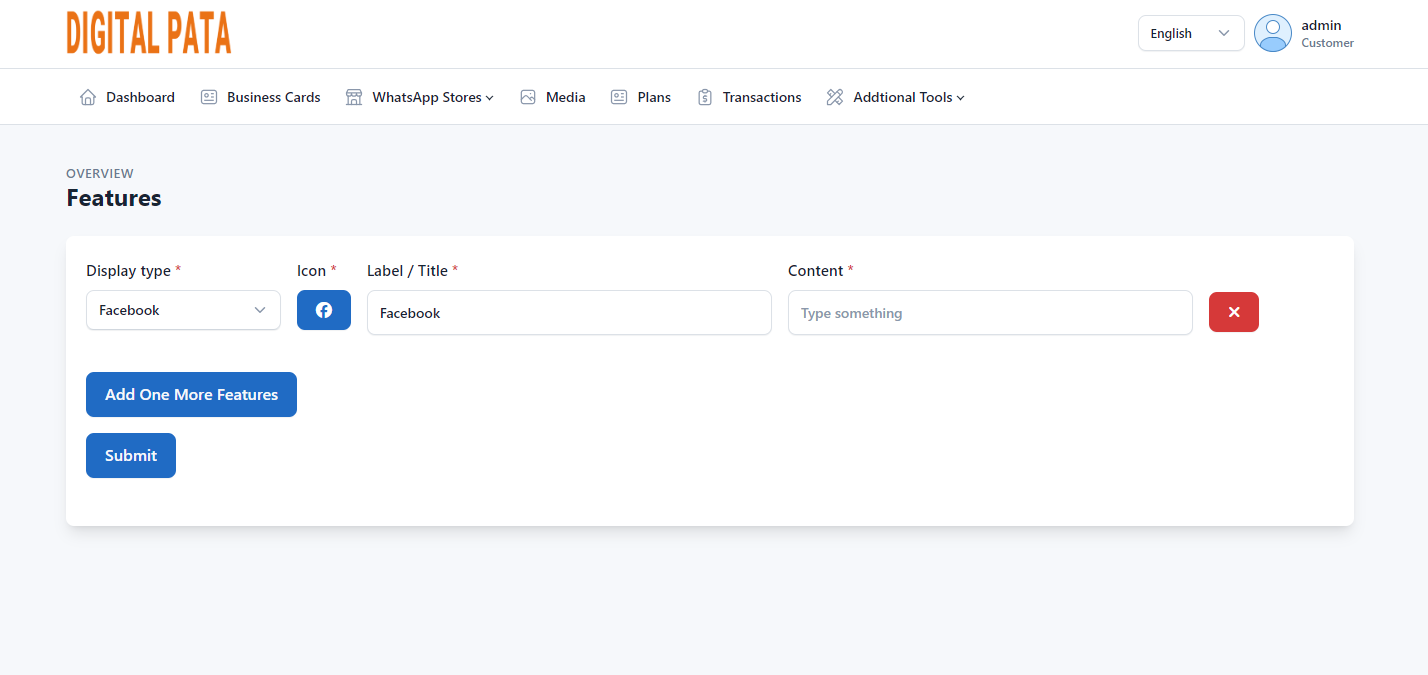
Step 6- Add some additional details like facebook page or Linkedin page. You can also add services offered by the company and product details. Add some photos to make your Digital Business card more attractive. In addition add testimonials and contact details so that customers can get connected with you in case of doubt relating to any product or services.

image 8

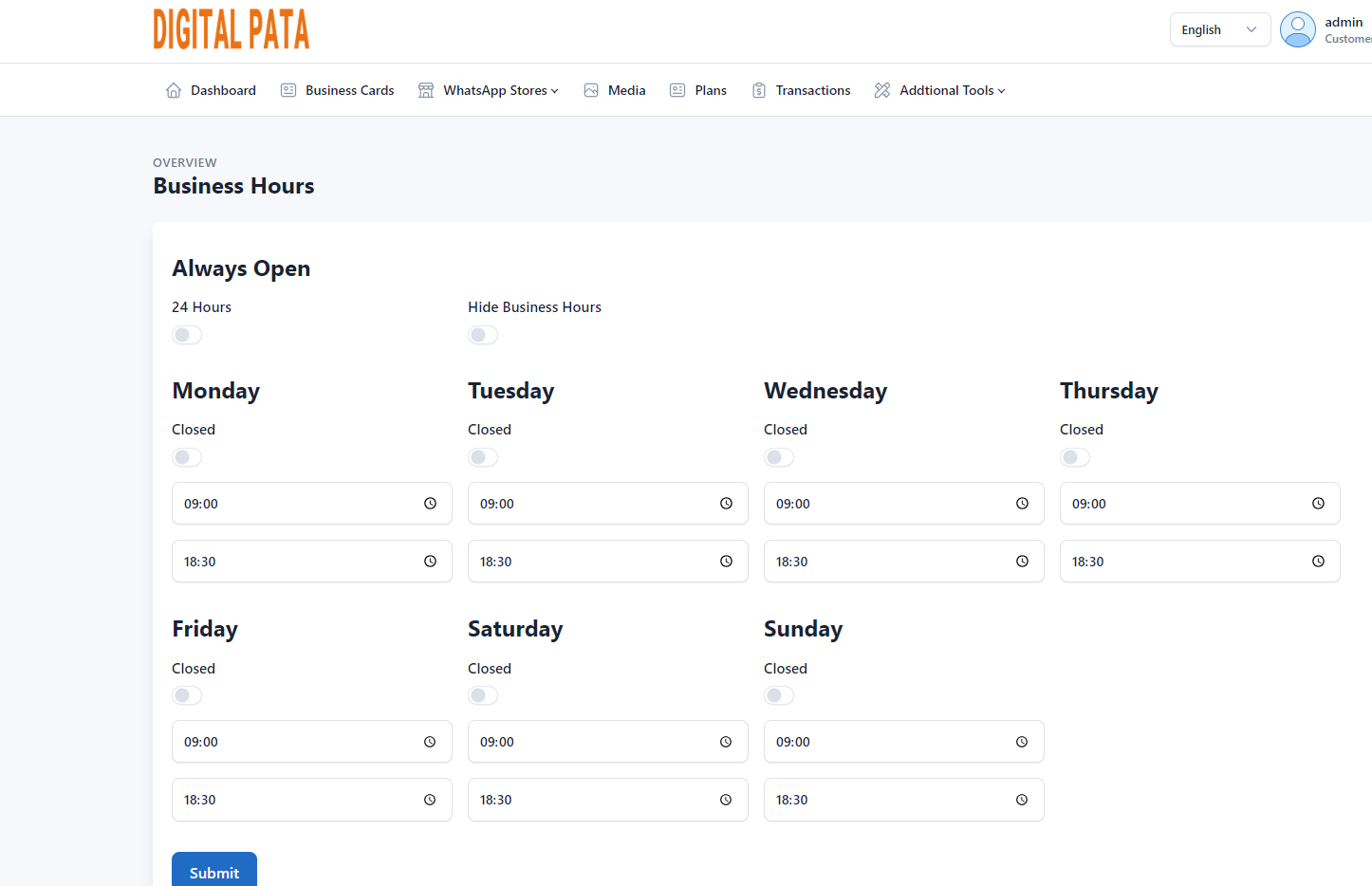
Step 7- In the next page you have to choose your business hours. If your business is open all the time you can choose always open or 24 hours, if your business has a schedule you can choose the days and timing for those days. Then click on submit button to create your digital business card (digital vcard).

image 9

Step 7– After clicking on submit button your digital business card is ready to use. The QR code of your digital card will be available which can be given to anyone as your digital identity. If you wish to change the details of your digital business card you can edit it at any time and details will be updated instantly .

image 11

Now you know how to create your digital business card or vcard in easy and simple steps. So what are waiting for go to DigitalPata.com and claim your digital presence as your personal digital business card.

What is Digital Business Card & its Benefits, Create Free QR Digital Card

We know paper visiting cards are now outdated, and now-a-days everything has changed into digitalization. Digital Business Card or Digital Interactive Visiting Cards or Min website are introduced in the modern era of advancing technology to enhance the reach of businesses to potential customers.

These digital business cards can be developed for multifunctional devices such as smartphones, tablets, and desktops.

Digital Business Card

We know that every person has access of mobile phone today and mostly are spending their maximum time on social media platforms.

The digital business card has incorporated plenty of interactive options to share information on social media.

What is a Digital Business Card / Digital Visiting Card?

A Digital business card is an interactive file that contains all the essential information about you and your organization.

In simple words, Digital Business cards or Digital Visiting Cards are cards bearing business information about a company or individual.

These digital business cards are incorporated with interactive elements like,

  • Social Media Links
  • Products & Services
  • Payment Details
  • Image Gallery
  • YouTube Video links
  • Customer Feedback Form and
  • Enquiry Form

To whom digital business cards are suitable?

These Cards are suitable to all range of Business Owners (small, medium, large) & Entrepreneurs – who frequently share their physical visiting card to share their personal and business contact details and business information, etc.,

The digital business cards are the best choice to Occupation (Skill) oriented professionals like: Digital Marketer, Architect, Charted Account, Business Consultants, Real Estate Agent, Artist, Insurance Advisor, Domestic Services, Electrician, Plumber, Carpenter etc.,

Let’s see in depth:

Do you want to impress your potential customer with smart and elegant interactive business card to sell your products and services?

Digital business cards will help you to convey your message to your customers in a most strategic manner.

Beneficial for:

  1. Business Owners (Small, Medium, Large Scale): Business owners who call and/or meet potential customers personally to get business.
  2. Sales Professionals: Independent Sales Professionals, Field Staff, and Sales Executives.
  3. Software & IT: Web Designers, Digital and Social Media Marketers, Freelancers, Part-time Jobbers who call/meet business people.
  4. Marketing Agencies: Advertising Agency, Branding Agency, Newspaper, Printing, and Media Planning Houses.
  5. Consultants: Architect, Interior Designers, Charted Accountants, Finance, and other Consultants.
  6. Events and Travels: Professionals from Event Management, Tours, and Travel Agencies or Companies.
  7. Finance & Realtors: People from Real Estate Brokers and Insurance Advisors.
  8. Education & Training: Corporate Trainers, Educational Workshops, HR Consultants and Teachers, Tutors, Coaching Centers, Study Circles.
  9. Health and Beauty: Gym, Beautician, Salon, Dietician, Image Consultants Yoga & Dance Professionals.

Our digital business card platform makes designing a card simple, convenient, and reliable.
Create what you need in Just 5 minutes

This digital business card is Smart, Elegant & Affordable.

A digital business card is always in your pocket, never tears, and never runs out.

Your digital visiting card can be easily updated

How to create digital/ virtual business cards easily and efficiently

As of now you must have understood the importance of digital business cards now lets explore how to create an efficient digital business card in some easy steps.

Earlier creating digital business cards was a difficult task which can only be created by someone with some technical expertise. However, with the advancement of technology these cumbursome tasks can be performed by anyone in very less time.

With the help of some online websites, you can create your digital business cards easily. One of such website is DigitalPata.com which has an interactive interface with some great features such as adding business hours, photo gallery, payment details, Google Maps integration, YouTube link integration, etc.

If you want to know more on how to create digital business card using digitalpata.com Click Here to read the full article.

Outstanding Features of Digital Business Card:

  • Share cards with anyone, Unlimited times
  • Update card Unlimited times.
  • E-commerce Online Store
  • Profile Photo
  • Select a design from available templates
  • 5 Products or Services
  • 10 Photos in Gallery
  • Social Media Links
  • 5 Videos in YouTube Video Gallery
  • Products with images.
  • Payment Section
  • Contact Form Included

One Business Card, Endless Possibilities

  1. One-Click Call: To make a call through your phone
  2. One-Click WhatsApp: Send a message without saving number in your contacts
  3. Single Click Email: Send email, to know more about product or service on a single click
  4. One-Click Navigate: This option allows the customer to get location and navigate through google maps
  5. Add to Contacts: Allows customers to save the contact.
  6. Website & Social Links: This is a very powerful and innovative option to share all popular social media links with customers.
  7. Share Unlimited: This option allows to customer to refer products and services with his friends
  8. Online Store:  Listed/added products are sold by the online store.
  9. Easy To Update: Changes are updated anytime, anywhere.
  10. Photo Gallery: We can add photographs of Products or Services.
  11. YouTube Video Gallery: 5 YouTube links are added.
  12. Payment Section: In the payment section, we add Paytm, Gpay, PhonePe Number and QR Codes
  13. Enquiry Form: This form allows to enquire about any product or service by entering name and email.

Are you a Businessman / Entrepreneur, or profession specified specialist? Boost up your business with world class designed business card at low price..!

WP Super Cache Plugin Advance Settings & Configuration 2025 Guide

You know every WordPress site need a cache plugin to optimize site that can load faster. WP Super Cache Plugin is a free cache plugin by Automattic, It is one of the best cache plugins on the market.

Here in this WordPress Guide, I’ll show you how to set up the WP Super Cache settings, that can speed up your website. In this plugin Advanced settings page is most advanced page to set up correctly.

WP Super Cache Plugin

It’s important to note that certain settings will vary based on whether your website is dynamic or eCommerce, whether you’re using shared or VPS hosting, and how frequently you update content and make changes to your site. Ensure that you have a good understanding of what each setting does and configure them to best suit your website.

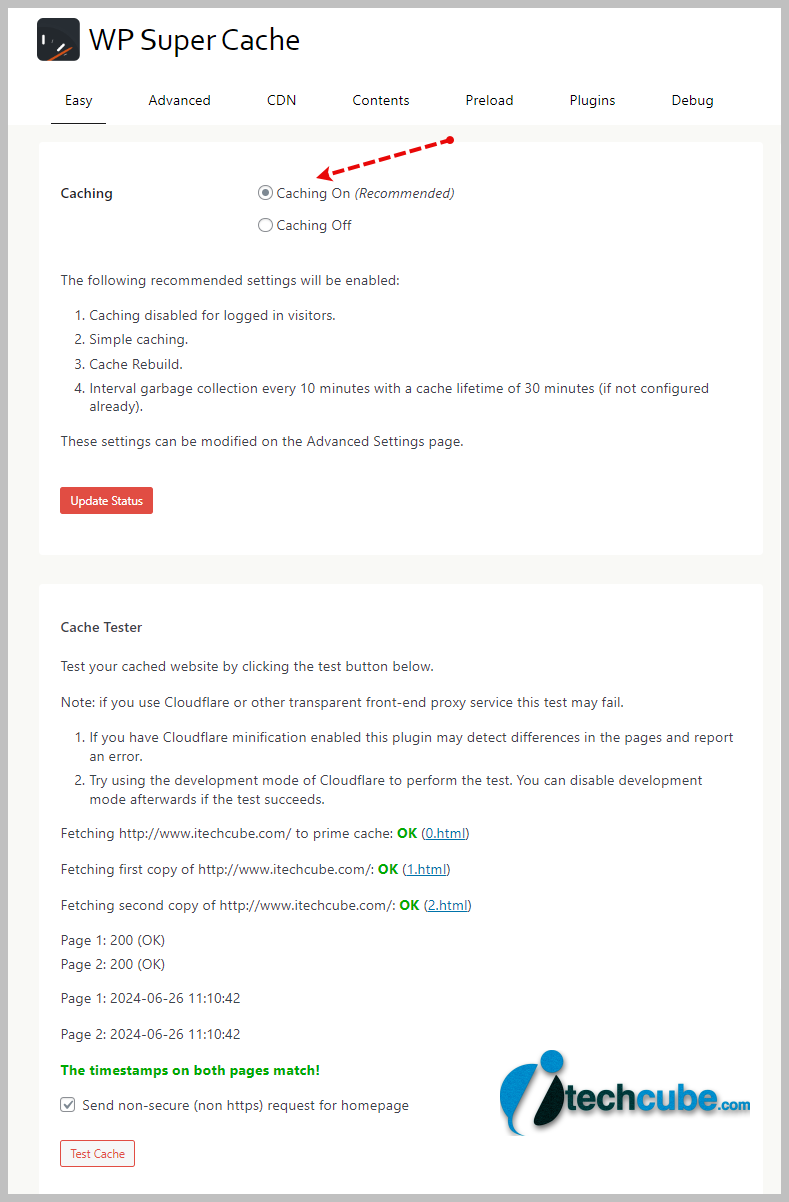
  • Caching: On – “The entire purpose of using the plugin.”
  • Test Cache: To test the cache to make sure it’s actually working.
wp super cache setting

Timestamps don’t match: if you get the error “The pages do not match! Timestamps differ or were not found!”, try disabling HTML minify in Cloudflare and purge the cache.

  • Caching: Enable caching.
  • Cache delivery method: Simple or Expert?
  • Choose Simple if you are a Beginner But if you want more fast speed then choose expert.

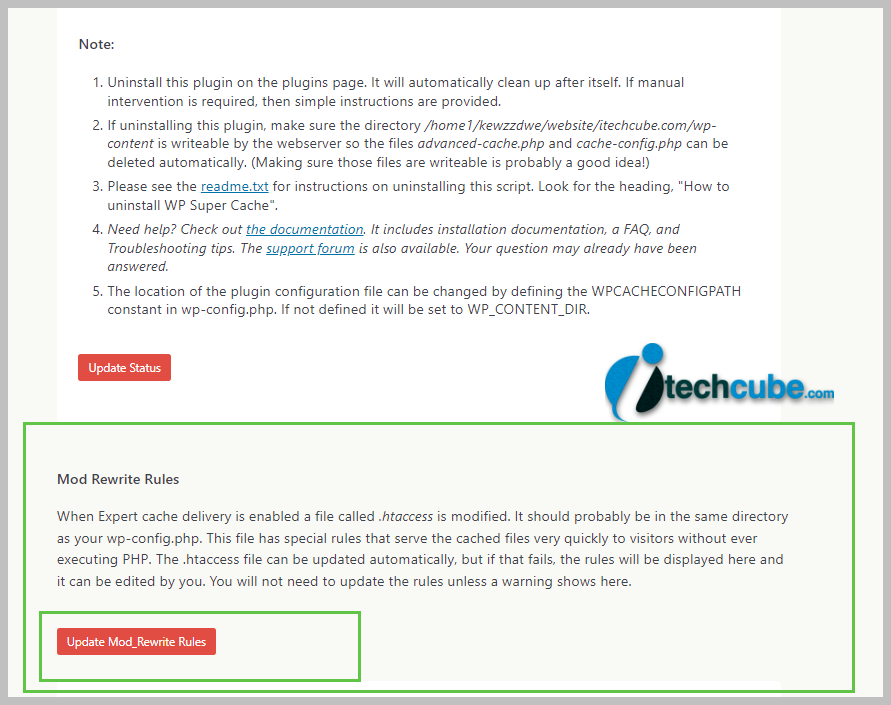
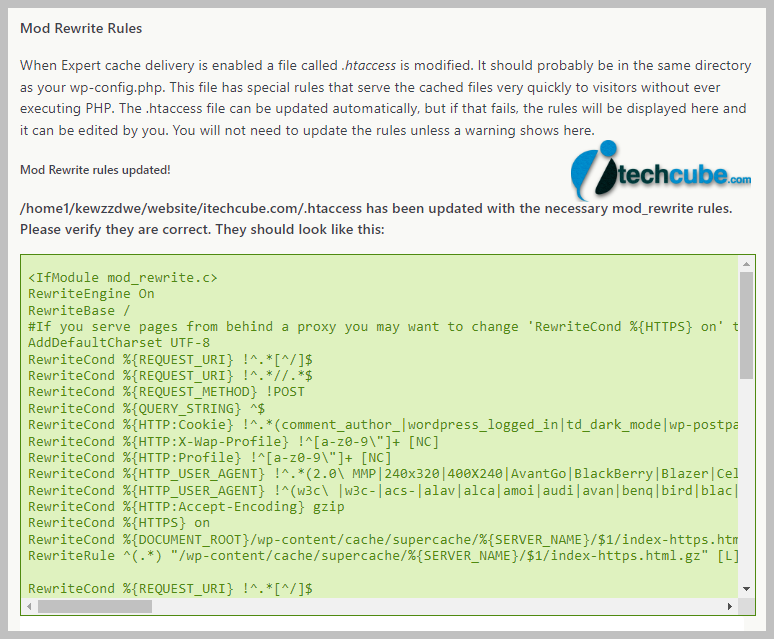
Expert Mode Setting– This is faster than simple mode with less chance of CPU spikes since it bypasses PHP and requests are lighter (described on the plugin page). Once this is turned on, Save the setting and after page refresh, scroll down and you see new button shows “Update Mod_Rewrite Rules.” WP Super Cache will automatically modify your .htaccess file and show you the message below. If it fails, you’ll need to edit the rules yourself which you can do directly in WP Super Cache. And if that fails, use simple mode. NGINX users will need to take a few extra steps to use Expert mode. Also note that some settings (such as dynamic caching) are only available in simple mode.

wp super cache advance setting
wp super cache advance setting 2

Cache restrictions: Choose Disable caching for logged-in visitors-Users who are logged in should see unique data, but if caching is in place, they could not. This is why it is advised.

Don’t cache pages with GET parameters: On – similar idea as before. You should not cache query strings pages because these pages are dynamic.

Compress pages: On – uses GZIP to compress pages, although if your host supports Brotli, you should use that instead since it’s more effective at reducing the size of pages.

Cache rebuild: On – if the cache is being rebuilt and is unavailable, the old cache file will be used until the new one rebuild. This not only ensures visitors get a cache HIT, but it also prevents CPU spikes since uncached pages won’t be served (which use a lot of resources).

Cache HTTP headers with page content: caches content using PHP scripts but is only available in simple mode (which is slower). If using simple mode, you should turn it On.

304 Browser caching: This setting also available for simple mode only. In this case, you’ll want to turn this On. Browser caching speeds up your site by storing common files in the visitor’s browser.

Make known users anonymous so they’re served supercached static files: Off– This overrides “disable caching for logged-in visitors” and should generally be left disabled.

Enable dynamic caching: This setting is only available in simple mode. In this case, you’ll want to turn this On since it keeps parts of your website dynamic (see more notes on the plugin page).

Mobile device support: Off – It serves a separate cached file for mobile users which isn’t required if you have a responsive website. Only enable if you use a separate mobile theme.

Remove UTF8/blog charset support from .htaccess file: Off – if you see weird characters on your website (Â â ¢), this should fix it. Otherwise, you should leave this setting disabled.

Clear all cache files when a post or page is published or updated: When you publish or update post or page content, this clears the cache so other parts of your website shows the most recent post.

Extra homepage checks: On – This setting checks the homepage more frequently before building the cache. WP Super Cache recommends turning this on.

Only refresh current page when comments made: On – when someone leaves a blog comment, only that page is refreshed. Makes sense since no other pages were changed.

List the newest cached pages on this page: – This setting shows all your newly cached pages on current page. like in sidebar. If you don’t want to see this, leave it disabled.

Coarse file locking:– WP Super Cache clearly says this can slow down your website. So make it disabled

Late init: Off – if you check your source code and see the error “Super cache dynamic page detected but late init not set”, enabling this setting will fix it. Otherwise, leave it off.

Cache location: nothing to do here, it just shows you the directory of your cached files.

Cache timeout: You must have to change this number. I basically use higher number of seconds so cache rebuild only build on 1 day or 2 day. If you use the default settings (1800 seconds), this can easily overload your server since the cache is rebuilt every 30 minutes. When determining this number, you should primarily take into account how frequently you update your website and the capacity of your server. You can enhance it even further if you do not update your website frequently and you are using shared hosting. This would likely decrease for large websites that publish a lot of content that is time-sensitive.

Scheduler: Timer – this lets WP Super Cache check for stale cached files using intervals. “Clock” lets you set a specific time which is good if you don’t update your site often. Like the previous setting, the number depends on how often you make updates and the server.

Accepted filenames & rejected URIs: dynamic pages (especially on WooCommerce sites) should be excluded from the cache while static content (pages/posts) should be cached.URL strings, cookies, filenames, tracking parameters, user agents: the previous setting should give you enough control over what’s cached and not, otherwise you can use these.

Lock down: Disabled – only use if you expect a large traffic spike. This prevents the cache from being refreshed when new comments are made. Most sites shouldn’t need to use it.

wp super cache advance complete setting guide

The WP Super Cache CDN settings should only be used if you’re using a CDN (ContentDelivery Network). I’m Not using CDN for now, so we are not writing setting for this here.

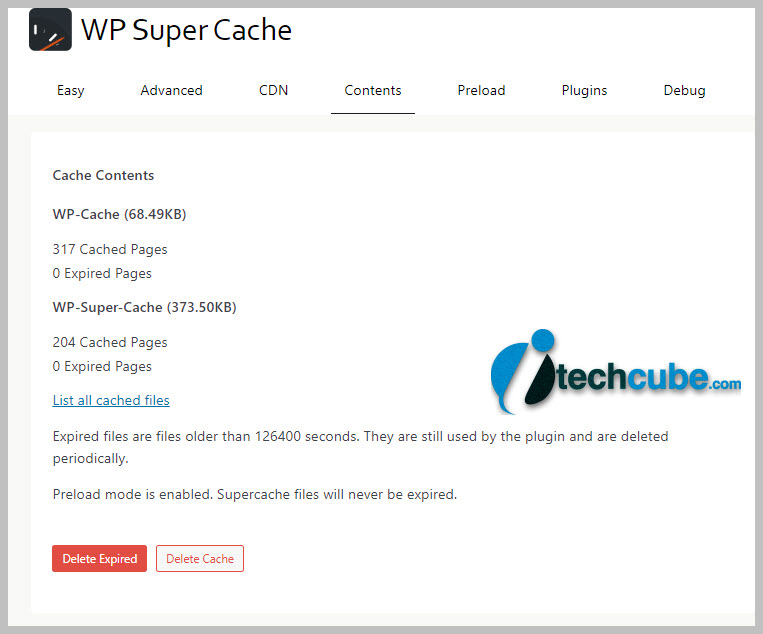
The content tab shows cache vs. expired pages and has settings to delete the cache.

wp super cache setting

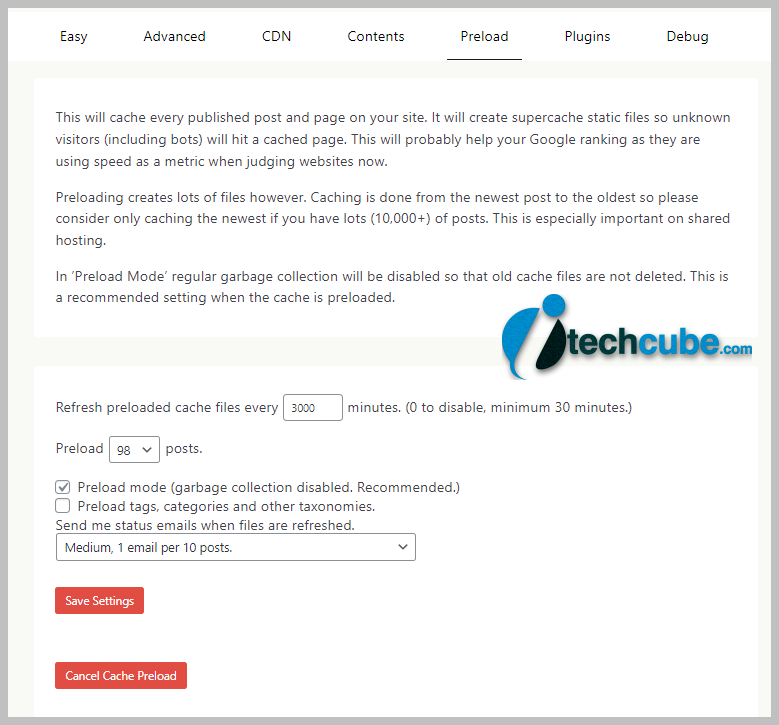
Preloading is good for your website because it generates cached files for your posts, categories, and tags. Preloading is bad for your website because it can use a lot of server resources. I recommend it if you’re on a VPS or higher, but leave it off if you’re on shared hosting. You can always test it and see for yourself.

To use it, select preload mode (garbage collection disabled). You probably don’t want to preload tags or categories unless those are important pages on your blog. I set the preload to refresh every 3000 minutes (2+ day) so it won’t use as much CPU as the default (600 minutes).

wp super cache preload setting 1

Nothing to do here unless you use one of the plugins below.

Used for debugging, nothing to do here otherwise.


We hope this complete setup guide for WP Super Cache plugin help you to speed up your website.

50+ Ultimate Master Prompts List to use for ChatGPT & Gemini AI

Here we added interesting ultimate master prompts lists which you can use on ChatGPT or Gemini AI

50+ Master Prompts List

Master Prompts List
Master Prompt for Multiple HTML Tools:-
Write 100 prompts for text based AI websites for Generating multiple HTML tool prompts like screen recorder, text to pdf, Image editor etc. And add all main features in every tool prompt. And must write like (write a complete responsive code of [tool name] with all its features in HTML with CSS and JavaScript)
Master Prompt for Digital Product:-
Write 100 prompts for AI websites for creating digital products like online tools, audiobooks, online softwares, online games etc. Write the product name in [ product name with example ] with all its features in 50 words for each prompt. And write like ( create “product name” ) and for online tools, online software and online games must add at the end of the prompt “in HTML, CSS with java script”. And for audiobooks use write story “name of story”
Master Prompt for Audience Building Content:-
Write 100 prompts for AI websites for creating Audience Building content. Write the content name in [ content name ] with all its features in 50 words for each prompt. And write like (write the audience building content for)
Master Prompt for eCommerce Websites:-
Write 100 prompts for AI websites for Developing eCommerce websites with HTML with CSS and JavaScript. And add all main full detailed features in every website prompt. And must write like (write a complete responsive code of [website name] with all its features in HTML with CSS and JavaScript)
Master Prompt for Sales Funnels:-
Write 100 prompts for AI websites for Creating Sales Funnel. In 100 words for each prompt. And write like (Create sales funnel) must add using “HTML, CSS with javascript” at the end
Master Prompt for Email Marketing Templates:-
Write 100 prompts for AI websites for Generating Email Marketing Templates, write email template name in [ Template name ] with all main email marketing features in 50 words for each prompt. And write like (write an email for)
Master Prompt for Landing Pages:-
Write 100 prompts for AI websites for Creating Landing Page. In 100 words for each prompt . And write like (create Landing Page)must add using “HTML, CSS with javascript” at the end
Master Prompt for Affiliate Marketing Content:-
Write 100 prompts for AI websites for creating Affiliate Marketing content. Write the content name in [ content name ] with all its features in 50 words for each prompt. And write like (write the affiliate marketing content for)
Master Prompt for Advertising Content:-
Write 100 prompts for AI websites for creating Advertising content. Write the content name in [content name] in 50 words for each prompt. And write like (write the advertising content for)
Master Prompt for Crypto Trading Bot:-
Write 100 prompts for AI websites for creating crypto trading bot. In 100 words for each prompt. And write like (Create crypto trading bot )must add at the end of the prompt “in HTML, CSS with java script”
Master Prompt for Multiple eBook:-
Write 100 prompts for AI websites for Generating Multiple ebook prompts like Motivational eBook, Romance eBook, Social Media Marketing Platforms eBook, Science Fiction eBook, Fantasy eBook, Mystery eBook, Historical Fiction eBook etc. in 100 words for each prompt with ebook languages like Hindi, English etc. And write like (write an ebook for)
Master Prompt for YouTube Script:-
Write 100 prompts for AI websites for Creating YouTube scripts for YouTubes like Money making script, app promotion script, motivational script, YouTube tips and tricks script, Podcast Script etc. in 100+ words for each prompt with script languages like Hindi, English etc. And write like (write a YouTube script for)
Master Prompt for Social Media Post Ideas:-
Write 100 prompts for AI websites to get Social Media Post Ideas. In 100 words for each prompt. And write like (Give me 100 ideas)
Master Prompt for Email Templates:-
Write 100 prompts for AI websites for Creating Email Templates like Sales Operation Email, Sales Reporting Email etc. write email template name in [ Template name ] in 50 words for each prompt. And write like (write an email for)

Master Prompts List for ChatGPT

Master Prompt for Blogging Content:-
Write 100 prompts for AI websites to get Blogging Content. In 100 words for each prompt. And write like (Write an article on “category name”)
Master Prompt for Product Description:-
Write 100 prompts for AI websites to get Product Description. In 100 words for each prompt. And write like (Write Description for “product name”)
Master Prompt for Multiple Story:-
Write 100 prompts for AI websites for Generating Multiple story prompts like moral story, cartoon story, emotional story, motivational story, funny story, action story etc. In 100 words for each prompt with story languages like Hindi, English etc. And write like (write a story for)
Master Prompt for Copywriting Content:-
Write 100 prompts for AI websites for creating Copywriting content. Write the content name in [content name] in 50 words for each prompt. And write like (write the copywriting content for)
Master Prompt for Cybersecurity Content:-
Write 100 prompts for AI websites for creating cybersecurity content. Write the content name in [content name] in 50 words for each prompt. And write like (write the cybersecurity content for)
Master Prompt for Technical Content:-
Write 100 prompts for AI websites for creating Technical content. Write the content name in [content name] in 50 words for each prompt. And write like (write the Technical content for)
Master Prompt for Dialogue Content:-
Write 100 prompts for AI websites for creating Dialogue . Write the dialogue name in [DIALOGUE NAME] in 50 words for each prompt. And write like (write the Dialogue for)
Master Prompt for Proposal Content:-
Write 100 prompts for AI websites for creating Proposal. Write the Proposal name in [PROPOSAL NAME] in 50 words for each prompt. And write like (write the proposal for)
Master Prompt for Customer Feedback:-
Write 100 prompts for AI websites for creating Customer Feedback. Write the Feedback in [FEEDBACK TYPE] in 50 words for each prompt. And write like (write the feedback for)
Master Prompt for Content Marketing Strategies:-
Write 100 prompts for AI websites for creating Content Marketing Strategies. In 50 words for each prompt. And write like (write the Content Marketing Strategies for)
Master Prompt for Article Writing:-
Write 100 prompts for AI websites to Write Articles. In 100 words for each prompt. And write like (Write an article on “category name”)
Master Prompt for Email Newsletter:-
Write 100 prompts for AI websites for writing Email Newsletters. Write the Newsletter name in [Newsletter Name] in 50 words for each prompt. And write like (write the Email Newsletter for)

Master Prompts List for Gemini AI

Master Prompt for Blog Post:-
Write 100 prompts for AI websites to Write Blog Post on social media marketing. In 100 words for each prompt. And write like (Write a blog post on “post category name”)
Master Prompt for Facts Content:-
Write 100 prompts for AI websites to Write Facts on any topic. In 100 words for each prompt. And write like (Write a facts on “fact category”)
Master Prompt for NGO Content:-
Write 100 prompts for AI websites to Write NGO Content for Donating to poor people. In 100 words for each prompt. And write like (Write a NGO Content on “Donation Type”)
Master Prompt for Podcast Interview Ideas:-
Write 100 prompts for AI websites to Write Podcast Interview Ideas. In 100 words for each prompt. And write like (Write a Podcast Interview Ideas for “Podcast Name”)
Master Prompt for Blockchain Content:-
Write 100 prompts for AI websites for creating Blockchain content. Write the content name in [content name] in 50 words for each prompt. And write like (write the Blockchain content for)
Master Prompt for Influencer Content:-
Write 100 prompts for AI websites for creating Influencer Marketing content. Write the content name in [content name] with all its features in 50 words for each prompt. And write like (write the Influencer marketing content for)
Master Prompt for Space Exploration Content:-
Write 100 prompts for AI websites for creating Space Exploration content. Write the content name in [content name] with all its features in 50 words for each prompt. And write like (write the Space Exploration content for)
Master Prompt for Food and Cooking Content:-
Write 100 prompts for AI websites for creating Food and Cooking content. Write the content name in [dish name] in 50 words for each prompt. And write like (write the Food and Cooking content for)
Master Prompt for Beauty and Screen care Content:-
Write 100 prompts for AI websites for creating Beauty and Skincare product content. Write the content name in in 50 words for each prompt. And write like (write the Beauty and Skincare product content for)
Master Prompt for Poems:-
Write 100 prompts for AI websites to Write Poems. In 100 words for each prompt. And write like (Write an poem on “poem title”)
Master Prompt for Video Marketing Content:-
Write 100 prompts for AI websites for creating Video Marketing content. Write the content name in [content name] in 50 words for each prompt. And write like (write the Video Marketing content for)
Master Prompt for Branding Content:-
Write 100 prompts for AI websites for creating Branding content. Write the content name in [content name] in 50 words for each prompt. And write like (write the Branding content for)