


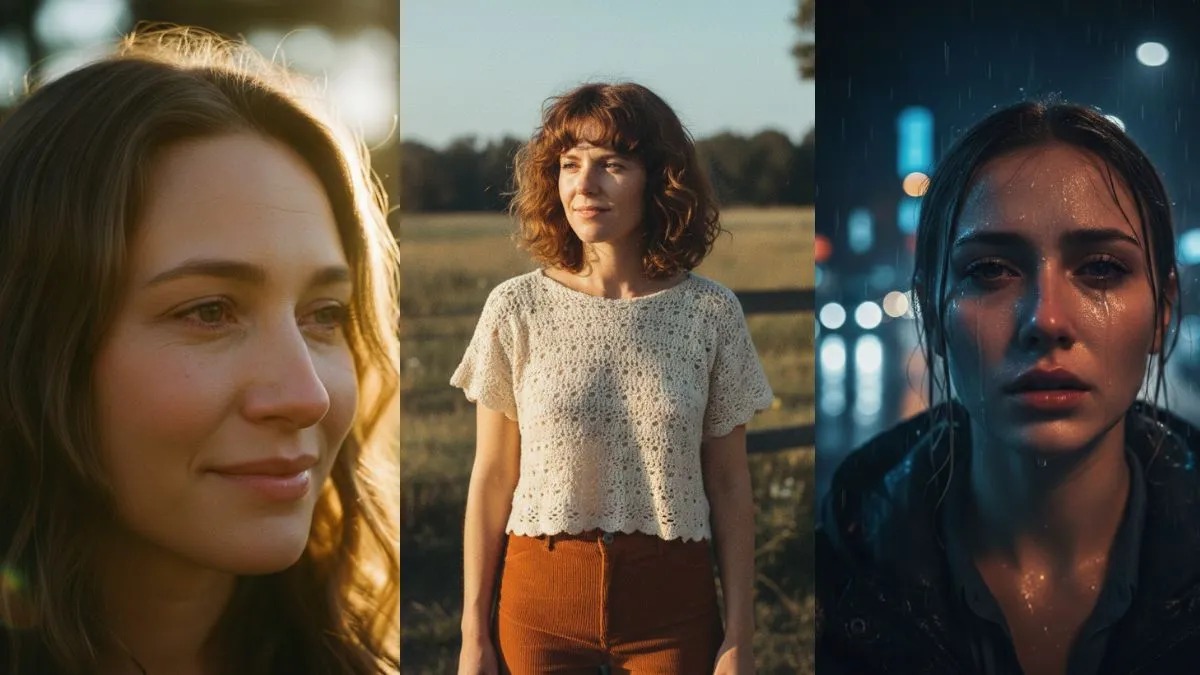
The rise of AI-generated art has completely transformed digital creativity, especially in portrait photography. With Google Gemini, creators can now design stunning, film-like portraits using nothing but well-crafted text instructions.
That’s where Best Google Gemini AI Prompts for Cinematic Portraits come into play. These prompts help you control lighting, mood, camera angles, emotions, and storytelling in a single frame. Whether you’re a content creator, designer, or AI art enthusiast, cinematic portraits elevate your visuals to professional standards.
In this guide, you’ll discover carefully curated AI prompts, expert tips, and creative insights designed to help you generate scroll-stopping portraits that feel straight out of a movie scene.
Why Cinematic Portrait Prompts Matter
Cinematic portraits are not just about faces; they tell stories. The Best Google Gemini AI Prompts for Cinematic Portraits help you achieve depth, drama, and realism without expensive gear. They allow you to:
• Control lighting styles like soft glow or harsh shadows
• Define emotions and expressions precisely
• Add environmental storytelling elements
• Achieve professional color grading
• Maintain consistency across multiple images
By using structured prompts, you guide Gemini to think like a cinematographer, not just an image generator. This approach saves time, improves output quality, and ensures repeatable results for branding or portfolios.
How to Structure Cinematic Prompts Effectively
Before using the Best Google Gemini AI Prompts for Cinematic Portraits, understanding prompt structure is essential. A strong prompt includes several key elements:
• Subject description (age, gender, expression)
• Camera details (lens, angle, depth of field)
• Lighting style (natural, neon, low-key)
• Mood and emotion (dramatic, calm, intense)
• Environment and background
• Color grading or film style
Combining these elements ensures Gemini produces images with cinematic depth rather than flat visuals. Clear structure equals better creative control.
20 Best Google Gemini AI Prompts for Cinematic Portraits
Moody Low-Light Character Study
Create a cinematic portrait of a lone character under dim lighting, soft shadows on the face, shallow depth of field, dramatic mood, film still quality, ultra-realistic textures, dark cinematic color grading.
Golden Hour Emotional Portrait
Generate a close-up cinematic portrait during golden hour, warm sunlight, emotional expression, natural skin tones, soft background blur, cinematic film lighting, professional photography style.
Noir-Style Black and White Look
Produce a black-and-white cinematic portrait inspired by classic noir films, high contrast lighting, deep shadows, intense gaze, dramatic composition, timeless atmosphere.
Neon Cyberpunk Portrait
Create a futuristic cinematic portrait with neon lights, cyberpunk city background, reflective surfaces, dramatic lighting, bold colors, sharp focus, cinematic depth.
Vintage Film Aesthetic
Generate a cinematic portrait inspired by 1970s film photography, grain texture, muted colors, natural lighting, authentic retro mood.
Rainy Night Drama
Produce a cinematic portrait set in rain, reflections on skin, moody lighting, emotional expression, urban night background, shallow depth of field.
Soft Romantic Close-Up
Create a romantic cinematic portrait with soft lighting, pastel color grading, intimate mood, gentle expression, professional film still quality.
Epic Hero Portrait
Generate a cinematic hero portrait, dramatic lighting, strong shadows, powerful pose, cinematic background, high realism.
Natural Window Light Portrait
Produce a cinematic portrait using soft window light, realistic skin texture, minimal background, emotional depth, film-style composition.
Fantasy Cinematic Look
Create a fantasy-inspired cinematic portrait, mystical lighting, ethereal atmosphere, detailed textures, cinematic storytelling.
Desert Heat Scene
Generate a cinematic portrait in a desert environment, harsh sunlight, dramatic shadows, warm tones, intense expression.
Cold Winter Mood
Produce a cinematic portrait in snowy surroundings, cool color grading, visible breath, emotional intensity, shallow focus.
Studio Film Lighting
Create a cinematic studio portrait with controlled lighting, dark backdrop, professional color grading, high-end photography look.
Documentary-Style Realism
Generate a cinematic portrait with raw realism, natural lighting, candid expression, film documentary aesthetic.
Action Movie Still
Produce a cinematic portrait mid-motion, dynamic pose, dramatic lighting, blurred background, action film feel.
Classic Hollywood Glamour
Create a glamorous cinematic portrait inspired by old Hollywood, elegant lighting, smooth textures, timeless beauty.
Street Photography Drama
Generate a cinematic street portrait, urban background, natural shadows, emotional storytelling, realistic atmosphere.
Painterly Cinematic Style
Produce a cinematic portrait with painterly textures, soft lighting, artistic mood, fine-art film aesthetic.
Close-Up Emotional Tears
Create an extreme close-up cinematic portrait capturing tears, detailed skin texture, dramatic lighting, intense emotion.
Minimalist Cinematic Portrait
Generate a minimalist cinematic portrait, clean background, subtle lighting, strong expression, professional film composition.
Tips to Improve Results with Gemini
Using the Best Google Gemini AI Prompts for Cinematic Portraits becomes more powerful when paired with smart practices:
• Use descriptive adjectives instead of vague terms
• Mention camera lenses like 50mm or 85mm
• Add emotional context to faces
• Avoid overcrowding prompts
• Experiment with color grading keywords
Small adjustments can dramatically improve realism and mood without rewriting entire prompts.
Common Mistakes to Avoid
Many users don’t get the best results because of simple errors:
• Overloading prompts with conflicting styles
• Forgetting lighting details
• Ignoring emotional cues
• Using generic terms like “nice portrait”
• Not refining outputs with follow-up prompts
Avoiding these mistakes ensures the Best Google Gemini AI Prompts for Cinematic Portraits deliver consistent, high-quality visuals.
Conclusion
Mastering Best Google Gemini AI Prompts for Cinematic Portraits is the fastest way to create professional, story-driven visuals without complex tools. With the right structure, creativity, and experimentation, you can transform simple ideas into cinematic masterpieces.
These prompts empower creators to control mood, lighting, and emotion while saving time and effort. As AI creativity evolves, cinematic prompting will remain a valuable skill for artists, marketers, and designers alike. Start refining your approach today, and let the Best Google Gemini AI Prompts for Cinematic Portraits elevate your visual storytelling to the next level.